INSTALLATION & OPERATION MANUAL
MULTI-FLAVOR MERCHANDISERS
8
5. MENU STRUCTURE
5.1 Accessing Menus
The multi-flavor merchandiser allows the user to change the visual content displayed on the interface and the functionality
of the multi-flavor barrel through the service menus. The menu is locked and not accessible to consumers but, once
opened by authorized personnel, can be used to change visual content, barrel settings, and data management. Follow the
steps below to unlock the screen.
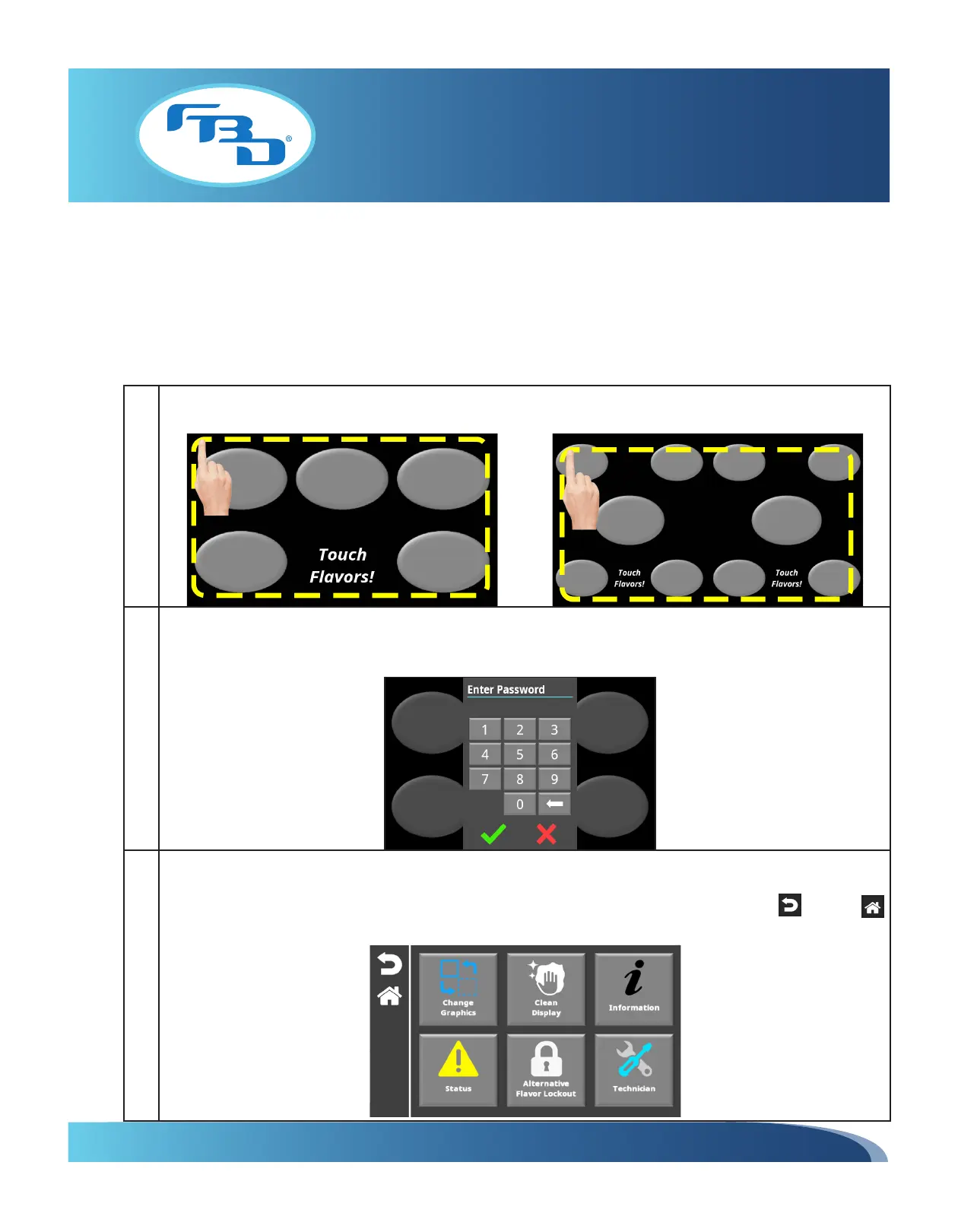
1 Starting from any of the four corners, touch and trace around the edges of the display without lifting your finger in
a clockwise or counterclockwise direction until coming back to the corner where you started.
2 Enter the store operator, store manager or service technician password. Please note that the merchandiser has
been set up with default passwords for store operators and store managers, if a password change is required, this
can be done through the service technician access level.
3 Once the screen has been unlocked, the menu options will appear. There are three levels of access and the available
options will vary based on access level (password used). Please refer to the Menu Options by Access Level table in
this section for a breakdown of available menus. In addition every screen will also show a back or home
button for easy navigation through the menu.



 To Next Page