INSTALLATION & OPERATION MANUAL
MULTI-FLAVOR MERCHANDISERS
27
5.10 System Administration
This menu provides other settings that control security, system, and graphic parts of the interface functionality. This menu
is only available to service technicians. Once selected, there are four categories to choose from: "Passwords", "Graphics",
"Settings", and "System."
Passwords
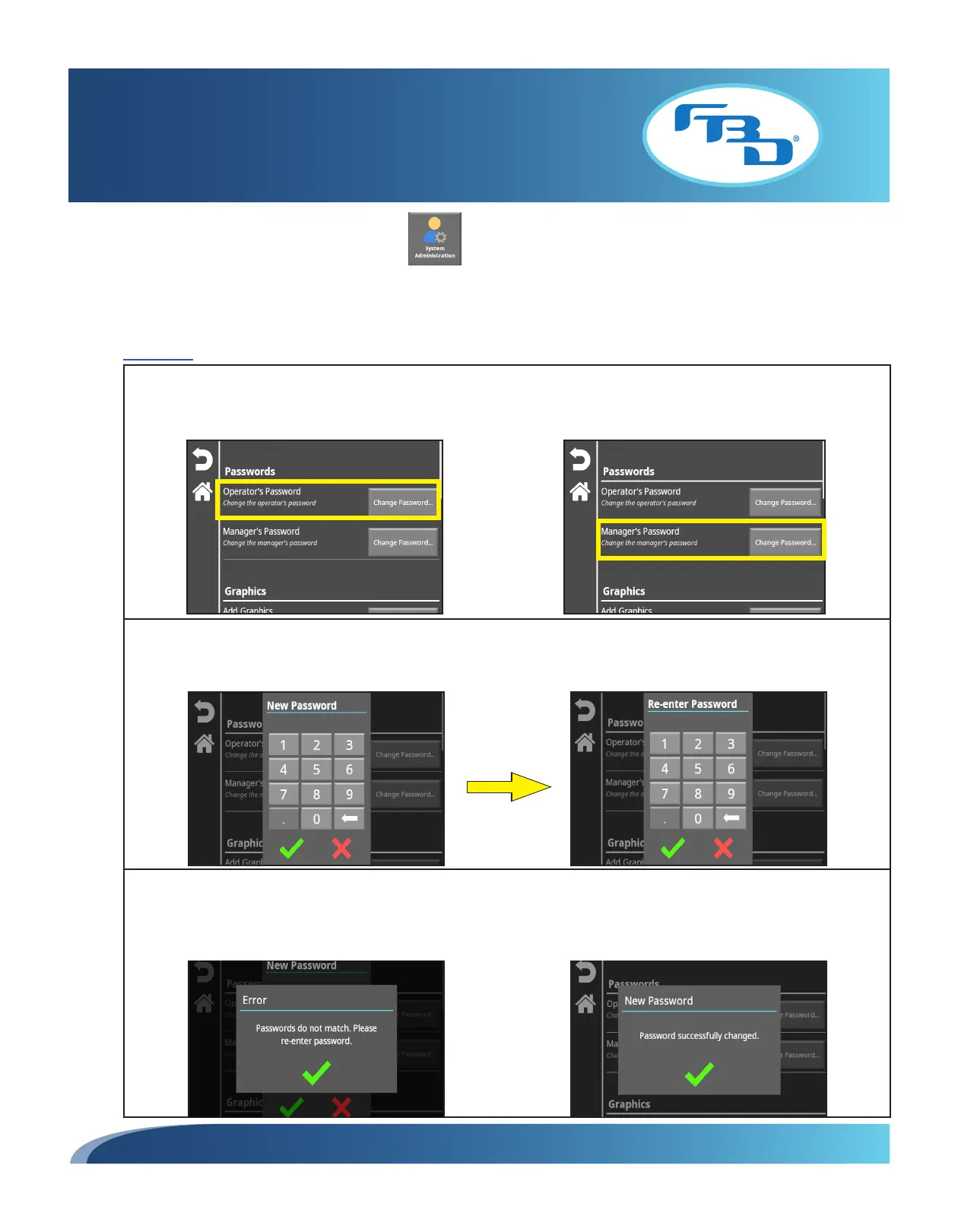
The store operator or store manager password can be changed in this menu. Please note that the service technician
password cannot be changed. Under the "Passwords" category, select the "Change Password" button next to the
required option: "Operator's Password" or "Manager's Password."
Enter the new password on the pop-up window and select the green check mark. A second password pop-up window
will appear asking that the new password be re-entered. After re-entering, select the green check mark to confirm the
updated password.
If the passwords did not match, an error window will appear asking that you re-enter the password. Select the green
check mark to return to the previous screen and re-enter the password. Once the correct password has been entered
both times, a window will show the password was successfully changed. Pressing the green check mark will return you
to the menu screen.



 To Next Page