INSTALLATION & OPERATION MANUAL
MULTI-FLAVOR MERCHANDISERS
24
Miscellaneous Settings Continued
Item Description
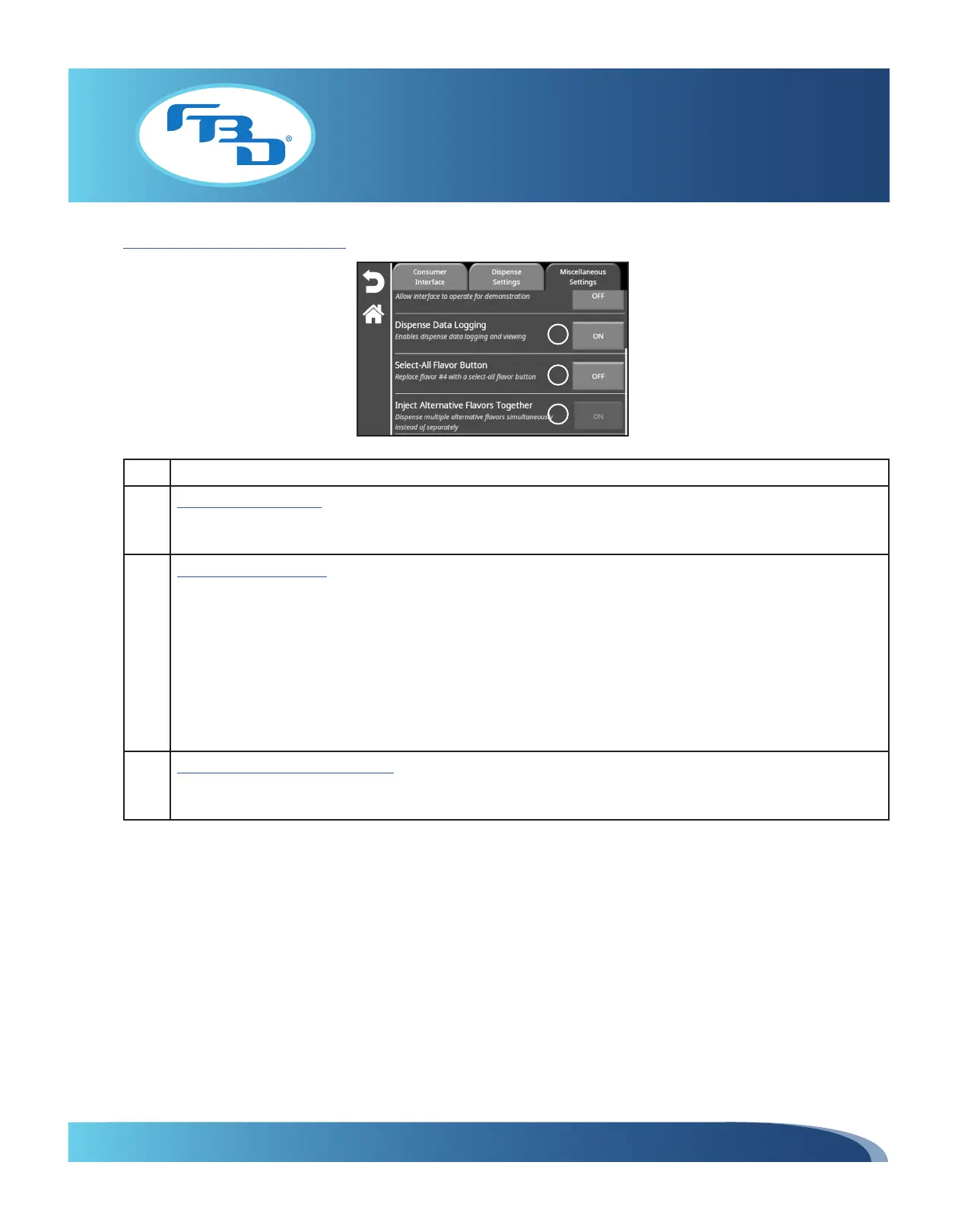
4 Dispense Data Logging:
Enables/disables dispense data recording. When turned ON, the system will log information of flavors dispensed
or drinks poured. Please refer to Section 5.9 for additional information on dispense data.
5 Select-All Flavor Button:
Converts the fourth flavor add-in button to a "select all" option. This setting is only available on 372MFLV and
771MFLV merchandisers and can only be used when three flavor add-ins are set up. When ON, the fourth flavor
add-in image can be selected to choose all three flavors at once. When OFF, the fourth flavor image will act as a
standard add-in that can be selected individually.
When set to ON the first time, the fourth flavor add-in will change to a gray bubble. The image can be updated
by going to the Change Graphics menu option (Section 5.2). While enabled (ON), the "Configure Flavors" menu
option will only show three flavors to configure.
When enabling/disabling this option, it may take several seconds for the screen to load up.
6 Inject Alternative Flavors Together:
Shows that when selecting alternative flavors, they will dispense simultaneously instead of separately as standard
flavor shots do. This option will always remain ON.
4
5
6



 To Next Page