INSTALLATION & OPERATION MANUAL
MULTI-FLAVOR MERCHANDISERS
33
771/772 Multi-Flavor Merchandiser
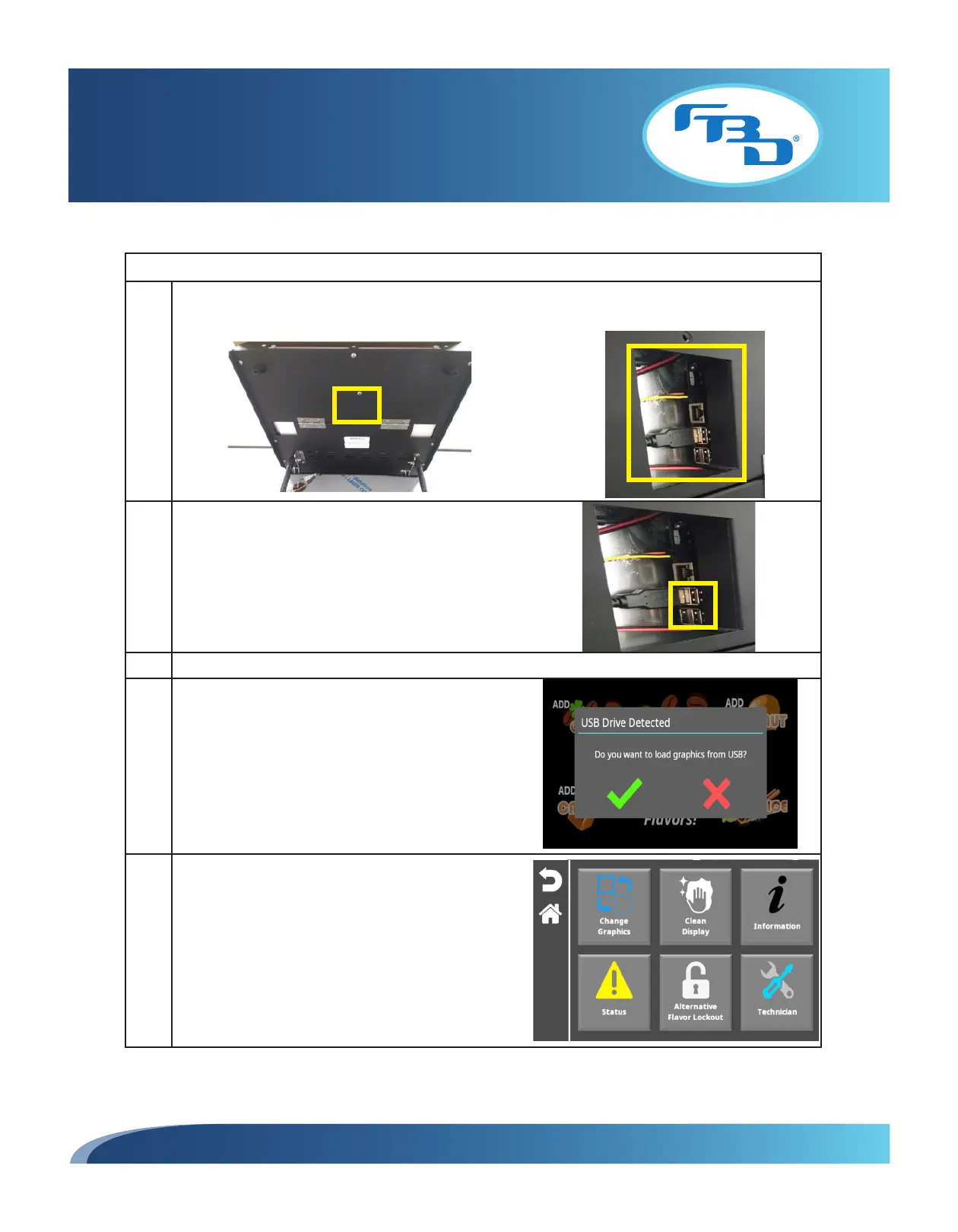
1 Lift the door up to view the back panel and locate the access panel in the center back area of the door.
Remove the access panel using a Phillips screwdriver.
2 Insert a USB into any of the available USB ports. Ensure
it is inserted correctly.
3 Push the door back down to close and make sure the door clicks into place.
4 A prompt to load the images onto the merchandiser will
appear on the screen. Select the green check mark to
load the graphics.
If the red X is selected, the process will be canceled.
However, the images can always be uploaded through
the "System Administration" menu, under the Graphics
category by selecting the "Add Graphics" option
(Section 5.10).
5 Once loaded, content can be access through the
"Change Graphics" option (Section 5.2).



 To Next Page