FCI WATERMAKERS, INC. 77Operational Instructions
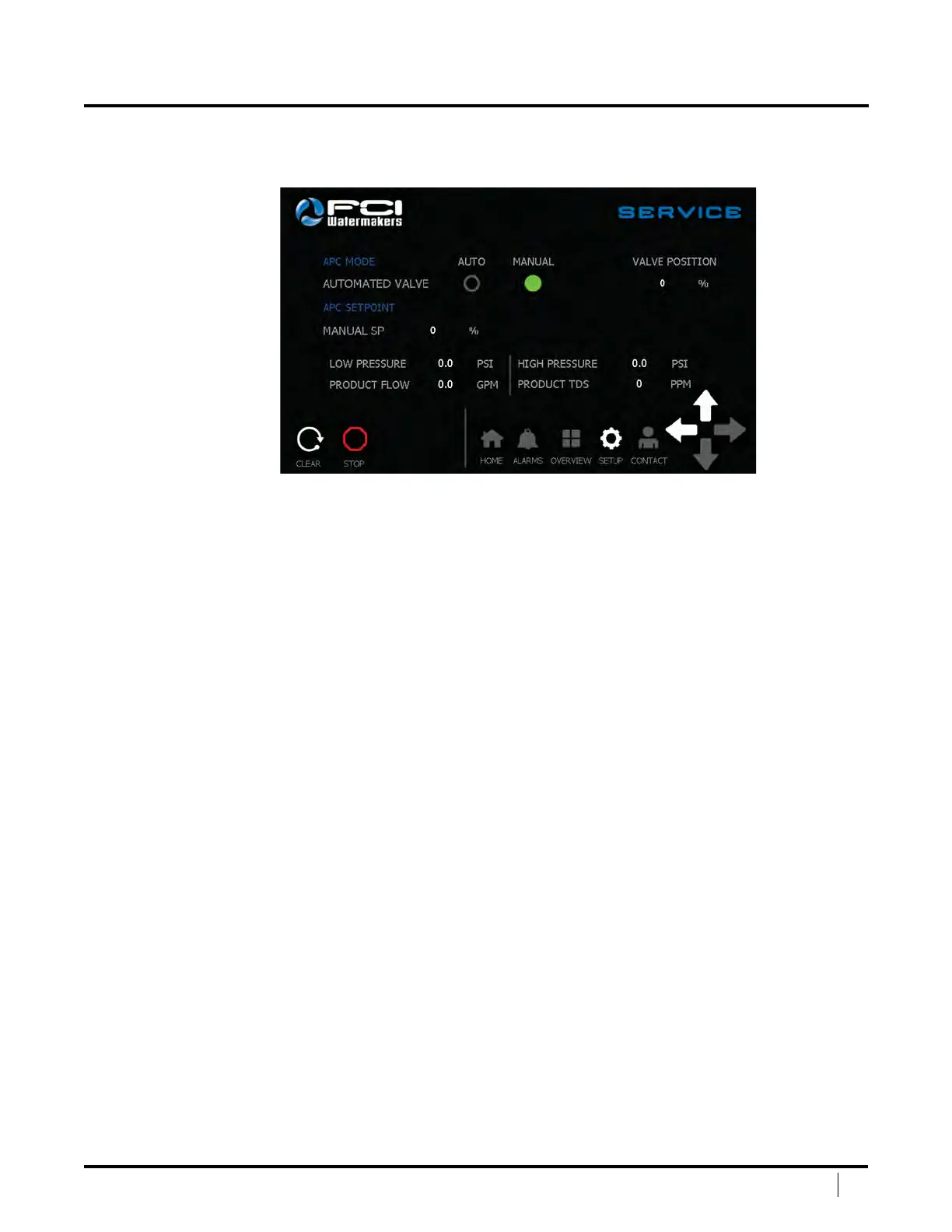
SERVICE SCREEN #2
e Service Screen allows the user to test and run the system in a manual mode.
Service Screen #2 gives key pressures and ows to allow the user to run in a manual mode.
Automated Valve – Controls the APC. Auto mode allows the
control system to adjust the valve for maximum eciency. Manual
mode allows the user to adjust the valve via Manual SP.
Valve Position – Informs the user the position of the valve in percentage closed.
Manual SP (%) ‑ When the unit is in manual mode, the user can adjust the valve
position by touching the numeric input, from 0% (open) to 100% (closed).
Clear – Press this button to clear the system once a shutdown has taken place.
Stop – Press this button to stop the system.
Navigation Bar – is allows the user to easily navigate between main screens.
Le Arrow – Goes back to the main setup screen.
Up Arrow – Goes to page #1 of Service.
DISPLAY SCREENS (continued)


 To Next Page