FCI WATERMAKERS, INC. 76Operational Instructions
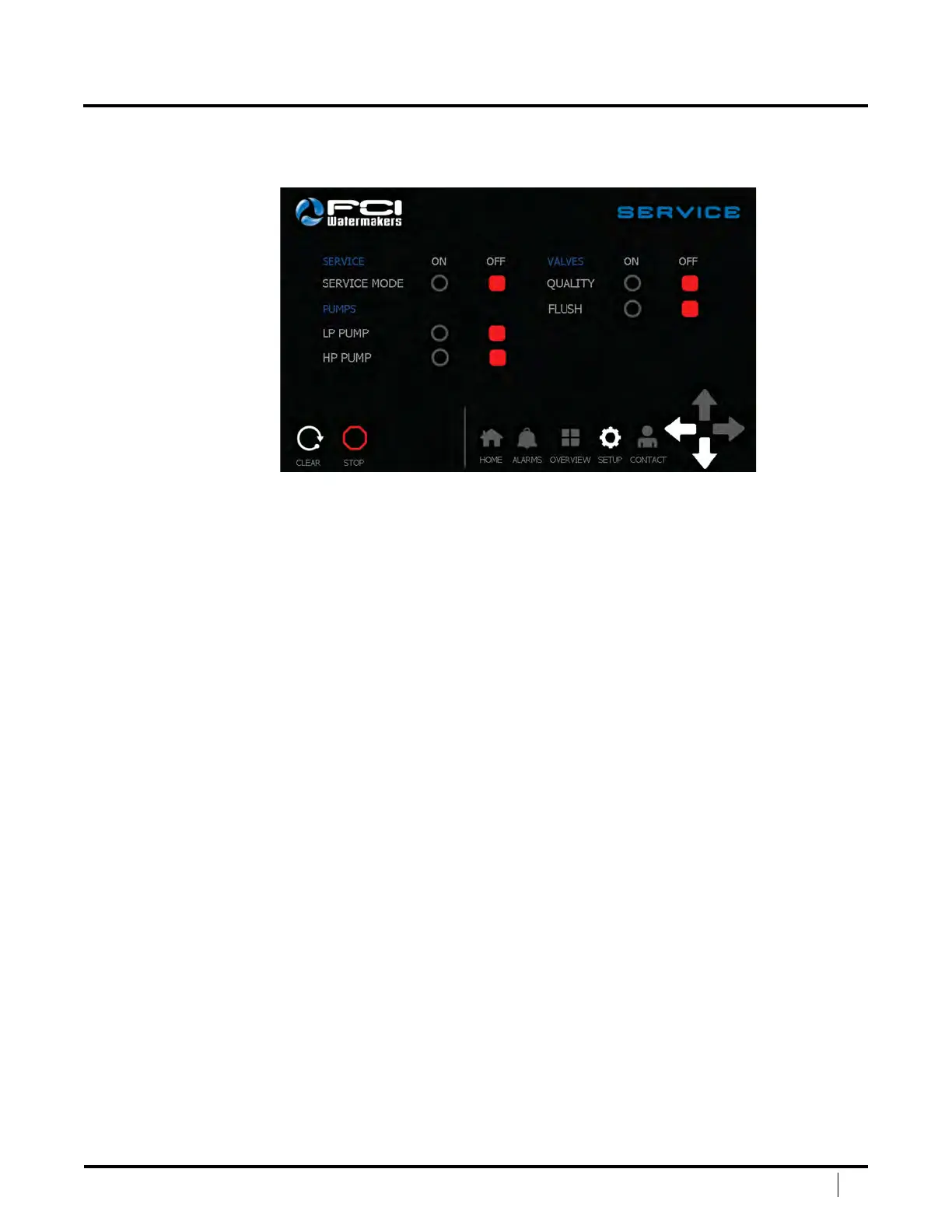
SERVICE SCREEN #1
e Service Screen allows the user to test and run the system in a manual mode.
To turn on a setting, touch the grey circle. e circle will then turn
to a green circle, indicating the item is on. To turn o an item, touch
the grey square. e square will turn red once the item is o.
Service Mode – Allows the user to turn service mode on/o. When service
mode is on, the user can manually activate the pumps and valves. Once
complete, turn o service mode in order to run the machine normally.
Service mode can only be activated when the machine is not running.
LP Pump – Manually turn on the low pressure pump.
HP Pump – Manually turn on the high pressure pump.
Quality – Manually open or close the quality valve.
Flush – Manually open or close the fresh water ush valve.
Clear – Press this button to clear the system once a shutdown has taken place.
Stop – Press this button to stop the system.
Navigation Bar – is allows the user to easily navigate between main screens.
Le Arrow – Goes back to the main setup screen.
Down Arrow – Goes to page #2 of Service.
DISPLAY SCREENS (continued)


 To Next Page