FCI WATERMAKERS, INC. 75Operational Instructions
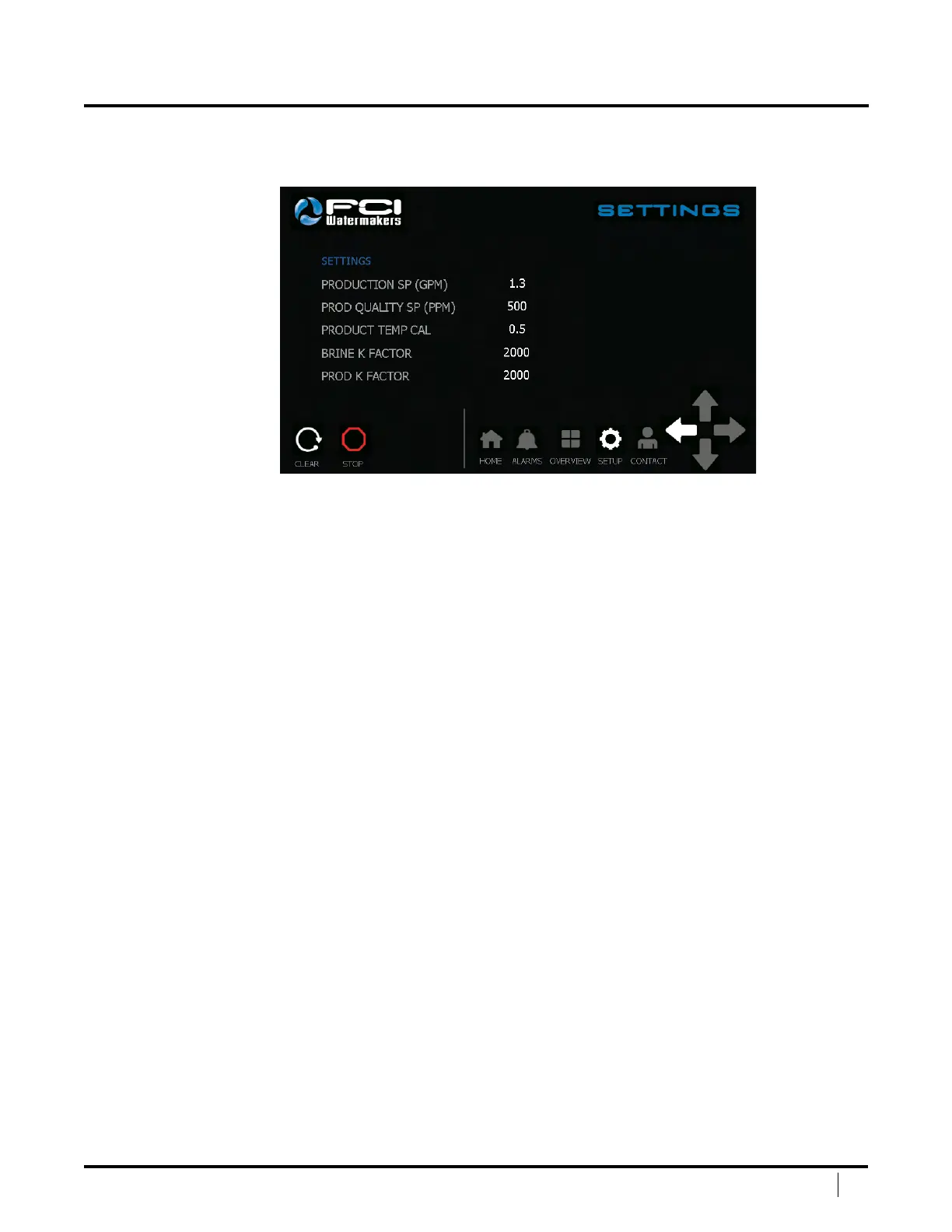
SETTINGS SCREEN
e Settings Screen will allow you to adjust system settings.
To adjust a setting, press the white number of the setting you would
like to adjust. Once pressed, a numeric keypad will come up
Production SP (GPM) – If equipped with APC, this setting is the amount of water your
system will produce. It is recommended to keep the setting as is to maintain eciency
and life of your system. If not equipped with APC, this is what you should dial your
high pressure control valve to for maximum eciency and life of your system.
Prod Quality SP (PPM) – is setting is the Product Quality Setpoint.
Once the system reaches a number below the setpoint, the system will
allow the water to go to your product tank. If the system is above the
setpoint, the water will not be allowed to go to the product tank.
Prod Temp Cal – is is your Product Temperature Calibration.
is is set by the factory and can be adjusted if needed.
Brine K Factor – is is your Brine Flow Meter Calibration. is is set
by the factory and it is not recommended to change this setting.
Prod K Factor ‑ is is your Product Flow Meter Calibration. is is set
by the factory and it is not recommended to change this setting.
Clear – Press this button to clear the system once a shutdown has taken place.
Stop – Press this button to stop the system.
Navigation Bar – is allows the user to easily navigate between main screens.
Le Arrow – Goes back to the main setup screen.
DISPLAY SCREENS (continued)


 To Next Page