FCI WATERMAKERS, INC. 74Operational Instructions
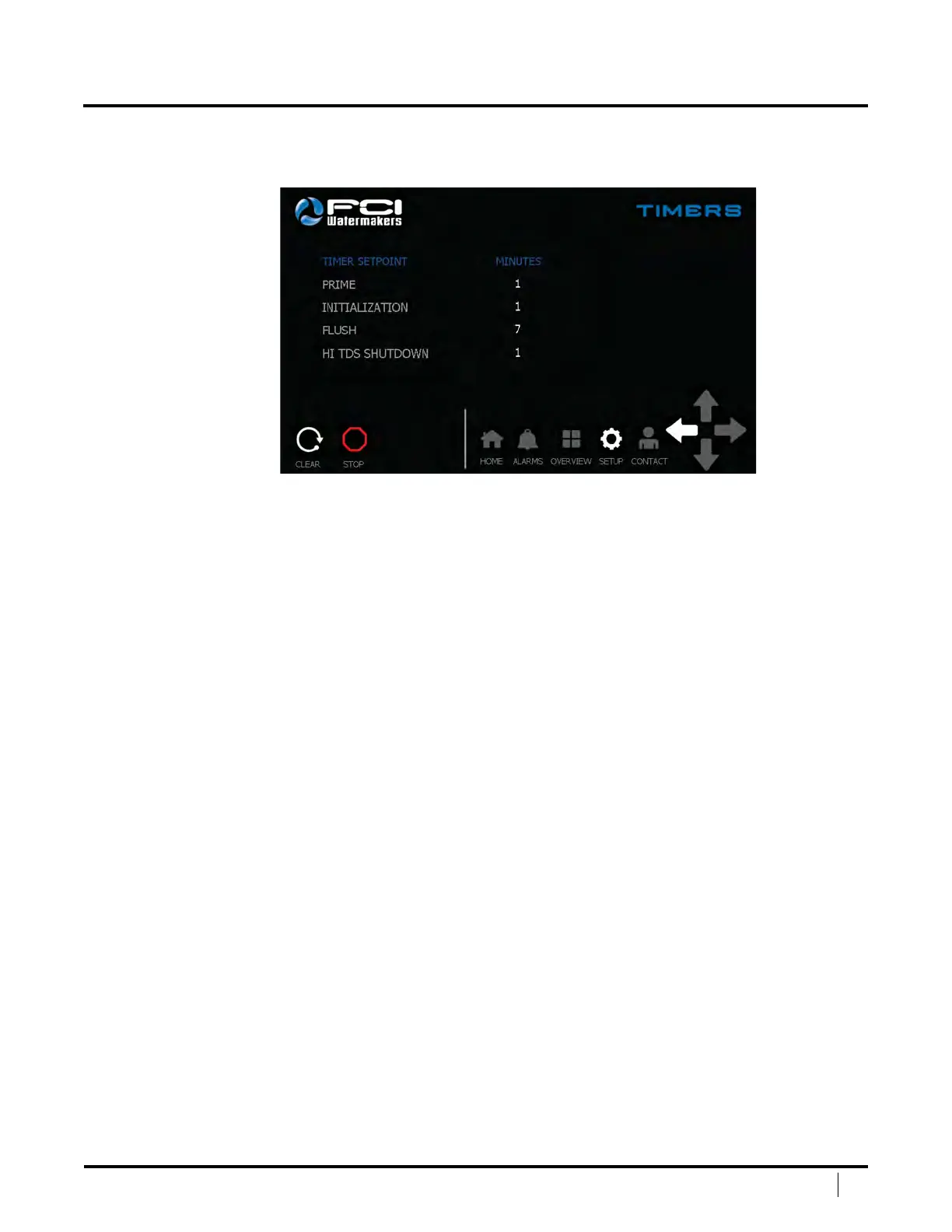
TIMERS SCREEN
e Timers Screen will allow you to adjust timer setpoints for the system.
To adjust a timer, press the white number of the timer you would like
to adjust. Once pressed, a numeric keypad will come up.
Prime – e Prime Timer is the amount of time in
minutes the Prime Sequence will be active.
Initialization – e Initialization Timer is the amount of time
in minutes the Initialization Sequence will be active.
Flush – e Flush Timer is the amount of time the
Fresh Water Flush Sequence will be active.
High TDS Shutdown – e High TDS Shutdown Timer is the amount of time
the system will allow for a high TDS prior to shutting down the system.
Clear – Press this button to clear the system once a shutdown has taken place.
Stop – Press this button to stop the system.
Navigation Bar – is allows the user to easily navigate between main screens.
Le Arrow – Goes back to the main setup screen.
DISPLAY SCREENS (continued)


 To Next Page