CHAPTER 1
TWIN ROTOR MIMO SYSTEM
Installation and Commissioning Introduction
33-007-0 1-1
1. Introduction
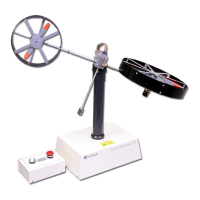
This manual contains a description of the components of the Twin Rotor MIMO System
(
TRMS
), and assembly and test procedures. It is intended to provide the means for
validating the correct operation of the system,
before
proceeding to the more advanced
functions and demonstrations using control software and MATLAB / SIMULINK.
The procedures described in this Section of the TRMS manual will ensure the correct:
•
Assembly of the system
•
Switch and Jumper settings of the PCL-812 interface card
•
Cable connections between the PC and the TRMS
1.1 REQUIRED EQUIPMENT
The following items of equipment, software and documentation are required to use the
system.
•
IBM Compatible PC
with minimum configuration:
8 Mb of memory, Math co-processor (included in 486 or Pentium processor)
VGA screen and mouse.
DOS version 5 or later, Windows 3.1 or Windows 95
•
MATLAB
Version 5.1 with SIMULINK 2.1(from
Mathworks Inc
)
•
Advantech
PCL-812PG Enhanced Multi-Lab Card for installation in the PC with
2 x 20 way and 1 x 40 way ribbon cables
•
Feedback
Twin Rotor MIMO System consisting of rotor unit, base unit and
remote power control box.
•
1 CD containing
:
Commissioning and Test software
TRMS Control software for use with MATLAB 5.1 and SIMULINK 2.1
Set of 6 manuals in Adobe AcrobaT Format
33000M5 - Feedback Matlab Based Control Systems – Software
Installation
33-007-0M5 - Twin Rotor MIMO System - Installation and Commissioning
33-007-1M5 - Twin Rotor MIMO System - Getting Started
33-007-2M5 - Twin Rotor MIMO System - Reference Manual
33-007-3M5 - Twin Rotor MIMO System - External Interface
33-007-4M5 - Twin Rotor MIMO System - Advanced Teaching Manual
Adobe Acrobat Reader and installation utility


 To Next Page