EasyManua.ls Logo

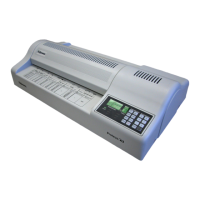
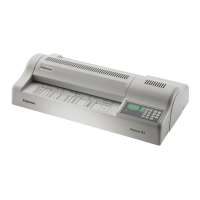
Fellowes Proteus A3 - User Manual

Fellowes Proteus A3
24 pages
Print Icon
To Next Page IconTo Next Page
Loading...
fellowes.com
1789 Norwood Avenue, Itasca, Illinois 60143-1095 USA 630-893-1600
Australia China France Korea Singapore
Benelux Deutschland Italia Polska United Kingdom
Canada España Japan Russia United States
Heavy Duty Laminator
Thank you for choosing the Proteus laminator.
Please read these instructions before use and take time to register your machine
at www.fellowes.com/register
Merci d’avoir choisi la plastifieuse Proteus.
Lire ces instructions avant d’utiliser l’appareil et prendre le temps d’enregistrer
votre produit en ligne sur www.fellowes.com/register
Vielen Dank, dass Sie sich für das Proteus Laminiergerät entschieden haben.
Bitte lesen Sie diese Anleitungen vor Gebrauch des Geräts genau durch und reg-
istrieren Sie es unter www.fellowes.com/register
Gracias por elegir la plastificadora Proteus.
Lea atentamente estas instrucciones antes del uso y registre su máquina en www.
fellowes.com/register
ES
GB
FR
DE
405600_EUR_Proteus_All_v1.5.indd 1 12/23/2010 1:50:31 PM

Other manuals for Fellowes Proteus A3

Questions and Answers

  • A
    Abigail MendozaAug 18, 2025
    How to turn on Fellowes Laminator if there is no power?
    • S
      Sylvia CoxAug 18, 2025
      If the power LED on your Fellowes Laminator isn't on, the machine might not be switched on. Make sure to switch on the machine at the rear next to the plug inlet and at the wall socket.
  • W
    Walter ClaytonAug 20, 2025
    What to do if Fellowes Proteus A3 Laminator pouch is lost in the machine?
    • T
      taylordavidAug 20, 2025
      If a pouch gets stuck inside your Fellowes Laminator, it likely means the pouch is jammed. Select the reverse button and gently pull the item out by hand.
  • B
    bennettbarbaraAug 23, 2025
    What to do if Fellowes Proteus A3 rollers not running?
    • R
      Rebecca RyanAug 23, 2025
      If the rollers aren't running, it could be for a couple of reasons. First, the rollers might be too cold (less than 60°C); wait for them to warm up. Also, check if the "STOP" button may be pressed; if so, press the "MOTOR" or "SPEED" button.
  • R
    Richard FrancoAug 26, 2025
    How to fix Fellowes Proteus A3 Laminator pouch with waves or bubbles?
    • J
      John MillerAug 26, 2025
      If your laminated pouch has waves or bubbles, the temperature setting may be incorrect. Check that the pouch thickness is correctly selected and pass it through the Fellowes laminator again.
  • C
    Chelsey SweeneyAug 28, 2025
    What to do if Fellowes Proteus A3 Laminator pouch does not completely seal the document?
    • D
      Dustin NguyenAug 28, 2025
      If your Fellowes laminator pouch isn't sealing the document completely, it might be due to a couple of reasons. The document may be too thick to laminate, in which case you should pass it through the machine again. Alternatively, the temperature setting may be incorrect. Check the pouch thickness is correctly selected and pass it through again.
  • B
    Beth BushAug 30, 2025
    How to prevent curled or burnt laminations in Fellowes Proteus A3 Laminator?
    • A
      amanda80Aug 30, 2025
      Curled or burnt laminations usually happen because the Fellowes laminator is too hot. Reduce the temperature or increase the speed.
  • B
    Brittany BoydSep 2, 2025
    How to fix soft or poor lamination with Fellowes Laminator?
    • R
      Renee BradfordSep 2, 2025
      If you're getting soft or poor lamination, it's likely that the Fellowes laminator is too cold. Try increasing the temperature or reducing the speed.
  • J
    Jonathan BoyleSep 4, 2025
    Why does my Fellowes Laminator pouch have waves or bubbles?
    • K
      Kurt BennettSep 4, 2025
      If your Fellowes Laminator pouch has waves or bubbles, it might be due to an incorrect temperature setting. To resolve this, verify that the pouch thickness is correctly selected on your laminator and then pass the pouch through the laminator again.
  • E
    Eric WilliamsSep 7, 2025
    What to do if my Fellowes Proteus A3 Laminator pouch does not completely seal?
    • A
      Anna BrownSep 7, 2025
      If the pouch of your Fellowes Laminator does not completely seal the item, the temperature setting may be incorrect. Check that the pouch thickness is correctly selected on the laminator and pass it through again.
  • J
    Jason WilliamsonSep 9, 2025
    What to do if the pouch is lost in my Fellowes Laminator?
    • C
      Chelsea WallaceSep 9, 2025
      If a pouch gets lost in your Fellowes Laminator, it likely jammed. Press the reverse button and gently pull the item out by hand. Also, ensure the cooling plate is correctly positioned.

Summary

Laminator Capabilities and Specifications

Performance Specifications

Details the performance metrics of the laminator, including format, speed, and roller count.

Technical Data

Provides technical specifications like voltage, wattage, dimensions, and laminating capacity.

Important Safety Instructions

Features and Tips for Use

Need Help?

Laminator Controls Overview

Display and Status Indicators

Shows temperature, speed, and operational status via LEDs.

Temperature and Function Controls

Buttons to adjust roller temperature and select operational functions.

Speed and Motor Controls

Buttons to adjust motor speed and control roller movement (Stop/Reverse).

LED and Status Display Details

Temperature Adjustment and Function Controls

Speed and Motor Control Details

Operating Procedures

Before Laminating

Essential steps to prepare the machine and environment for lamination.

Steps to Cold Laminate

Instructions for performing cold lamination and readiness indicators.

Steps to Hot Laminate

Instructions for performing hot lamination and machine readiness.

Steps to Switch Off the Machine

Procedure for safely shutting down the machine after use.

Storage and Cleaning

Replacing the Fuse

Troubleshooting Common Issues

Product Registration and Worldwide Warranty

WEEE Directive Information

Declaration of Conformity and Useful Phone Numbers

Fellowes Proteus A3 Specifications

General IconGeneral
BrandFellowes
ModelProteus A3
CategoryLaminator
LanguageEnglish

Related product manuals