4 DUOX PLUS IP CAMERA INTERFACE
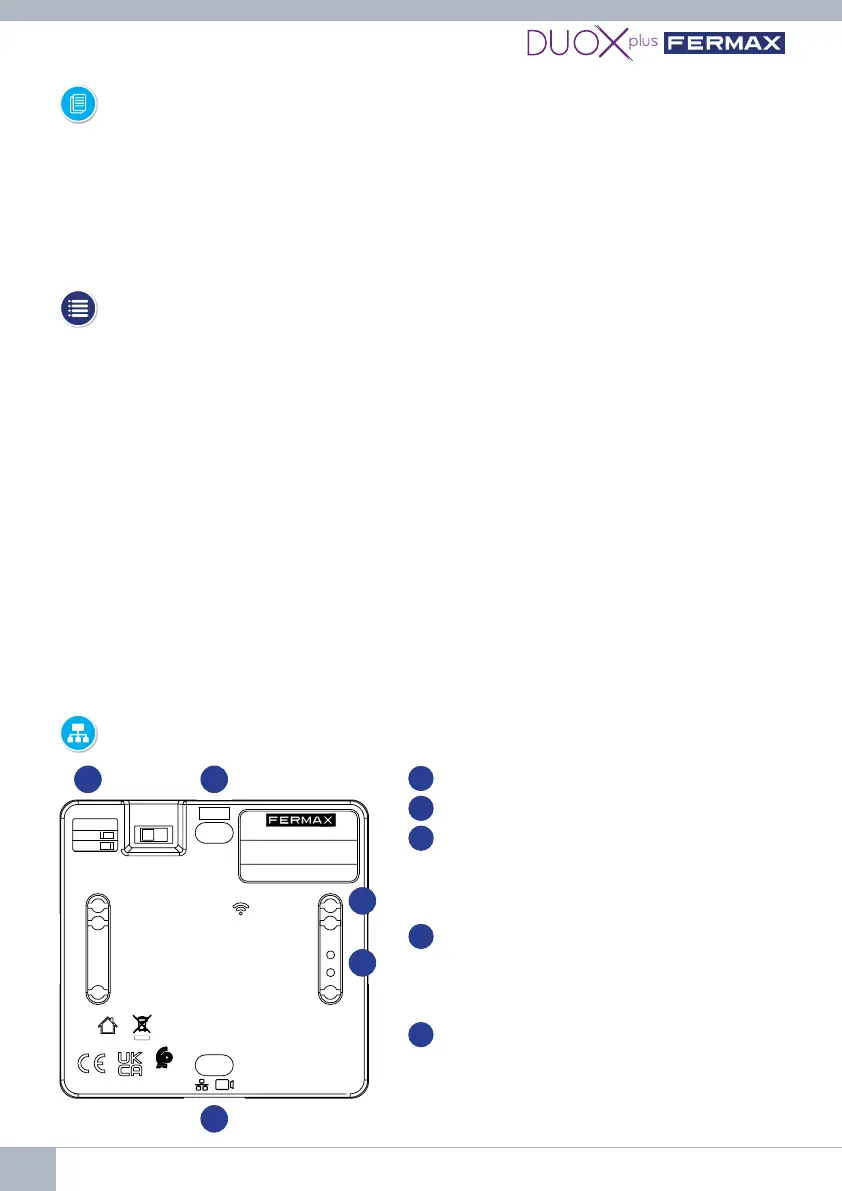
3. CONNECTIONS AND LIGHT-UP INDICATORS (LEDS)
1
BB: Connection of the DUOX Plus bus.
RJ-45: Ethernet/IP camera connection
SW1: Line adapter included.
Right: Without OFF line adaptation. (by
default)
Left: Type C adaptation.
PRG: Programming pushbutton.
Pressing for 2 seconds activates the web
server. After 5 minutes of inactivity, it is
deactivated.
PWR LED:Standbyblinking1sec(on/o)
WIFI LED: Continuous when there is a
device connected to the WiFi it generates.
Switches o when the web server is
deactivated.
2
3
4
5
1. INTRODUCTION
The Duox Plus IP Camera Interface allows IP CCTV cameras to be integrated into a Duox
Plus installation.
The module is able to connect to the video stream sent by the IP cameras in H264 format
(within certain parameters), process it and convert it into a DUOX PLUS signal that is
connected directly to the Duox Plus bus.
2. REQUIREMENTS
This Interface will handle requests from those monitors (APP BLUE) that request auto
switch-on via the bus or via the Blue App. The Interface behaves like an outdoor panel both
intermsoftopology (installation andadaptation)andwhenconguringthetype ofpanel
(General Entrance or Interior Block, indicating the block number). It is important to point out
thatnotwodevicesconguredinthesameinstallationcanbethesame(Example:Ifthere
isanoutdoorpanelconguredasblock0panel0,itwillnotbepossibletohaveanInterface
withthisconguration).
-IftheinterfaceisconguredasGeneralEntranceitshallonlyallowthemanagement
of one camera.
IftheinterfaceisconguredasaBlock,itwillallowthemanagementofuptotwocameras.
- Each camera shall be powered externally with its own power supply or through a POE switch.
-ThecameramustbeconguredbeforehandwithitsIP,userandpassword.
- The Interface shall be powered directly from the Duox Plus bus.
PRG
PWR
WIFI
BB
BUS
R5
46017 VALENCIA - SPAIN
FERMAX ELECTRONICA, SAU
AV TRES CRUCES, 133
1) SCAN QR
2) fermaxinterface.com
INTERFAZ CAMARA IP/DUOX PLUS
REF. 9454
MADE IN SPAIN
US Patent No. 9.215.410
9.762.852
SW1
C
OFF
IP/DUOX PLUS CAMERA INTERFACE
1
2
4
5
3















 To Next Page