8 DUOX PLUS IP CAMERA INTERFACE
5. FAQs — FREQUENTLY ASKED QUESTIONS
5.1 How do I congure the FERMAX IP camera (ref. 9985)?
1. Power the camera with an external power supply (ref. 9982 with adapter ref. 9984) or
with a POE switch.
2.ConnectanRJ-45cablefromthecameratoyourPC(thePCmustbeconguredwithin
the IP range of the 192.168.1.xx Interface).
3. Open a browser and enter the IP address (192.168.1.64) that the camera has by default
ifyouwanttochangeyourcamera'sIPandport.Thersttimeyouarepromptedtoenter
apasswordandconrmit,enterfermax123oryourchoiceofpassword.
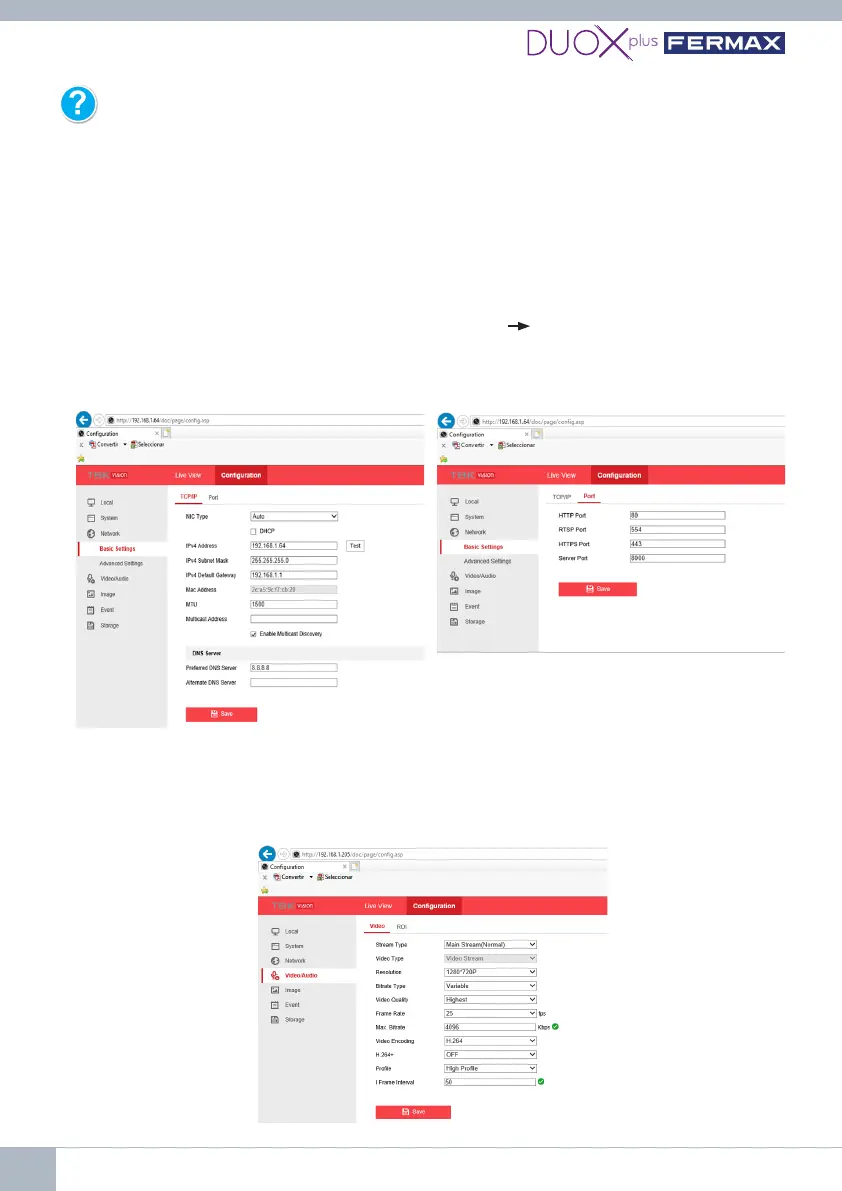
4. Enter user admin and password fermax123. Go to Basic Settings.
Change the IP to 192.168.1.205, for
example.
The port tab will show 554 for the RTSP
protocol.
Video:
Resolution 720P, Video Quality Highest,
Frame Rate <30, Video Encoding H264,
ProleHighProle.
Exit.















 To Next Page