11
made, the last temperature used is automatically
saved to the selected setting and replaces the de-
fault setting.
Switching on
Press the on/off switch
[1-8]
once and hold until
the Festool logo appears on the display
[1-20]
.
The machine increases the temperature in heating
mode until the setpoint temperature is reached
(display
[1-20]
lights up red).
Machine switches to warming phase (display
[1-20]
flashes red/green).
Machine is ready for operation (display
[1-20]
lights
up green).
Switching off
Press the on/off switch
[1-8]
< 1 s
The machine reduces the temperature in cooling
mode and then switches off.
Display
[1-20]
lights up red, fan symbol is dis-
played.
Press the on/off switch
[1-8]
and hold > 1 s
The machine switches off immediately.
Settings
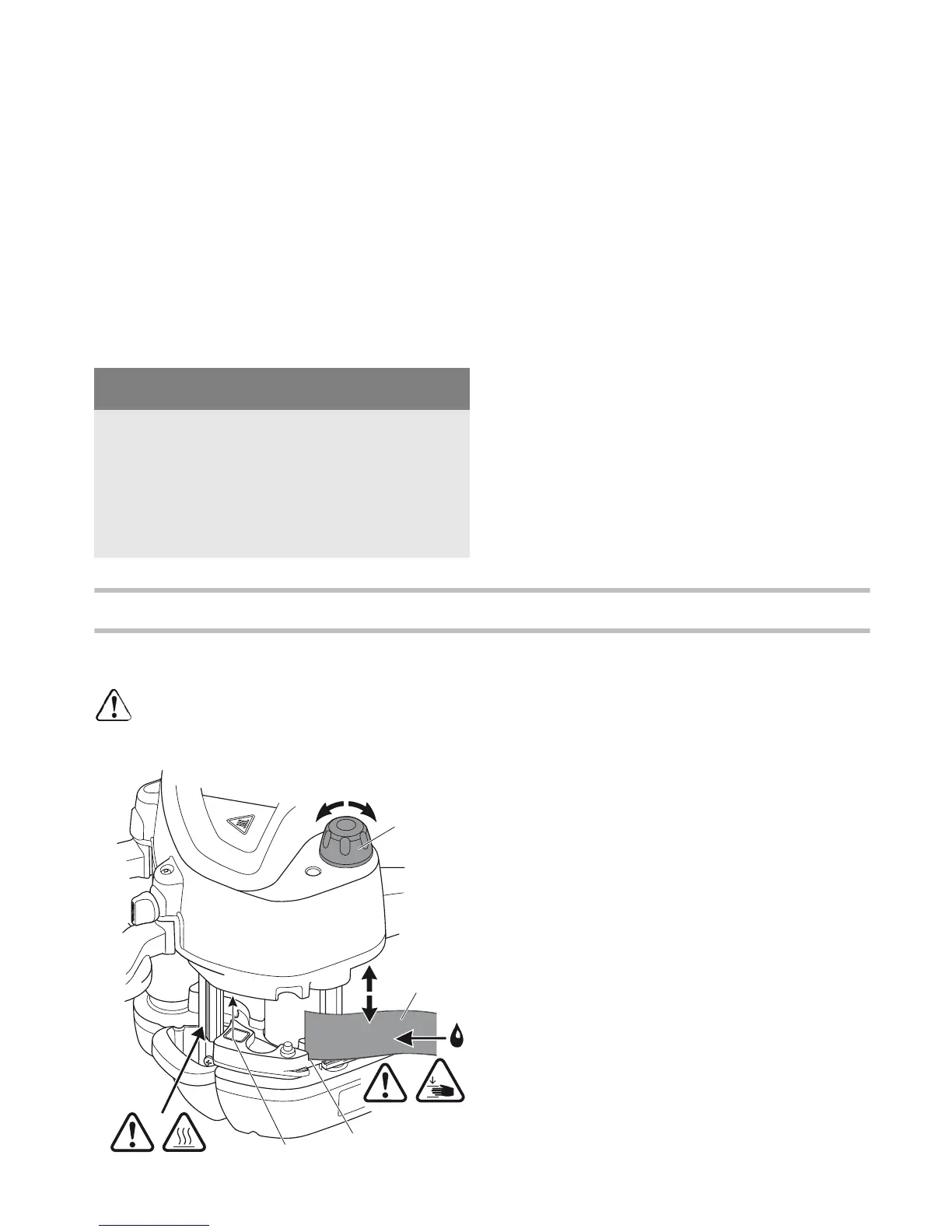
Adjusting the edge height [3]
The edge height can only be adjusted
at op-
erating temperature
! Ignoring this instruc-
tion may result in machine damage.
Guide the edge band
[3-2]
into the edge inlet
[3-
3]
.
Use the rotary knob
[3-1]
to adjust the height of
the edge inlet
[3-3]
until the edge band
[3-2]
rests against the top and bottom of the inlet.
Turn back the rotary knob by one locking posi-
tion so that the edge band
[3-2]
can slide
through smoothly without becoming caught.
Adapting the adhesive quantity
The necessary adhesive quantity is automatically
adjusted to the current edge height.
Press the menu buttons
[1-19]
to adapt the adhe-
sive quantity (layer thickness) to different work-
piece materials
(chapter Menu buttons [1-19])
.
NOTE
Do not leave the machine unattended!
When taking a break of less than 15 minutes,
switch the machine to cooling mode (chapter
Switching off).
When taking a longer break, switch off the ma-
chine completely.






 To Next Page