Go to fetco.com for the latest versions of all information Page 4 User Guide & Operator instructions P194Re0 November 2020
Pro
ramin
Menu La
out
10 to A70
B10-B40
C10-C50
D10-D90
E10-E70
F10-F120
G10-G11
Batch Parameters
General Settings
Service Inputs
Service Outputs
Calibration
Service Menu
Exit and Save
|
|
|
|
|
|
|
A11
Brew Volume
B1
Tank Temperature
C1
LLC Probe
D1
Heater SSR
E1
Ready Temp. Offset
F1
Firmware
G1
Save Changes
|
|
|
|
|
|
|
A12
Brew Time
B2
Brew at Temp
C2
Basket Sensor
D2
Fill Valve
E2
LLC Sensitivity
F2
Bootloader
G2
EXIT?
|
|
|
|
|
|
A13
Prewet Percent
B3
Temperature Units
C3
Tank Temperature
D4
Brew Valve
E3
Slow Flow Compensate
F3
Select Model
|
|
|
|
|
A14
Prewet Delay
B4
Volume Units
C4
USB Drive
D9
LCD Brightness %
F4
Customer Name
|
|
|
|
A16
Drip Delay
C5
Keyboard Test
D10
LED Brightness %
F5
dd Customer Name
|
|
A20
Batch (2) Enabled
F6
Backup to USB
|
|
A30
Batch (3) Enabled
F7
Restore from USB
|
|
A70
Copy Batch
F8
Restore Defaults
|
|
A71
Copy Batch: From
F9
Demo Mode
|
|
A72
PASTE: To
F10
Error Log
|
F11
Erase Error Log
|
F12
Service Phone#
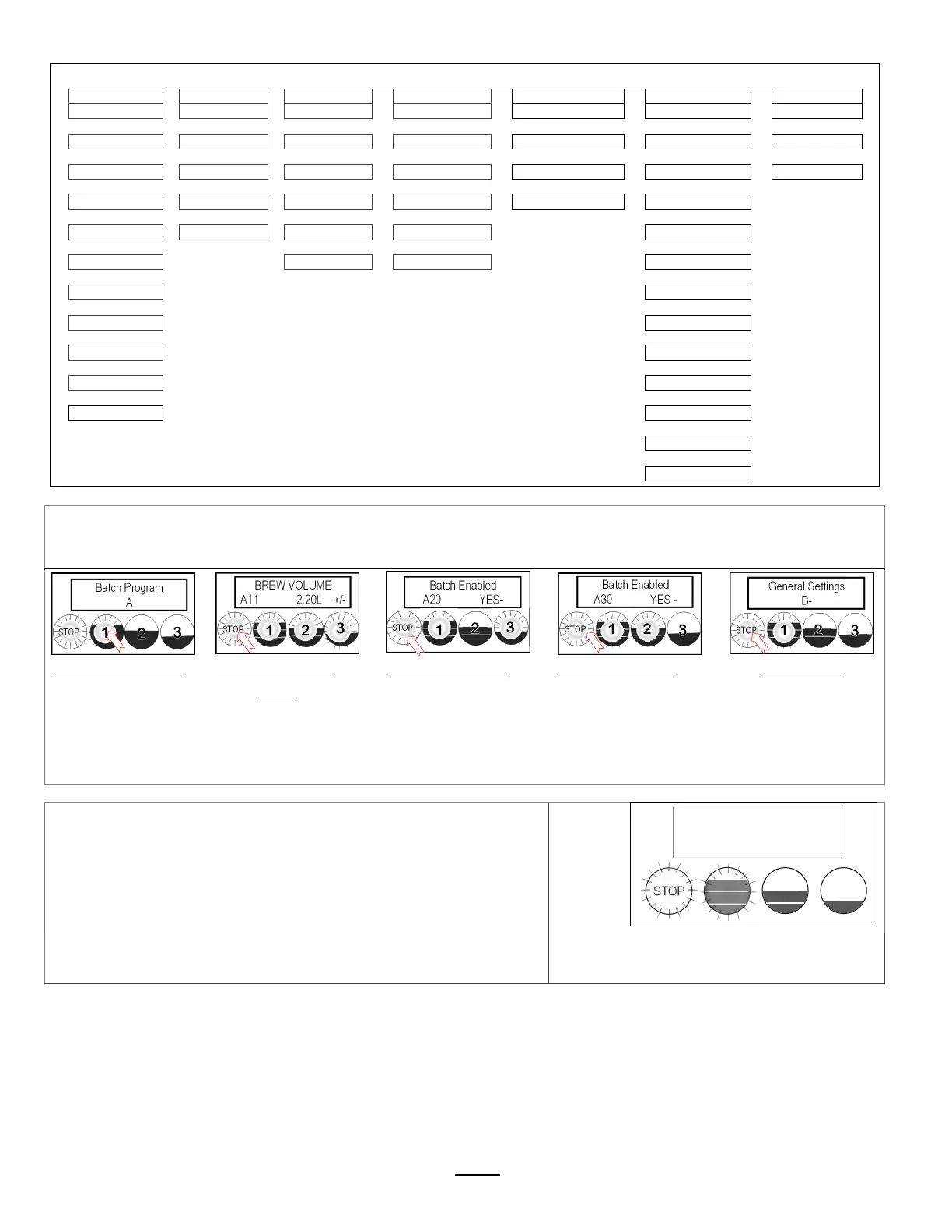
TheAmenus[A1‐3]correspondtobatchbuttons[1‐3]onthetouchpanel
AccesstheAmenustoPROGRAM&makechangestoindividualmenurecipes.Menusetti ngs canbecopied
MenupositionA1ispermanent.Menus A2,A3canberemovedbyoperatorifdesired
FromAPRGscreen
Pressbutton1togo
totheAmenu
accessscreen
FromA11screen
PressSTOPtoscroll
toA20.
(A1 is permanent)
FromA20screen
PressSTOPto
scrolltothethird
batchinthe“A”
menus.Makeany
changesasrequired
FromA30screen
PressSTOPtoscroll
throughCOPYand
furthertoremaining
programmingkeys.
Tocontinue
PressSTOPtoscroll
throughsections
SeeSAVE&EXITin
previoustable
.
RECIPE Location map
View and change settings for the brew recipes from the “A” screens
with the controls in PROGRAMMING.
The batch A1 button position is permanent and will not display
programming steps A20 or A30 to ENABLE/DISABLE.
DISPLAY
STOP BATCH
A1
(permanent)
BATCH
A2
BATCH
A3
STOP
Batch Program
A
STOP
BREW VOLUME
A11 2.20L +/-
STOP
Batch Enabled
A20 YES-
STOP
Batch Enabled
A30 YES -
STOP
General Settings
B-
STOP
Batch Program
A


 To Next Page