14
Device – mounting and installation
a) The device may only be installed on an even surface and in a vertical
position. Provide the selected area of installation with suitable holes
for fastening the device. The diameter of the drilled hole is depend-
ent on the screw employed (screw diameter max. 5/16” [8 mm]) and
the type of supporting base material (steel, wood, concrete, plaster-
board etc.) and must be chosen accordingly.
S 11, Figure 4 Inside view of telephone lower part ..
b) Loosen (2) cover screws, pull out plug connectors (7)
Figure 4, of
the flat cable from the pin contact strip (21)
Figure 3, of the upper
part of the telephone (1) and take off the upper part.
S 8, Figure 1 Set view
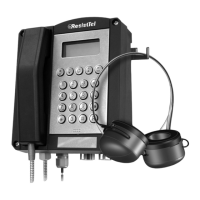
In case headset accessory is used.
c) Screw on the (17) handle from the accessory packing with the help
of the two supplied screws (18) onto the rear side of the telephone
(3).
S 9, Figure 2 Outside view of telephone lower part
d) Remove sealing plugs (6) from the lower part of the telephone (3)
and screw in cable entry gland M20x1.5 (19)
Figure 2, from the
accessory packing.
S 11, Figure 4 Inside view of telephone lower part and mounting
holes
e) Insert screws with head diameters of 0.3937 in [10 mm] to 0.51181 in
[13 mm] in the openings (20) of the lower part of the telephone (3)
secure the lower part of the telephone (3) onto the prepared installa-
tion surface.
S 11, Figure 4 Inside view of telephone lower part and mounting
holes
In case headset accessory is used.
f) Pass the prefabricated connecting cables from the accessory pack-
ing through the cable entry gland M20x1.5 (19) and fix them with the
help of the screw fasteners.
S 9, Figure 2 Outside view of telephone lower part
g) Place the cable core ends of the connecting cables on the terminals
located in the section HEADSET of the connecting diagram. The
terminals are labelled with the cable core colours of the connecting
cables.
S 11, Figure 6 Connection diagram
h) Pass and fix the connecting cables of the telephone through the
cable entry glands (5).
S 11, Figure 4 Inside view of telephone lower part and mounting
holes


 To Next Page