29
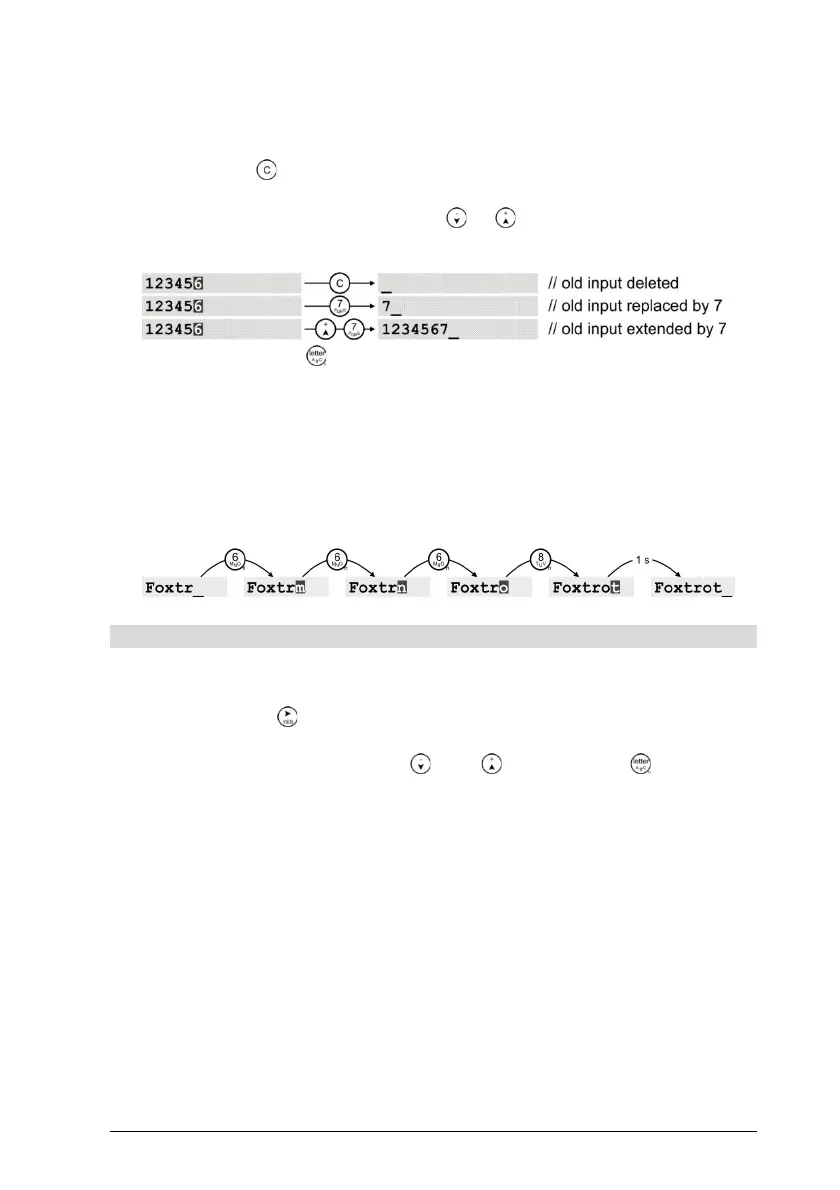
With the opening of an entry dialogue, all old entries are shown in
AutoEdit-mode, which is indicated by a blinking overwrite-cursor █ on
the last entered character and is accompanied by a short beep-tone.
To completely delete an old entry or to replace it with a new one,
only the key - or one of the entry keys need to be pressed. On the
other hand, the old entry is retained if the AutoEdit mode is termi-
nated by pressing the cursor keys or .
Example:
The keys marked are allotted to character strings whose charac-
ters are inserted one after the other in the cursor-position if the key is
operated consecutively. Here, with the first keystroke, the cursor
switches over to the block mode or overwrite mode and remains in
this position until another key is pressed or the Abc-key time limit
(1s) elapses. After that, the cursor returns to the original mode and
positions itself behind the last entered character.
Example:
Menu – using phone book
The telephone directory shows the alphabetically arranged list of en-
tered subscribers, waits for the selection of a subscriber and opens, on
pressing the key the menu "Entry", out of which the action to be
taken on the selected subscriber entry must be chosen. For the selec-
tion of the subscriber, the keys and - or the keys of the text
character-key string can be used. The latter allows the entry of a search
term with which the telephone directory searches and selects the sub-
scriber whose name most closely resembles the search term.


 To Next Page