28
Menu – using input lines
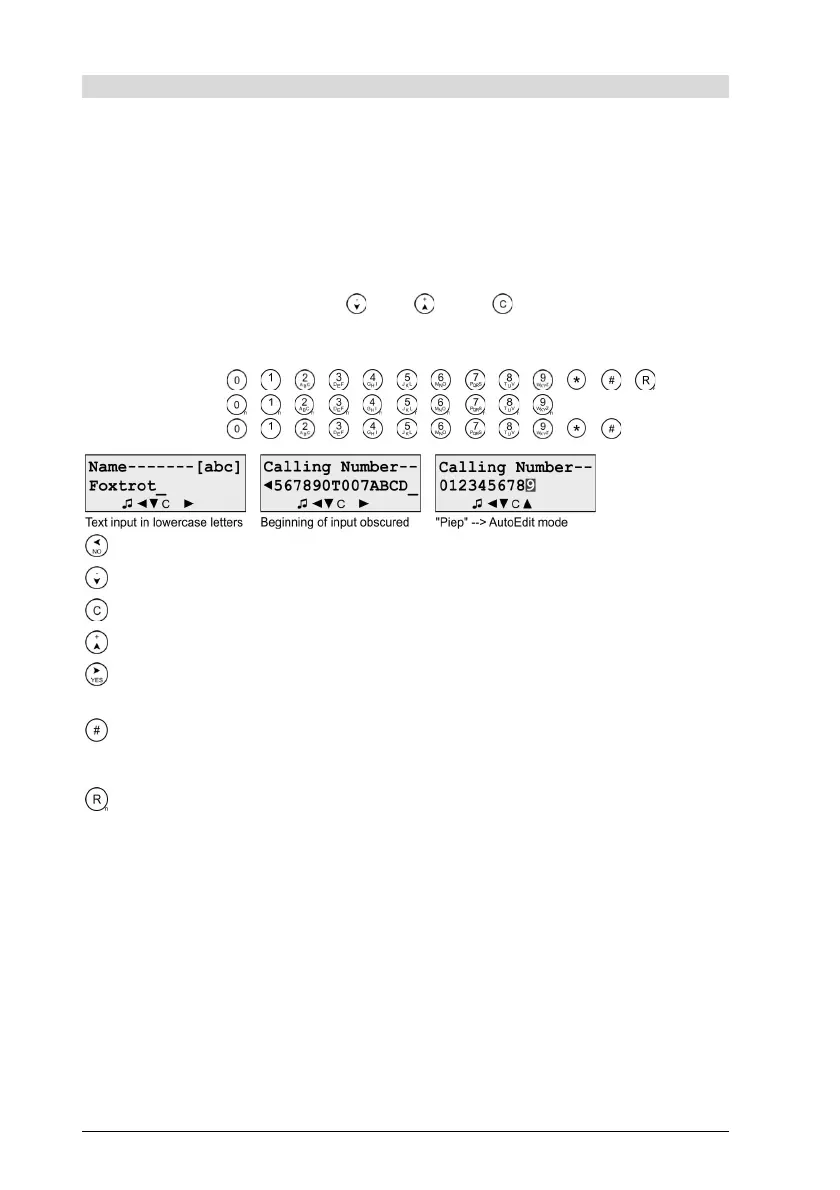
Entry elements change properties with which strings are processed, e.g.
during specification of telephone numbers. The opened entry element
usually appears as a title line, under which the display section is
located, in which the entry is made with one of the following key
strings/character strings. The character entry takes place at the position
of the cursor, which usually works in the overwrite or insert mode and
automatically changes to block mode or overwrite mode in case the
entry reaches the maximum length of the property. The cursor position
can be shifted with the keys and ; key enables the deletion of
individual characters.
Key strings / Character strings:
- Numbers: , , , , , , , , , , , ,
- Text: , , , , , , , , ,
- PIN: , , , , , , , , , , ,
Abort
Shift the cursor one character to the left.
Delete character before the cursor (backspace)
Shift the cursor one character to the right.
Ends the entry and saves the changed property value.
-------- Optional --------
Switching between upper case [ABC] and lower case [abc] for text entries, in case the
title line contains the superimposition [ABC] or [abc], which illustrates the current
mode of upper or lower case.
Entry of special dialing characters during entry of telephone numbers.
R Flash, interrupts the TIP/RING-line for the duration set with parameter Flash
Duration.
S 22, Configuration – PBX\PSTN\Inquiries
A DTMF-dial mark "A".
B DTMF-dial mark "B".
C DTMF-dial mark "C".
D DTMF-dial mark "D".
- Pause, interrupts the dial procedure for the duration set with parameter Pause
ExchCode.
S 22,Connection – PBX\PSTN\Calls to the PSTN
T Temporary switch over to tone dialling procedure..
Notes:
If the length of the entry exceeds the width of the display section, the
entry in the display is scrolled horizontally. The shortcoming of the
display is pointed out by blending-in the character ◄ at the begin-
ning and/or ► at the end of the section.


 To Next Page