27
Menu – using sliders
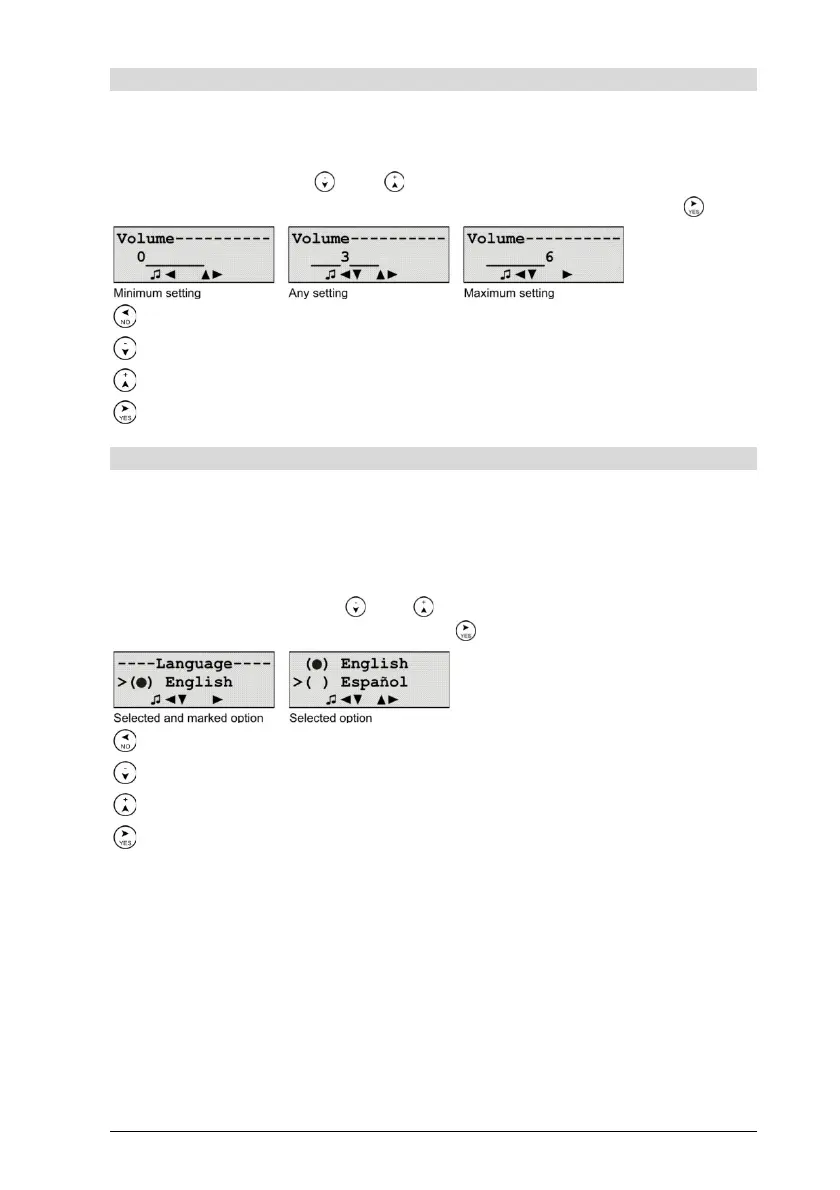
Slide controllers change the properties with incremental character, e.g.
speaker volume settings. The opened slide controller shows the entry
range as a horizontal bar, into which the current set value is superim-
posed. With the keys and the slide controller can be lowered or
raised to the value at which it is to be saved by pressing the key .
Abort
Lowers the property value by one unit.
Raises the property value by one unit.
Ends the setting and saves the changed property value
Menu – using options
Option switches change properties from which a choice of one out of a
range of 1 to N must be made, e.g. the setting of the menu language.
The opened option switch appears as a list with N named options, in
front of which is a button symbol ( ) or (●). Here, the (●) shows the cur-
rent set option, whereas the symbol ( ) shows the other N-1 options as
unmarked. With the keys and that option that is to be selected is
marked and saved by pressing the key .
Abort
Selects the next option.
Selects the previous option.
Marks the selected option and saves the changed property value.


 To Next Page