26
Menu
Menu – used confirmation-, error- and advisory tones
Confirmation tone (600 ms), signals the successful completion
of an operating action.
Error tone (700 ms), signals the failure induced rejection of an
operating action.
PIN-Ping (150 ms), signals the request for entry of the PIN.
Auto-Ping (100 ms), signals the AutoEdit status of an entry
element
Menu – using menus
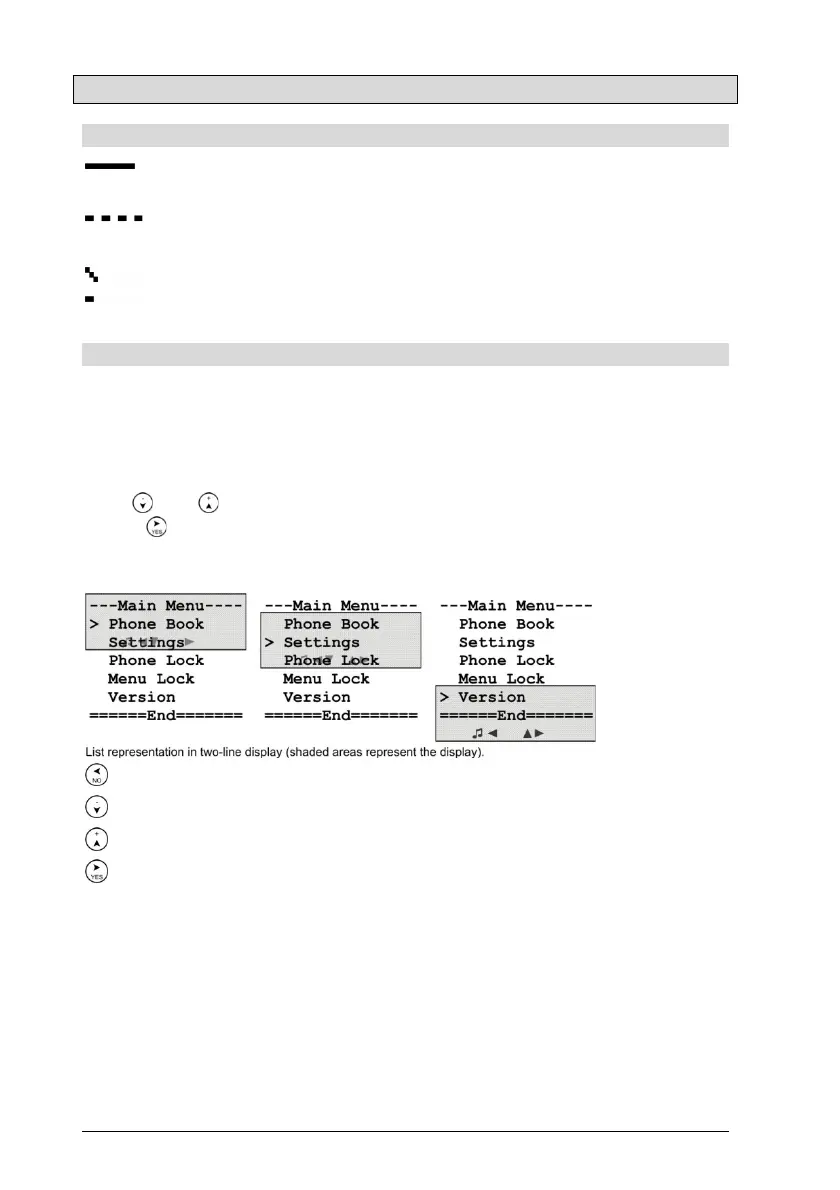
Menus serve the navigation through the setting elements of the tele-
phone configuration. The opened menu constitutes a list of entries,
which are arranged between the title line and the end line, from which
exactly one entry is selected. The selection, depicted by the symbol > in
column 1, must be moved forwards or backwards on the item with the
keys and , for the action that is associated with it to be carried out,
if key is pressed. Possible actions are menus, sliding controllers,
option switches, entry elements, the telephone directory and action
commands.
Abort
Selects the next menu entry.
Selects the previous menu entry.
Carries out the action connected with the selected menu entry.
Notes:
The number of entries in menus can vary depending on the context.
For example, the number of entries in the main menu with activated
menu lock and deleted telephone directory reduces to 2.
The menu system is equipped with a time monitor that automatically
ends the menu within 30 s if there is no user activity.


 To Next Page