The FIBARO KeyFob (model FGKF-601) is a Z-Wave Plus compatible, battery-powered, compact remote control designed for smart home automation systems. It allows users to control other devices within a Z-Wave network and execute various scenes defined in the FIBARO System. The device is equipped with six easily recognizable buttons, offering a wide range of configurable actions to suit diverse user needs.
Function Description:
The KeyFob's primary function is to act as a remote control for a Z-Wave smart home system. It supports 30 different actions, including single, double, and triple clicks, as well as holding a button, and button sequences for each of its six buttons. This extensive configurability allows for complex automation scenarios. The device can activate scenes in the Z-Wave controller by sending scene IDs and attributes using the Central Scene Command Class. By default, scenes are activated after a single click or pressing and holding any of the buttons and sequences. Additional actions can be activated through advanced parameters.
A built-in locking system enhances security by preventing unauthorized control of the home. When Lock Mode is enabled, the device locks itself after a set period of inactivity (defaulting to 60 seconds) or after pressing and holding a selected button. In Lock Mode, button presses do not activate any actions, though the menu remains accessible (excluding the reset option). The unlocking sequence can be configured using advanced parameters or through the Home Center configuration interface, allowing for a sequence of 2 to 5 button clicks.
The KeyFob also supports associations, enabling direct control of other Z-Wave devices such as dimmers, relay switches, or roller shutters without the direct involvement of the main controller. It provides thirteen association groups, including a "Lifeline" group for reporting device status to the main controller, and dedicated groups for each button (Square, Circle, Cross, Triangle, Minus, Plus) with both On/Off and Multilevel control capabilities. Paired button associations are also possible, where horizontal pairs of buttons (e.g., Square and Circle) can work as a single button, sending associations to the left button's groups. For multilevel groups, left buttons increase the level, while right buttons decrease it.
The device offers visual indications through an LED diode, signaling button presses, sequences, menu positions, and device status. For instance, a green blink confirms a command received by the controller, a yellow blink indicates commands in progress, and a red blink signifies that a command was not confirmed. Sequence indications include a blue pulse for entering a sequence, three blue pulses for a valid sequence, and three red pulses for an invalid sequence. Status indications cover learning mode (red blink for not added, fast white pulsing for adding mode, green blink for added), lock mode (red blink for locked, three red pulses for wrong sequence, red to green transition for unlocked, green to red transition for locked using button hold), and battery status (three magenta pulses for low battery).
Important Technical Specifications:
- Power Supply: CR2450 3.0 V battery (included).
- Battery Life: Estimated 2 years (default settings, max. 5 pushes per day and direct range).
- Operating Temperature: 10-40°C.
- Protection Class: IP54.
- EU Directives Compliance: RoHS 2011/65/EU, RoHS 2015/863, RED 2014/53/EU.
- Radio Protocol: Z-Wave (500 series chip).
- Radio Frequency:
- EU: 868.4, 868.42 or 869.8 MHz
- US: 908.4, 908.42 or 916.0 MHz
- ANZ: 921.4, 921.42 or 919.8 MHz
- RU: 869.0 or 869.02 MHz
- Range: Up to 50 m outdoors, up to 40 m indoors (depending on terrain and building structure).
- Dimensions: 70 x 38 x 15 mm.
Usage Features:
- Basic Activation: Involves opening the battery cover, removing a protective sticker, and closing the cover.
- Adding (Inclusion): To add the device to a Z-Wave network, set the main controller to add mode, power the device, and click any button three times. The LED pulses white during the process and turns green upon successful addition. Adding in Security Mode requires the device to be within 2 meters of the controller.
- Removing (Exclusion): To remove the device, set the main controller to remove mode, click the Square and Circle buttons simultaneously, then click the Square or Circle button until the LED glows green, and finally click the Plus button. Removing the KeyFob restores all default parameters.
- Menu Operation: The menu is accessed by simultaneously clicking the Square and Minus buttons. Users can navigate through menu positions (White for wake up, Green for learning mode, Cyan for battery level, Yellow for reset) by clicking the Square or Circle buttons, confirm selection with the Plus button, and exit with the Minus button.
- Waking up the device: The device can be woken up using the first menu position (white) or by simultaneously clicking the Square and Plus buttons. This is necessary for the KeyFob to receive new configuration information from the Z-Wave controller.
- Sequences: Users can create sequences of two to five button clicks to expand the number of possible actions. Up to six unique sequences can be created, each sending a corresponding Scene ID to the Z-Wave controller. Sequences are configured via advanced parameters.
- Advanced Parameters: The KeyFob's operation can be customized through advanced parameters accessible via the Home Center controller interface. These parameters allow for setting the unlocking sequence, time to lock, locking button, scene activation for various actions, button association operating modes, and paired button associations.
Maintenance Features:
- Resetting to Factory Defaults: The device can be reset via the menu (navigate to yellow LED, then click Plus) or through an emergency reset (remove battery, then hold Square and Plus while reinserting battery). A successful reset is indicated by a smoothly brightening and dimming yellow LED. Note that resetting is not the recommended way to remove the device from a Z-Wave network.
- Checking Battery Level: The KeyFob automatically warns of low battery with three magenta blinks. The battery level can be checked manually via the menu (navigate to cyan LED, then click Plus). The LED indicates battery level with smoothly transitioning colors: green (100%), yellow (50%), and red (1%).
- Replacing the Battery: To replace the CR2450 battery, open the battery cover by turning it counter-clockwise using the included keyring or a coin, replace the battery, and then close the cover by turning it clockwise.

 Need help?
 General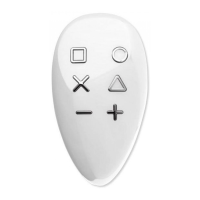

 To Next Page
