8 9
LOCK MODE
LOCK MODE
#6: Lock Mode
The KeyFob can be protected with a sequence of 2 to 5 button clicks.
When unlocking sequence is set, the device locks itself after:
• being inactive for time set with parameter 2 (60 seconds by de-
fault)
• pressing and holding selected button (if set in parameter 2).
Setting the unlocking sequence and locking time-out using
Home Center configuration interface:
1. Go to the device options by clicking the icon:
2. Select the „Advanced” tab.
3. Click the “Congure” button in "Lock Mode" section.
4. Select sequence of 2 to 5 buttons, click "Next".
5. Select time to lock and locking button, click "Next".
6. Click
and simultaneously to wake up the device.
7. Wait for the device to congure.
Setting the unlocking sequence using advanced parameter:
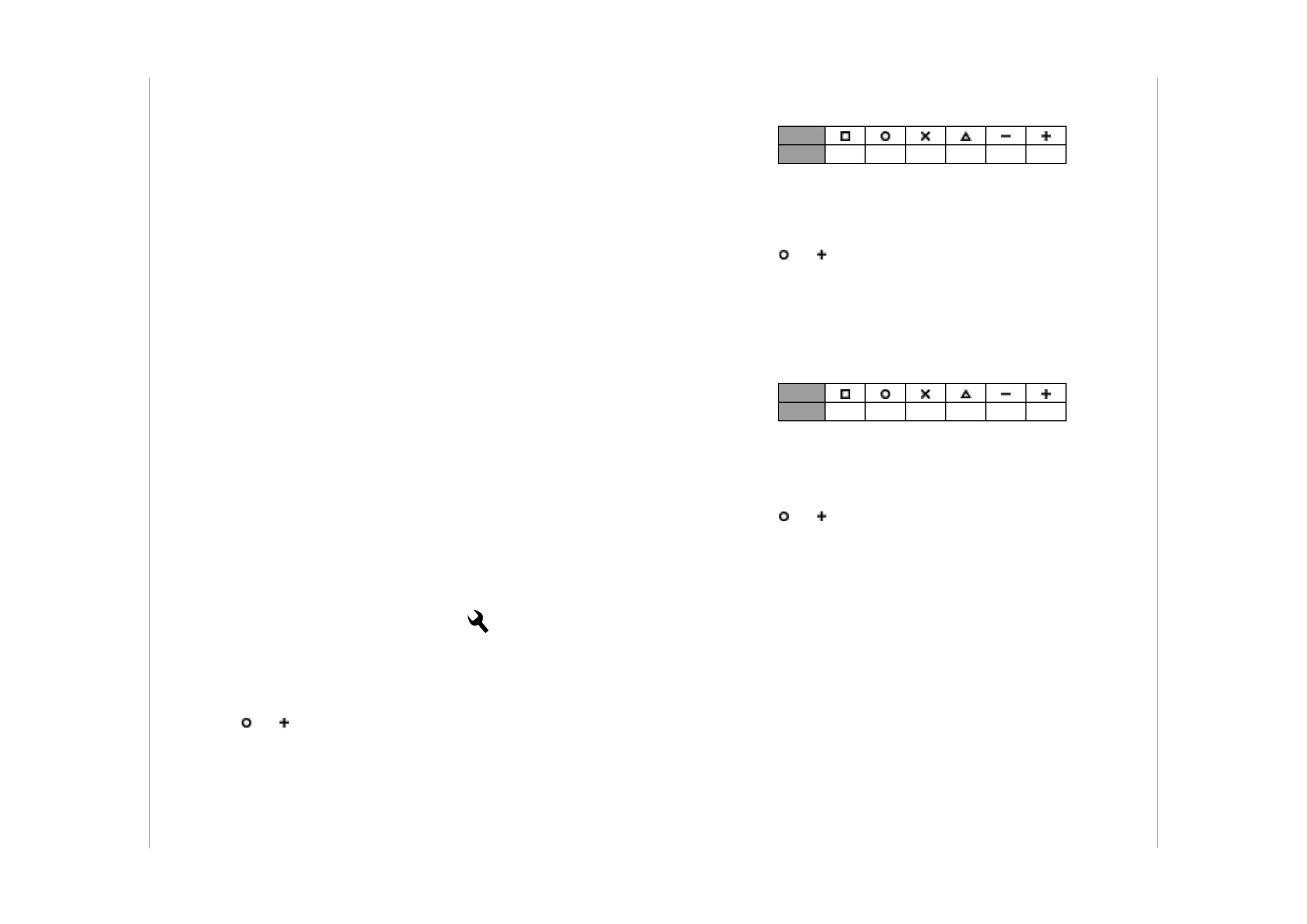
1. Calculate value of parameter using table and formula:
Value of parameter = Value of rst button +
+ 8 * Value of second button + 64 * Value of third button +
+ 512 * Value of fourth button + 4096 * Value of fth button
2. Change the value of parameter 1 [2 bytes] to calculated value.
3. Click
and simultaneously to wake up the device.
4. Wait for the device to congure.
Button
Value 1 2 3 4 5 6
Setting time to lock and locking button using advanced
parameter:
1. Calculate value of parameter using table and formula:
Time to lock should be 0 or 5-255 (seconds)
Value of parameter = Time to lock in seconds +
+ 256 * Value of locking button
2. Change the value of parameter 2 [2 bytes] to calculated value.
3. Click
and simultaneously to wake up the device.
4. Wait for the device to congure.
Button
Value 1 2 3 4 5 6
To enable Lock Mode:
• set sequence in parameter 1
• set time and/or locking button in parameter 2 (60 seconds by de-
fault)
• set PROTECTION Command Class to Local Protection by Sequence
(done automatically by Home Center controller).
Lock Mode will be disabled when:
• parameter 1 and/or parameter 2 is set to 0
• PROTECTION Command Class is set to Unprotected.
When device is locked:
• pushing buttons don't activate any actions
• menu is available, but without option of resetting the device.


 To Next Page