
 Need help?
Do you have a question about the FIBER FOX Mini 6SI and is the answer not in the manual?
Details on camera resolution, display size, and microscope magnification.
Information on power input, battery type, and data storage capacity.
Specifies splice speeds for different modes and heating oven settings.
Details on fiber types, diameters, and cable buffer diameter.
Defines splice loss values and operational environmental conditions.
Covers reliability metrics and storage environmental requirements.
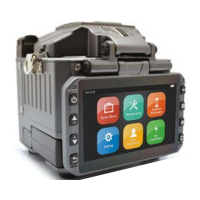
Identifies key external parts like the display, power supply, and ports.
Highlights internal parts such as the heat oven and buttons.
Step-by-step guide for replacing the fiber holder with cautions.
Instructions for cleaning critical optical components like V-grooves and lenses.
Stabilizes arc power after environmental changes or electrode cleaning.
Calibrates arc power for optimal performance and accuracy.
Navigating and managing splice modes and settings.
Selecting, editing, and deleting splice modes for various fiber types.
Configuring auto-start, pause settings, and fiber image display.
Adjusting and managing heater modes for splicing.
Displaying, deleting, and saving splice records and data.
Setting up password protection for menu access and device functions.
Adjusting buzzer, temperature units, heating, monitor, dust check, and password.
Choosing the user interface language from available options.
Configuring monitor and splicer shut down timers for power saving.
Setting the year, month, day, hour, and minute for the device.
Changing the device password for security.
Viewing the splicer's serial number and installed software version.
Accessing FPGA info, arc counts, last maintenance, and production dates.
Details on authorized sales region and manufacturer information.
Identifies symptoms like core offset, angle, step, curve, mismatch, and their reasons.
Provides solutions for common splice loss issues, including parameter adjustments.
Troubleshooting errors related to fiber placement, motor overruns, and propulsion.
Resolving issues with no arc discharge, motor overrun, and unidentified fiber types.
Addressing errors from fiber mismatch, large cleave/core angles, and focus issues.
Addressing issues with power not turning off and battery degradation.
Resolving inconsistent splice loss, high splice loss, and monitor turn-off problems.
Troubleshooting AUTO mode errors and fiber protection sleeve issues.
Solutions for forgotten passwords, arc power changes, and upgrade failures.
Guidance on other user-reported issues and references to additional resources.
 General
| Brand | FIBER FOX |
|---|---|
| Model | Mini 6SI |
| Category | Network Hardware |
| Language | English |

 To Next Page