- 26 -
- 27 -
Appendix II
If error message is shown as below during the process, Please follow the instruction accordingly. If
the problem still remains, please contact us.
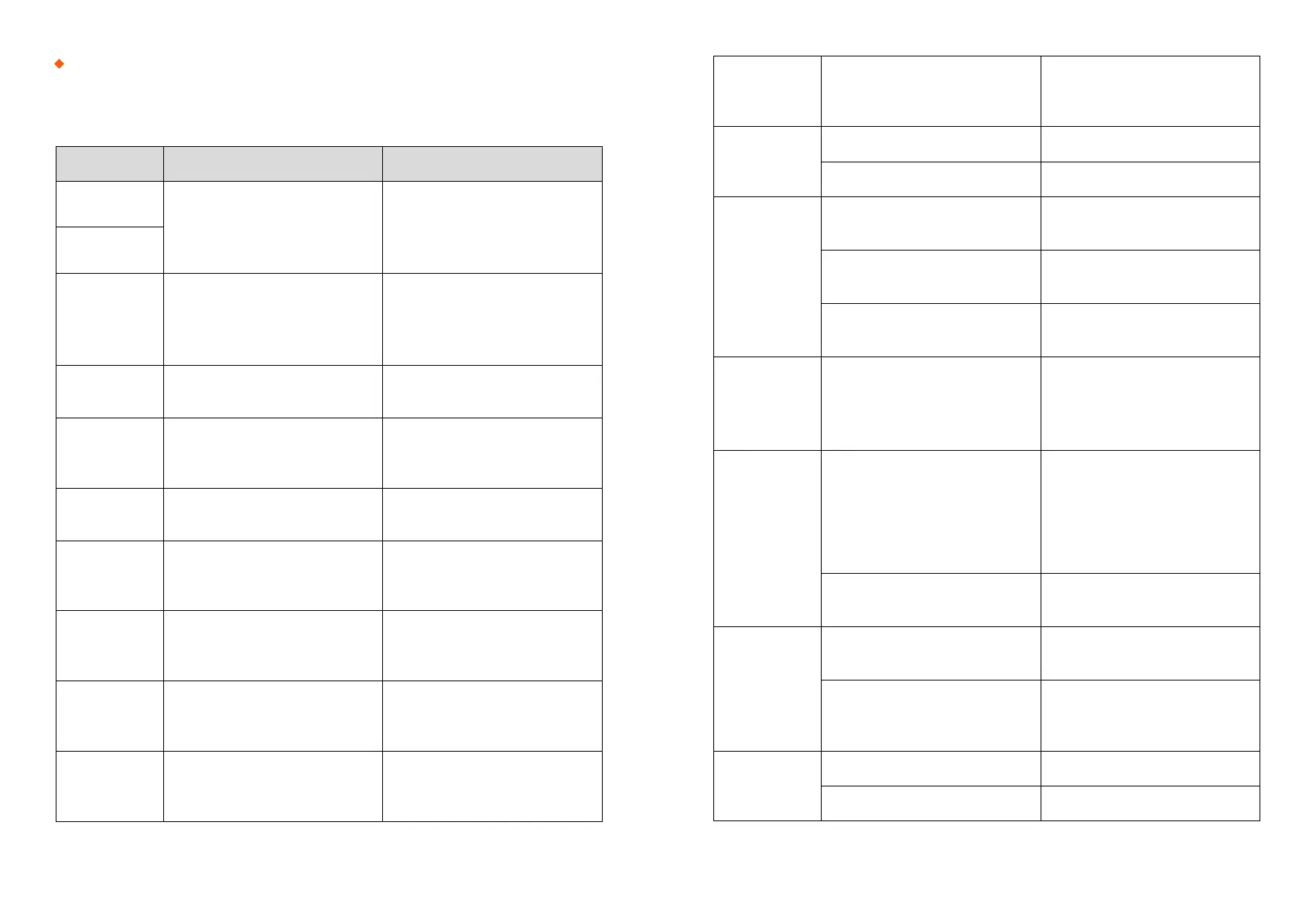
Error Message Reason Solution
L Fiber Place
Error
The fiber end-face is placed on the
electrode centerline, or beyond it
Press the “Reset” Button. Reload
the fibers, make sure fiber end
face between V-groove and the
centre position of electrodes
R Fiber Place
Error
Propulsion
Motor Overrun
The fiber is no set correctly at the
bottom of the V-groove, which
results in that the fiber offsets
beyond motor formation range
Press the “Reset” button and
then re-position the fiber at the
bottom of the V-groove
Propulsion
Motor Trouble
Motor might be damaged Consult your nearest sales agency
Failed to Find
The Fiber
End-face
The fiber is not set correctly at the
bottom of the V-groove
Press the “Reset” button and
then re-position the fiber correctly
at the bottom of the V-groove
No Arc
Discharge
Arc Discharge does not occur
Confirm the electrodes in proper
position; Replace electrodes
Motor Overrun
The fiber is not set correctly at the
bottom of the V-groove
Press the “Reset” button and
then re-position the fiber at the
bottom of the V-groove
Cannot Find
the Edge of The
Cladding
The fiber is not set correctly at the
bottom of the V-groove
Press the “Reset” button and
then re-position the fiber at the
bottom of the V-groove
Find Wrong
Fiber Edges
There’s dust on the fiber suface
Re-prepare the fiber;
Clean the lens and protector mir-
ror and then redo “Dust Check”
Unidentified
Type of Fiber
Shock occurred to the splicer
during the splicing process
Execute “Motor Calibration” If the
[problem stillexist, please contact
the sale agent
Unidentified
Type of Fibers
Shock occurred to the splicer
during the splicing process
Execute “Motor Clibration”
If the [problem still exist, please
contact the sale agent
Contact of Fiber
End-faces
Overlap too much Adjust overlap parameter
Motor is not calibrated Calibrate and maintain the motor
Focus Motor
Overrun
The fiber is misplaced
Press the “Reset” vutton and then
reposition the fiber correctly
There’s dust of dirt on the fiber
surface
Prepare the fiber again
There’s dust of dirt on the fiber
surface
Execute the [Dust check] after the
lenses and LEDs are cleaned
Fibers
Mismatch
The fibers of two sides are
different type
It may resul tin large splice loss if
you continue to splice,
Please use the proper splice mode
corresponding to the fibers
Large Cleave
Angle
Bad fiber end-face
check the condition of the fiber
cleaver, if the blade is worn,
rotate the blade to a new position
or change a new one, and then
re-prepare the fibers
[Cleave Limit] is set too low
Increase the [Cleave limit] to an
adequate limit(standard:3.0˚c)
Large Core
Angle
[Core angle limit] is set too low
Increase the [Core angle limit] to
an adequate limit (standard:1.0˚c)
Dust of dirt is on the V-groove or
hte clamp chip
Clean V-groove and clamp chip.
Prepare the fibers and re-load
them
Focus Error
Too large axial offset(>0.4um)w Re-prepare the fibers
The motor is not calibrated Execute [Motor clibration]


 To Next Page
 Loading...