FVA-IP Camera Installation and Operation Manual
Revision Date: June, 2019 P/N 06-523 (Rev. 5) 21
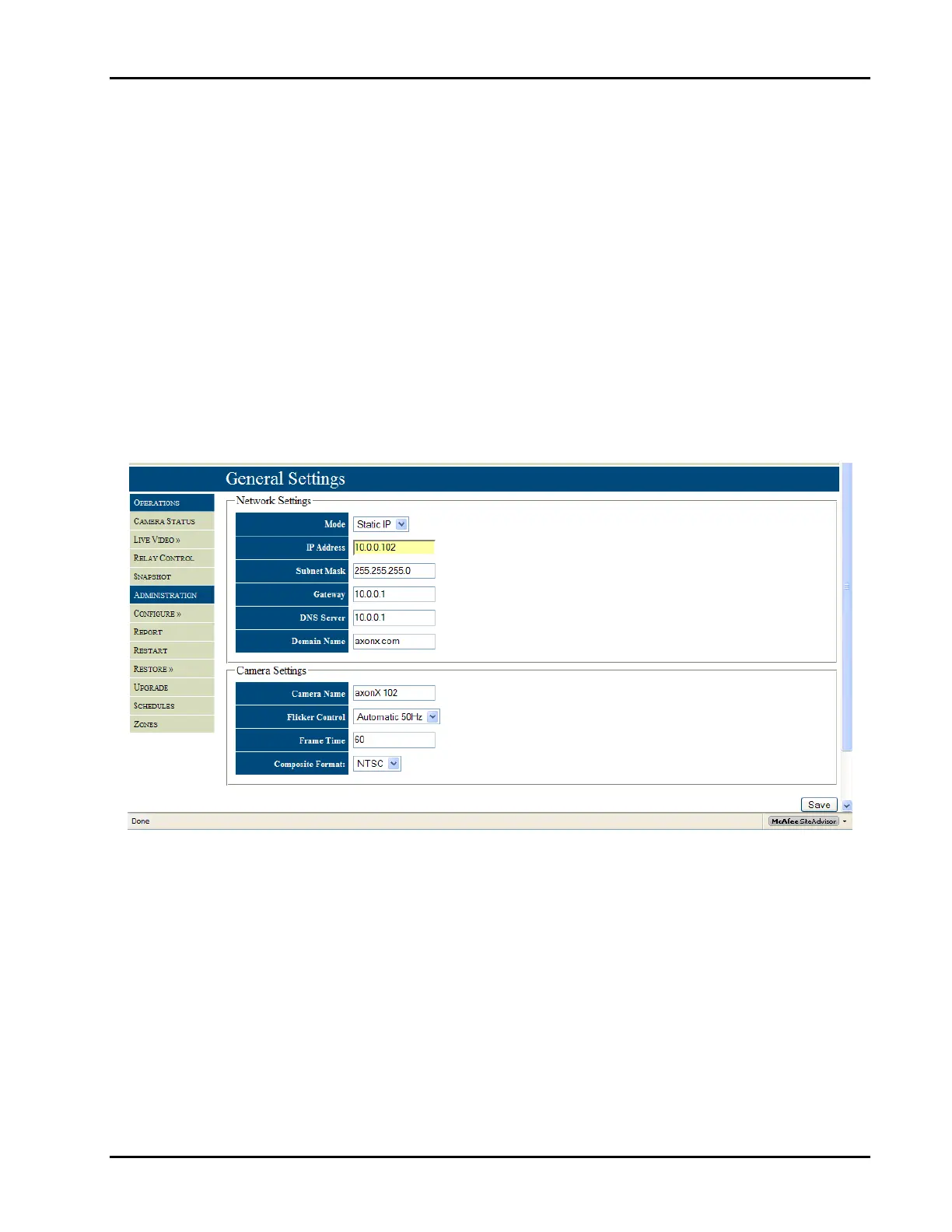
TheGeneralSettingisasub‐menufoundintheAdministrationSectionundertheConfigureselection,Figure17.This
iswherethemode(staticIPorDynamicHostConfigurationProtocol(DHCP))ofthecameraisset.Ifthecamerawillbe
onastaticnetworktheIPaddress,SubnetMask,Gateway,DNSserver,anddomainnamemustbefilledout.IfDHCPis
selectedthefixedIPsettingscanbeleftintheirdefaultsetting.TheIPcamerascanworkonbothafixedandDHCP
network.However,duetothefactthatanyphysicallocationwillbetied totheIPaddress,careshouldbe takenin
settingupaDHCPnetworksothephysicallocationcanbedeterminedandthecameralocationcanbeidentifiedbythe
IPaddress.WhenusingaDHCPconfigurationthebestwaytoensureacameragetsthesameaddressistofixthegiven
IPaddresstothecamerasMACaddressandgivethecameraanappropriatename.ContacttheITpersonneltoassistin
configuringthenetworksetup.
After the network setup comesthecamerasetting, which define the camera name,flicker control, frame time,and
videoformat(NTSCorPAL).Thecameracanbegivenanameofupto24characters.Itisbesttonamethecamera
afterthephysicallocationtoexpediteresponsetotheeventscene.
Theflickercontrolisusedtosetthefrequencyandmodeoftheflickercontrol.Theframetimeisusedtoincreaseor
decreasetherateatwhichimagesarecapturebythecamera.Avalueof60representsaframerateofapproximately
16fps(1000/60);at30,theframeratewouldincreaseto32fps(1000/30).Thevideoformatshouldbesetdepending
onthestandardinuseinthecountryofinstallation.ForNorthAmericaitisNTSCandPALforEuropeancountries.
Fig17–GeneralsettingsusedtoconfiguretheNetworksettingsandCamerasettings.
Onceproperoperationofthecameraisconfirmedandtheappropriatecommunicationscheme(staticIPorDHCP)is
selected, all further steps for camera configuration may be completedafterthecameraisphysically installed.
However,furtherset‐upmaybecontinuedatthispoint.


 To Next Page