PRE-INSTALLATION
8.
DAISY-CHAINING THE HEADSET MODULES
Daisy-Chaining the Headset Modules is a method used to increase the number of headset
positions available, or a method of reducing the number of cable runs and the length of the
cable runs. Daisy-Chaining the Headset Modules is easy to accomplish, but must be well
thought out in advance considering the following requirements:
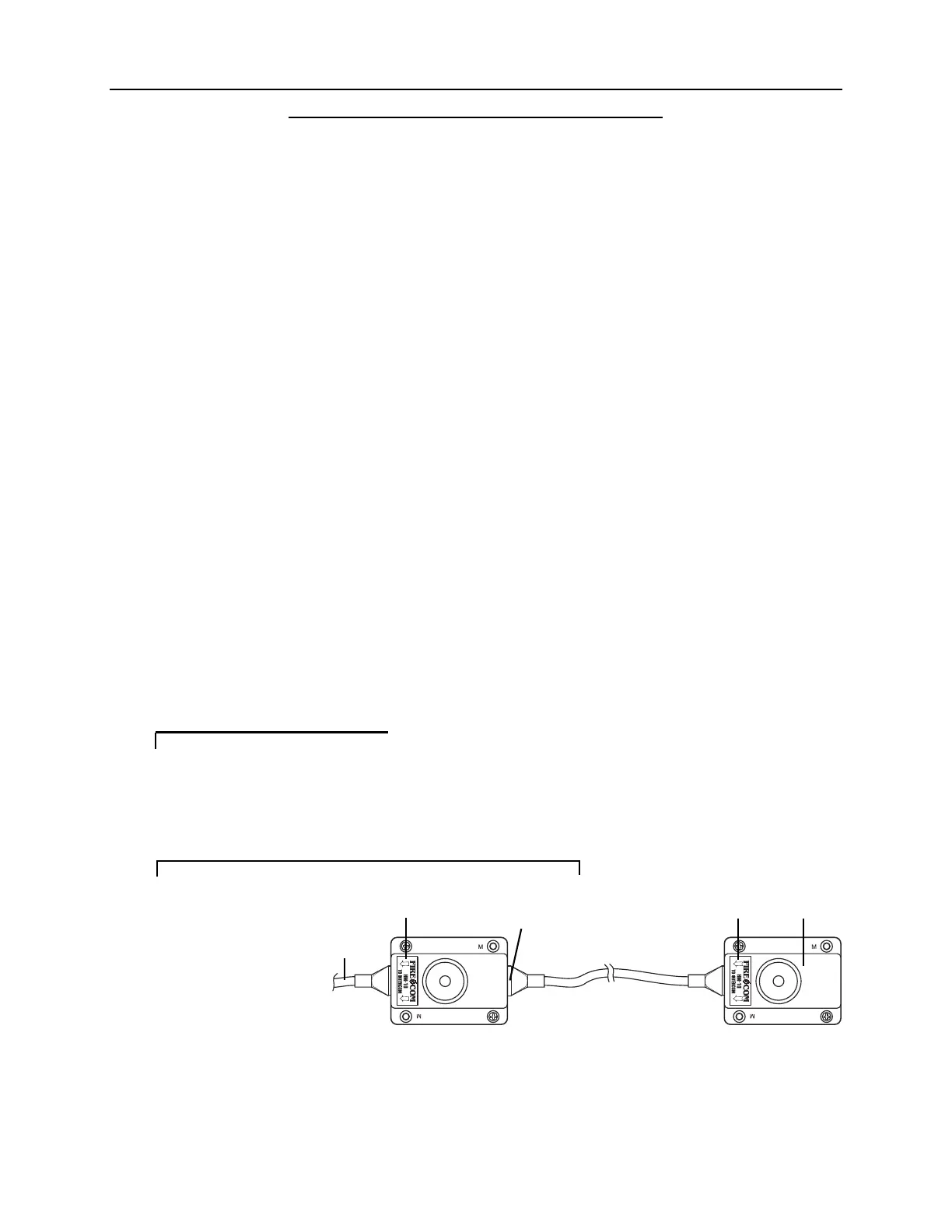
• The Headset Modules in a Daisy-Chain must be connected in a SPECIFIC
manner (Figure 6).
• The CA Cable from the Intercom unit should ALWAYS be plugged into the
Headset Module via the modular jack under the label.
• The modular jack on the other end of the Headset Module (behind a removable
plastic tab), is for the CA Cable which leads to the next Headset Module in the
Daisy-Chain.
• DO NOT mix headset types (Intercom-Only vs. Radio-Transmit) that are
plugged into a Daisy-Chain.
•Amaximum of 2 Intercom-Only Headsets may be plugged into a Daisy-Chain at
any time.
• You may have more Headset Modules in the Daisy-Chain, but NEVER plug
more than 2 Intercom-Only Headsets into the Daisy-Chain at any one time.
•Amaximum of 1 Radio-Transmit Headset may be plugged into a Daisy-Chain
at any time.
• You may have more Headset Modules in the Daisy-Chain, but NEVER plug
more than 1 Radio-Transmit Headset into the Daisy-Chain at any one time.
Improper Daisy-Chains ina system may result inoperational problems
and reduced system performance. If you have any questions regard-
ing Daisy-Chains, contact your local Firecom Dealer for more
information.
IMPORTANT
FIGURE 6:
Daisy-Chaining The
Headset Module
CA Cable to
Intercom
Label
Auxiliary Jack for
Daisy-Chaining
Label
Daisy-Chained
Headset Module


 To Next Page