INTERCOM OPERATION
26.
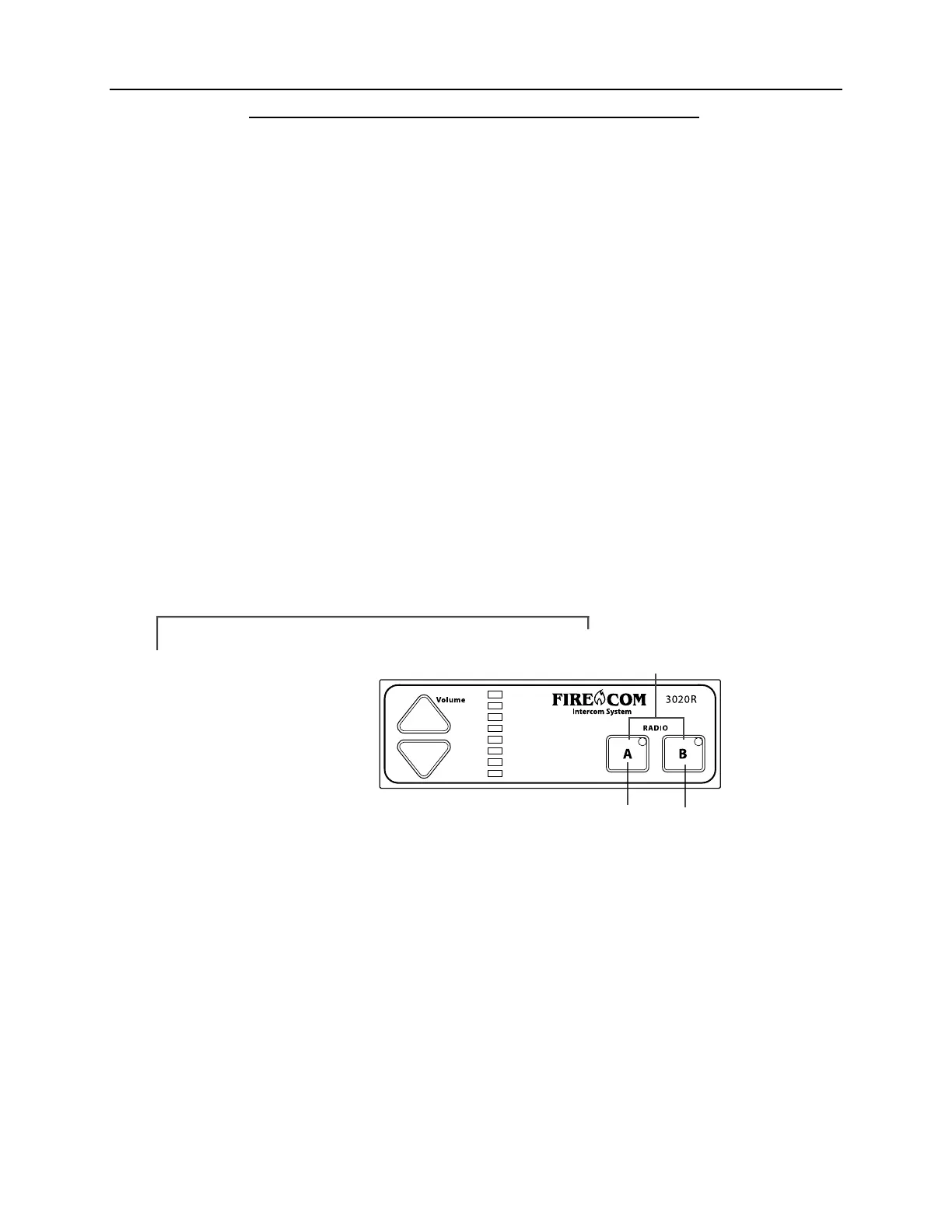
RADIO SELECT CONTROLS
(3020R ONLY)
The Radio Select Controls/Indicators on the 3020R
ONLYcontrol which radio will be used
to transmit when a PTT Button on a Radio-Transmit Headset is pressed. They do NOT
control which radio is heard in the headsets. BOTH radios are monitored at all times in the
headsets.
RADIO A SELECT BUTTON
Pressing the Radio A Select Button, selects radio A as the radio for transmission. The green
Radio A Selected Indicator will then light.
RADIO B SELECT BUTTON
Pressing the Radio B Select Button, selects radio B as the radio for transmission. The green
Radio B Selected Indicator will then light.
RADIO SELECTED/KEYED INDICATORS
The Radio Select Indicators will light with a green color when that radio is selected. It will
change to red when the PTT Button on a Radio-Transmit Headset is pressed. The indicator
will return to green when the PTT Button is released (Figure 28).
FIGURE 28:
Radio Select
Controls & Indicators
Radio Selected/ Keyed Indicators
Radio
Select
Button
Radio
Select
Button


 To Next Page