SYSTEM ORIENTATION
3.
3010R SERIES FRONT PANEL
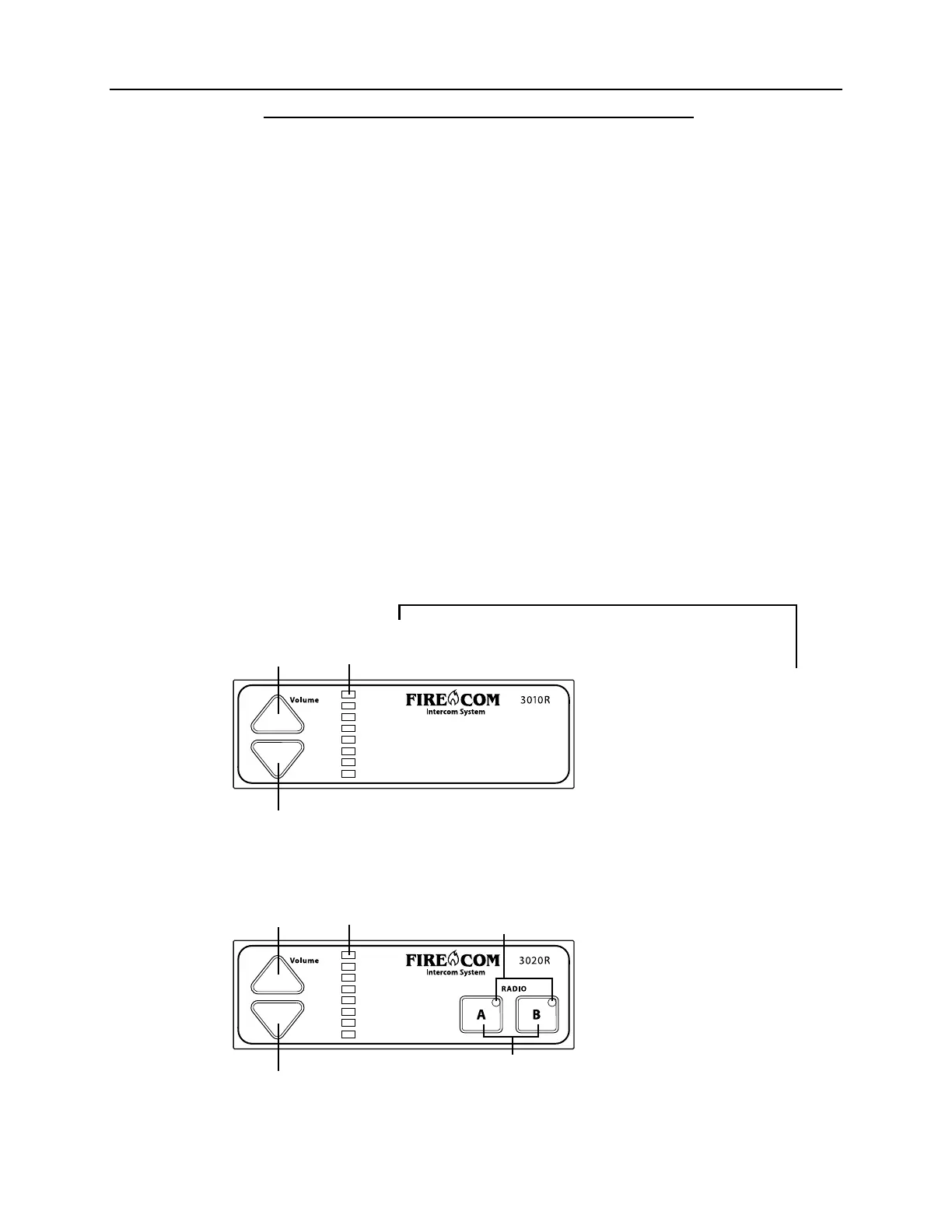
Figure 3 shows the Front Panel of the 3010R and the 3020R Intercom. Listed below are the
different items on the Front Panel and what they control/signify. These controls are
explained further in “Intercom Operation” (pages 24, 25, & 26).
VOLUME UP & VOLUME DOWN BUTTONS
Adjust the master volume for the Intercom System.
VOLUME INDICATOR LED'S
8 yellow LED’
There are 3 volume changes between lights.
s which indicate the master volume level setting.
RADIO SELECT BUTTONS (3020R ONLY)
Used to select which radio will be transmitted on when the PTT on a Radio-Transmit
Headset is pressed.
RADIO SELECT LED's (3020R ONLY)
Light up to show the status of the selected/keyed radio. Green when the radio is selected;
Red when the radio is keyed for transmission.
Volume
Down
Button
Volume
Up Button
Volume
Indicator
LED's
Radio
Select
LED's
Radio Select
Buttons
FIGURE 3:
Volume
Down
Button
Volume
Up Button
Volume
Indicator
LED's


 To Next Page