Programming Function
34
Document #50801 Rev.B 8/17/98 P/N 50801:B
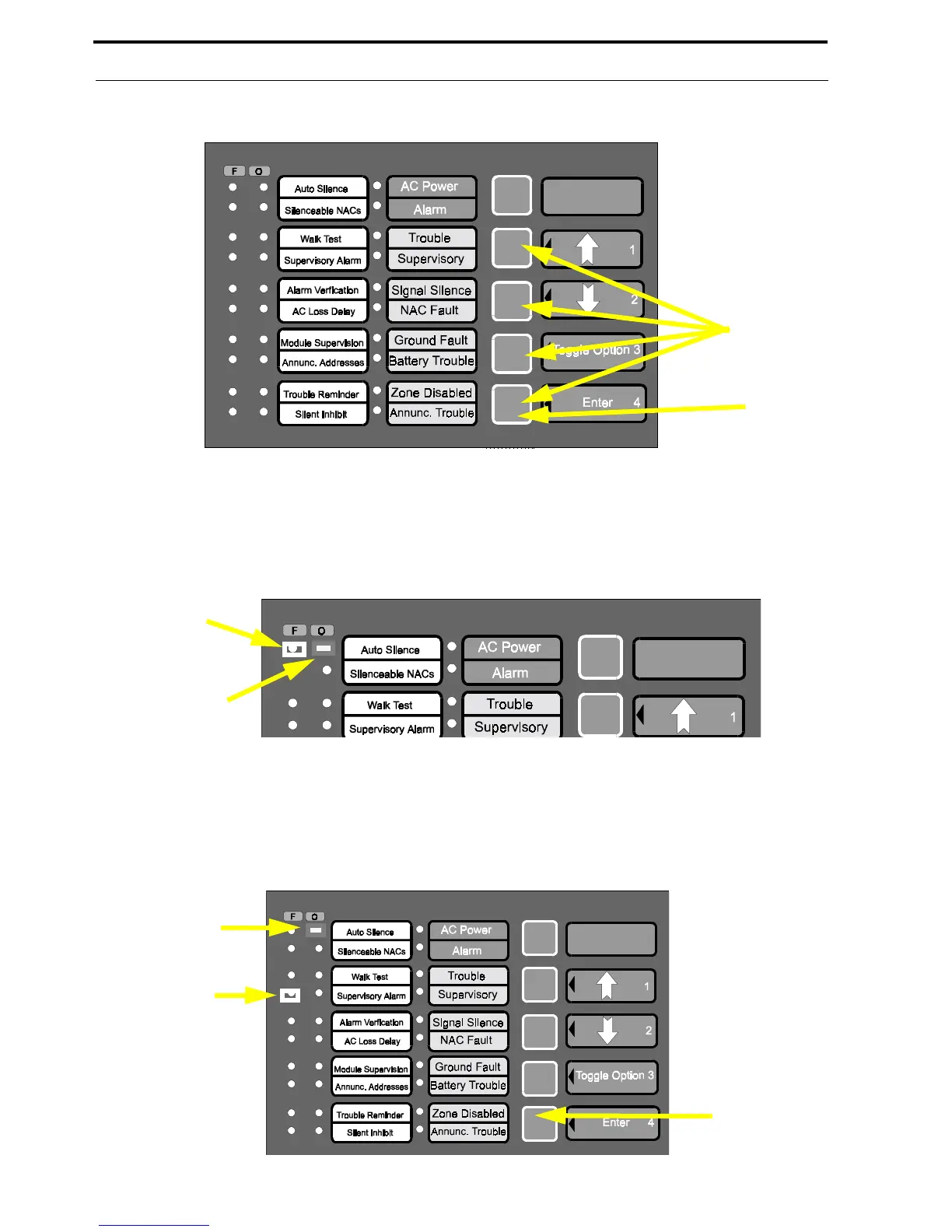
2. Using the numerical keys, enter the Program Mode password and press the Enter key
3. The 'pointer' will be located at the Zone 1 alarm LED which will be on steady.
4. The 'cursor' will be located at the Zone 1 trouble LED which will blink and one or more additional zone trou-
ble LEDs may be on steady
5. Press the Enter key three times to position the 'pointer' at Zone 4 alarm LED, which corresponds to the Super-
visory Alarms program feature
6. The 'cursor' should be positioned at Zone 1 trouble LED which corresponds to the Zone 9 latching/auto-
resettable option. Refer to Table 3-6, “Supervisory Alarm - Zone 4 Alarm LED,” on page 39. Note that addi-
tional zone trouble LEDs may be on if corresponding options were previously selected.
Password
Enter
Zone 1
Alarm LED
Zone 1
Trouble LED
Enter Key
Zone 1
Trouble LED
Zone 4
Alarm LED














 To Next Page