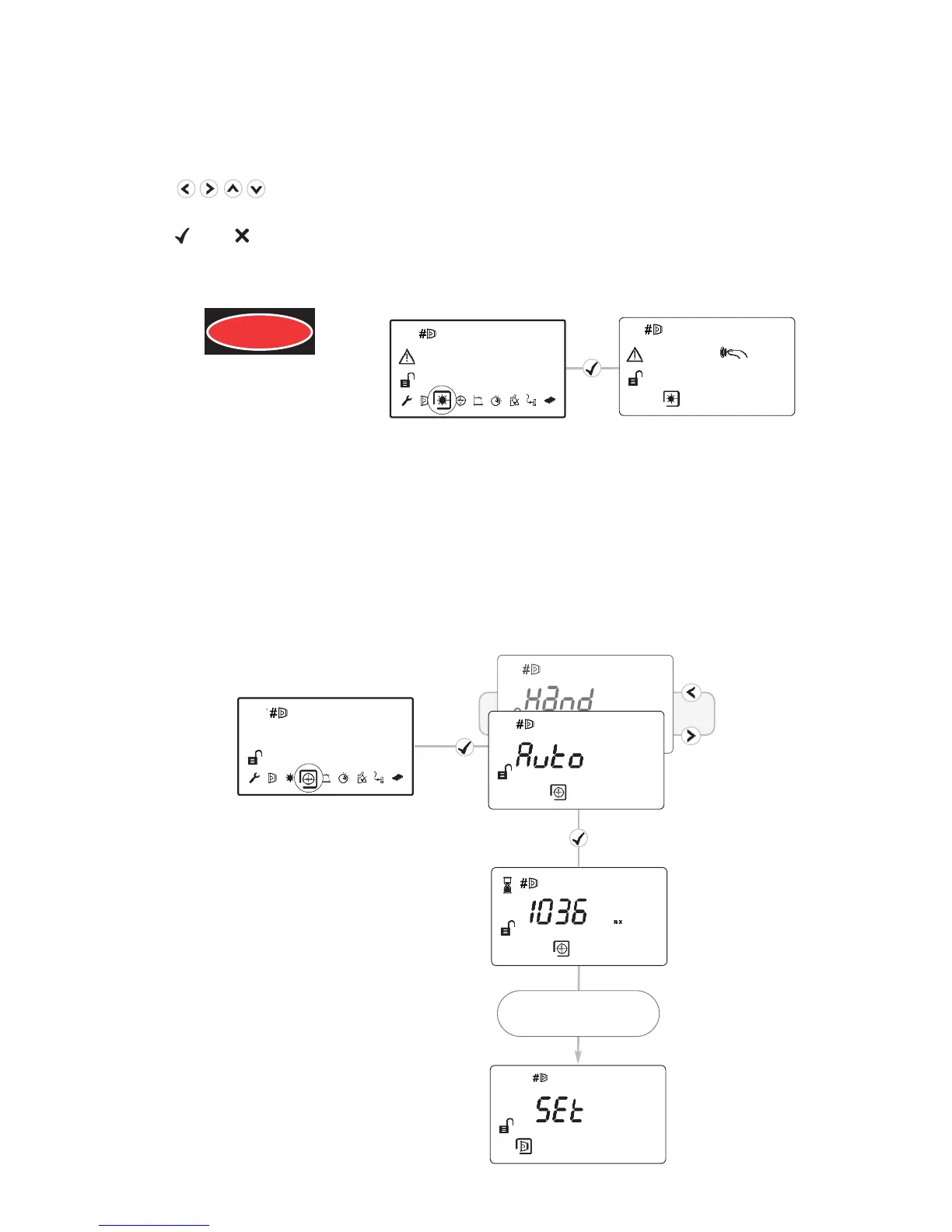
10. LASER Targeting
The system will signal Fault while in this mode
The LASER is used to align the Detector with the Reflector. It is an approximate alignment tool
only. After Auto-Align the LASER will not necessarily be pointing on the Reflector
• Use to move the LASER as close to the Reflector as possible
• One press of an arrow key results in one movement of the Detector head
• Press or to turn off the LASER and return to the Settings menu
• Refer to Additional Detector Information for troubleshooting if LASER is not visible
LASER RADIATION - AVOID
DIRECT EYE EXPOSURE
POWER OUTPUT < 5mW
CLASS IIIa LASER
Wavelength 630 - 680 nm
DANGER
11. ‘Auto’ Alignment
• Select ‘Auto’ to automatically align the infrared beam
• Signal Strength will be shown during Alignment
• If the LASER is turned on it will not necessarily be pointing on the Reflector after ‘Auto’ is
run - this is normal
• If ‘Auto’ ends with an error code ‘E- ’, refer to troubleshooting
HiA: 2 minutes
LoA: 25 minutes
9


 To Next Page