16
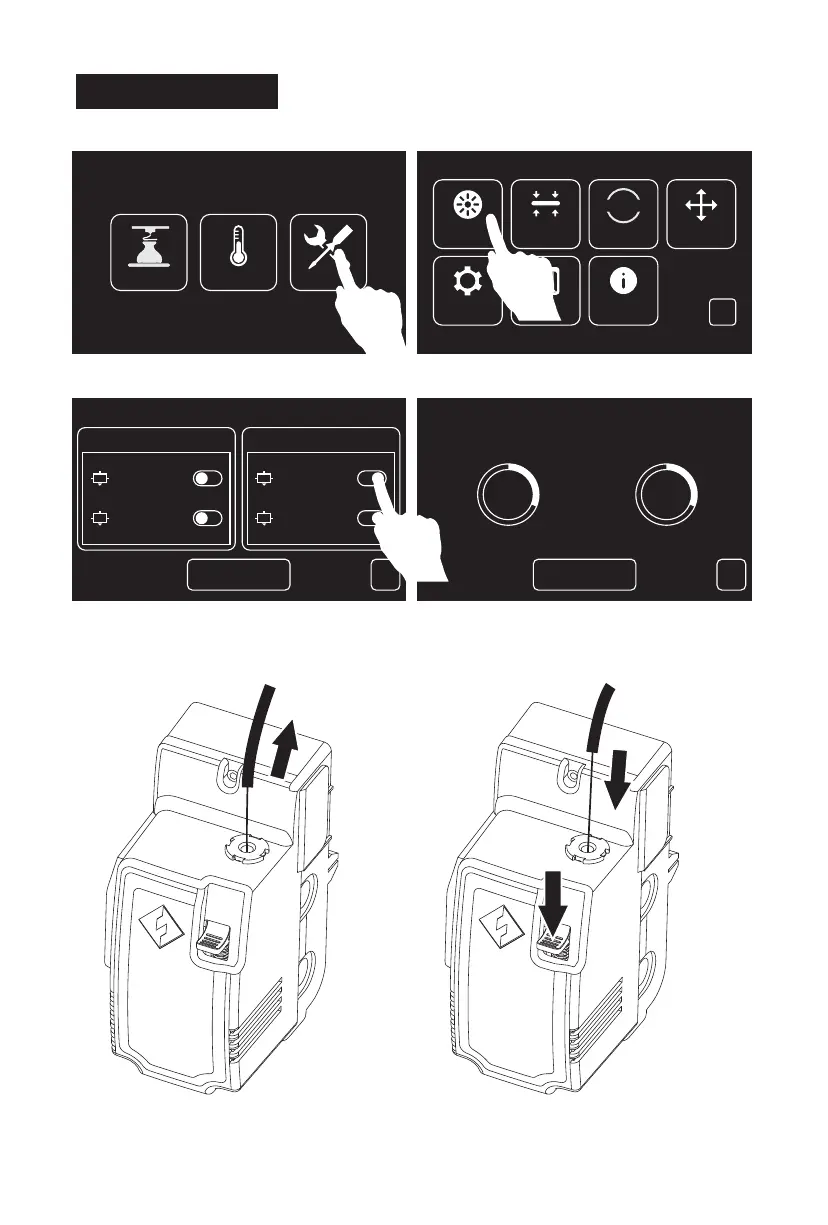
2. Tap the unload switch after corresponding
extruder to unload corresponding extruder.
3. Tap[Begin], the extruder will start heating.
The printer will start unloading filament
after heating completed.
1. Tap[Tools], [Filament] to enter the filament interface.
<
Load Unload
Begin
Left Extruder
Right Extruder
Left Extruder
Right Extruder
<
Cancel
Left Extruder is Heating... Right Extruder is Heating...
69℃ / 220℃ 69℃ / 220℃
31% 31%
ToolsPreheatBuild
Setting Status About
Filament Level Home Manual
HOME
<
Please follow steps below if you need to unload filament in
daily use.
Unload Filament
Push filament
down through
for 3 seconds
Press here
Withdraw
Filament
Guidetube
4. Pull filament guide tube out of filament intake,
leave filament 10cm to pull filament easily.
5. Press spring presser and push filament
down through for 3 seconds, then pull out
vertically quickly.















 To Next Page