Press here
Finish
L Extruder
230℃ / 230℃
Unload begins, press down spring presser
and withdraw filament
100%
Cancel
L Extruder 25
℃ / 230℃
16%
Load Left
Unload Left
Load Right
Unload Right
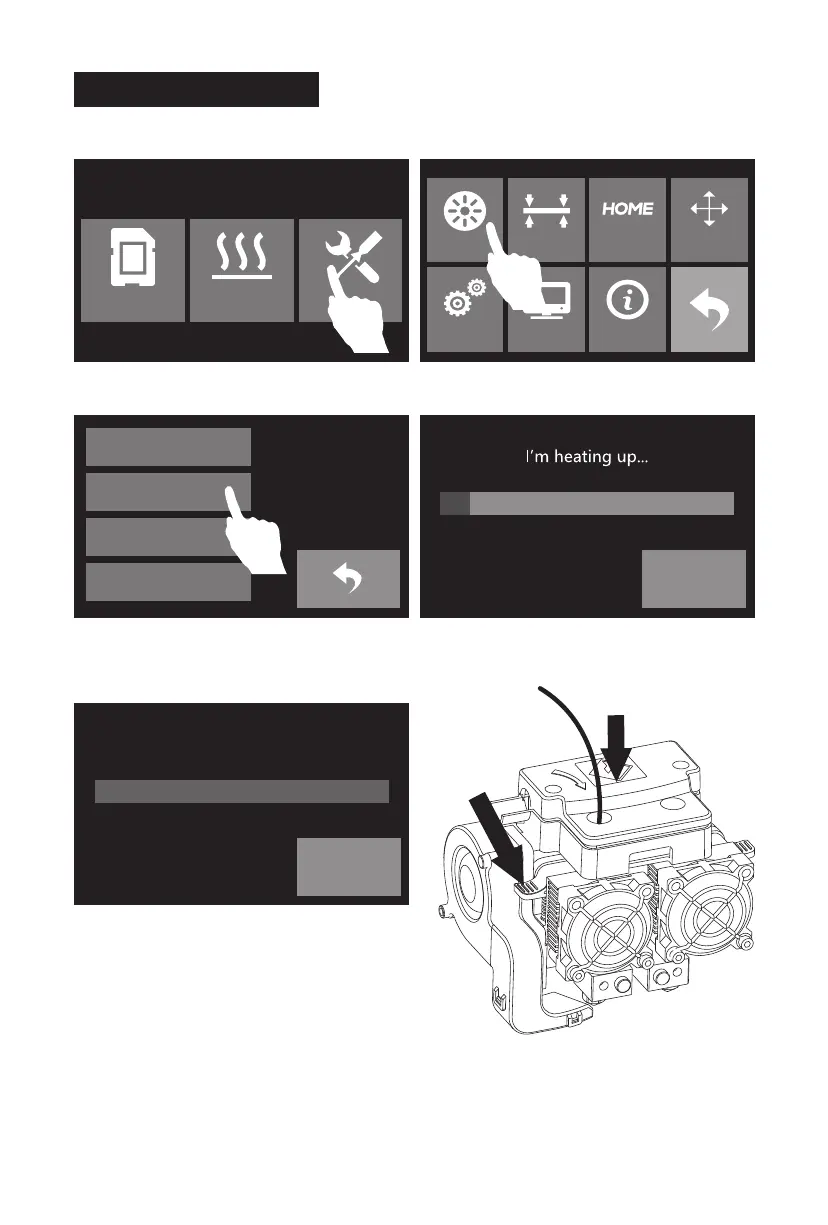
Please follow steps below if you need to unload filament in
daily use.
1. Tap [Tools]. 2. Tap [Filament].
3. Tap [Unload Left (or right)]. 4. Extruder start to heat.
Unloading Filament
Print Preheat
Filament Level Home
Setting Status About
Manual
16
Push Filament down
through for 3 seconds
5. When heating to target temparture, press
spring presser and push filament down through
for 3 seconds, until you see steady filament
coming out from nozzle.















 To Next Page