Happy3D Software软件安装包
User Guide 说明书
FlashPrint 切片软件
Test Files测试文件
40mmCUBE-L-PLA
Print
Print Preheat Tools
Copy
Delete
40mmCUBE-L-PLA
0:00
25℃ / 210℃
25℃
25℃ / 50℃
Print Time
L Extruder
R Extruder
Platform
Print Time: 1:02
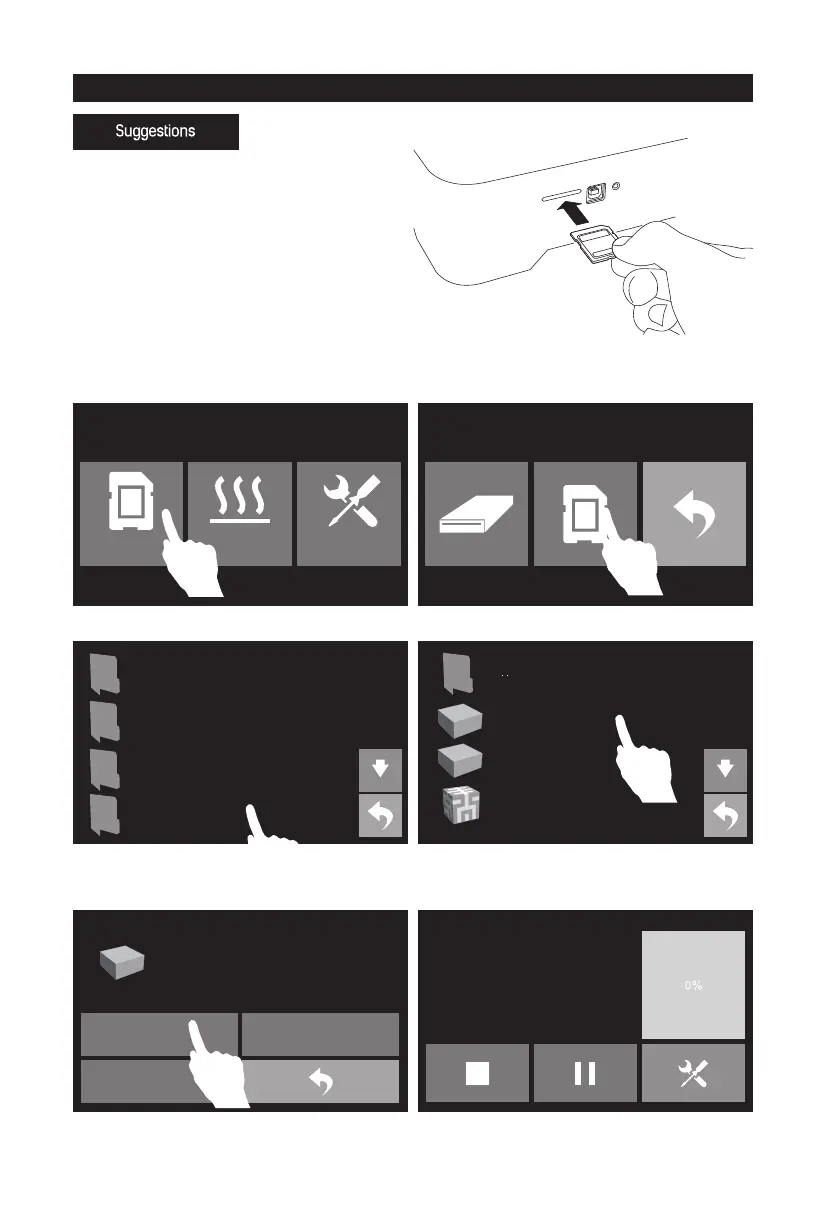
2. Tap [Print].
1. Insert SD card into SD card slot on the right
side of the printer.
3. Tap [SD card].
4. Tap [Test Files]. 5. Choose [40mmCUBE-L-PLA].
Attention: Make sure that PLA filament installed
on the left extruder.
First Print
7. The extruder starts to heat, once heated, the
printer will start to print.
6. Tap [Print].
15
1. Ensure that the build plate has been leveled
before printing.
2. Ensure that the filament has been loaded in
an appropriate approach.
3. Load the filament for a while to extrude all
the melted filament you printed last time out
of the extruder.
4. Print with ABS filament, install top cover, close
the front door. Print with PLA filament, remove
top cover, open the front door.
5. Please clean extruder before printing.
6. Do not leave the printer unattended during
operation.
40mmCUBE-L-PLA
40mmCUBE-R-PLA
Hillbert_Cube-PLA















 To Next Page