10
Multi: Stroboscopic Flash
With stroboscopic ash, a rapid series of ashes is red. It can be
used to capture a multiple images of a moving subject in a single
photograph.
You can set the ring frequency (number of ashes per sec.
expressed as Hz), the number of ashes, and the ash output.
Calculating the Shutter Speed
During stroboscopic ash, the shutter remains open until the ring
stops. Use the formula below to calculate the shutter speed and set
it with the camera.
Number of Flashes / Flash Frequency = Shutter Speed
For example, if the number of ashes is 10 and the ring frequency
is 5 Hz, the shutter speed should be at least 2 seconds.
MODE ZOOM SYNC
SET
ZOOM SYNC
SET
SLAVE
MODE ZOOM SYNC
MODE SYNC
SET
1
2
3
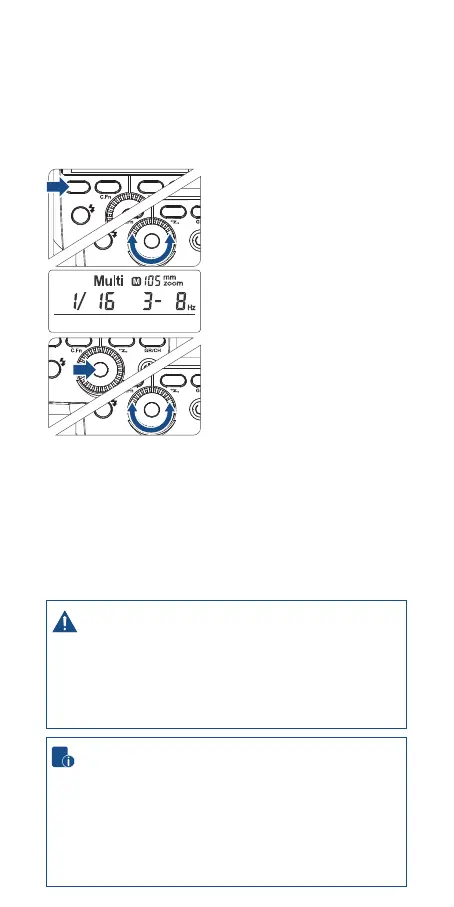
Press <MODE> button so that
<Multi> is displayed.
Turn the Select Dial to choose a
desired ash output.
Set the ash frequency and
ash times.
• Press the SET Button to select
the ash frequency. Turn the
Select Dial to set the number.
• Press the SET Button again to
select the ash times. Turn the
Select Dial to set the number.
To avoid overheating and deteriorating the ash head, do
not use stroboscopic ash more than 10 times in succession.
After 10 times, allow the camera ash to rest for at least 15
minutes. If you try to use the stroboscopic ash more than
10 times in succession, the ring might stop automatically
to protect the ash head. If this happens, allow at least 15
minutes’ rest for the camera ash.
• Stroboscopic ash is most eective with a highly reective
subject against a dark background.
• Using a tripod and a remote control is recommended.
• Stroboscopic ash can be used with“buLb”.
• If the number of ashes is displayed as “--”, the ring will
continue until the shutter closes or the battery is exhausted.
The number of ashes will be limited as shown by the
following table.


 To Next Page