11
Wireless Flash Shooting: Radio (2.4G)
Transmission
• You can set up three slave groups for TTL autoash shooting. With
TTL autoash, you can easily create various lighting eects.
• Any ash settings for the slave units on the master ash in TTL
mode will be automatically sent to the slave units. So the only
thing you need to do is to set the master unit for each slave
group without any operation for the slave units at all during the
shooting.
• This ash can work in TTL /M /Multi / OFF ash modes when set
as a master unit.
Flashpoint Zoom Mini is perfectly compatible with all R2 2.4G wireless
family.
As a master unit, a Zoom Mini can control any R2 family ash
As a slave unit, Zoom Mini can be controlled by any R2 family ash
Note: Please check for the latest rmware version
1. Wireless Settings
You can switch between normal ash and wireless ash. For normal ash
shooting, be sure to set the wireless setting to OFF.
Master Unit Setting
• Even with multiple slave units, the master unit can control
all of them via wireless.
• In this user manual, “master unit” refers to the camera ash on
a camera and “slave unit” will be controlled by the master unit.
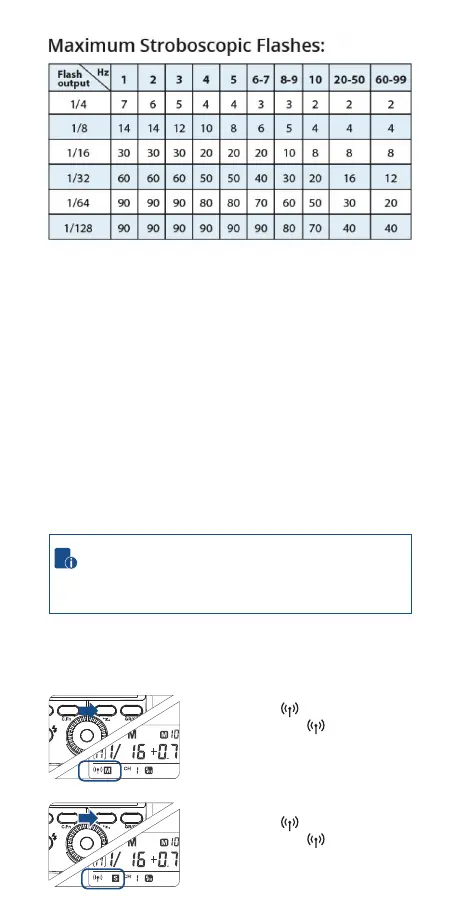
Long Press the <SYNC> button for 2
seconds so that is blinking. Turn the
Select Dial until the < M > is displayed
on the LCD panel, which means the
master unit.
Long Press the <SYNC> button for 2
seconds so that is blinking. Turn the
Select Dial until the < S > is displayed
on the LCD panel, which means the
master unit.
ZOOM SYNC
SET
SLAVE
ZOOM SYNC
SET
SLAVE
Slave Unit Setting


 To Next Page