13
Check the communication
channel
• If the master unit and slave
unit(s) are set to a dierent
channel, set them to the same
channel.
Position the camera and
ashes
• Position the camera and ashes
as the picture shows.
Check the ash operation
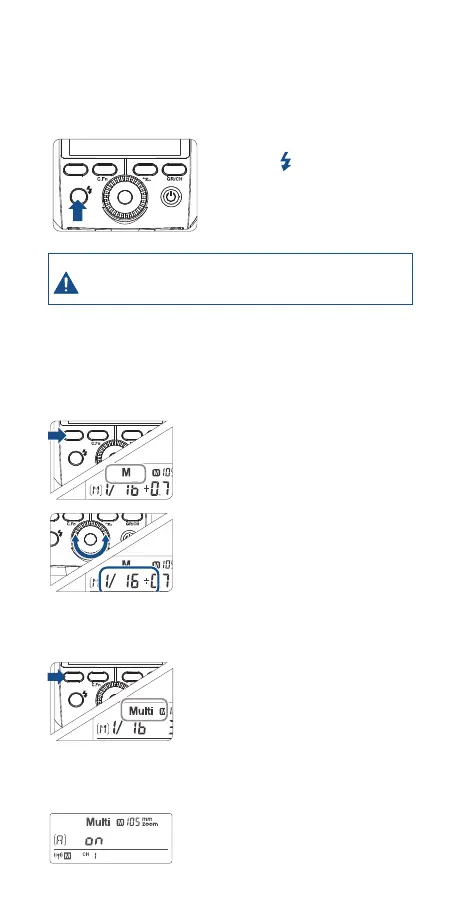
• Press the master unit’s
Test Button< >.
•,The slave unit will re. If not, adjust
the slave unit’s angle toward the
master unit and distance from the
master unit.
MODE ZOOM SYNC SLAVE
SET
In case of interference from other 2.4G devices on the same
frequency band causing unwanted ashes, please adjust the
Zoom Mini’s channel or turn o the oending devices.
5. M: Wireless Flash Shooting with
Manual Flash
This describes wireless (multiple shooting) using manual ash. You can
shoot with a dierent ash output setting for each slave unit (ring
group). Set all parameters on the master unit.
6. Multi: Wireless Flash Shooting with
Manual Flash
Setting the ash mode to <M>
Press the <MODE> Button
to set the ash to M mode.
Setting ash output
Turn the Select Dial to set the ash
output of the groups.
Taking the picture
Each group res at the set ash ratio.
ZOOM SYNC
SET
SLAVE
MODE ZOOM SYNC
SET
SLAVE
MODE ZOOM SYNC
SET
SLAVE
Setting <Multi>
stroboscopic ash.
• Long press the <MODE>button for 2 seconds
so that <Multi> is displayed. Long press the
<MODE> button for 2 seconds again to exit.
Setting ash output/ash frequency/
ash times.
Set the ash output/ash frequency/ash times
of the groups in the M mode. Setting the multi
ash mode.
A, B and C group can only control the ON/OFF of
the slave unit by pressing the <MODE> Button.


 To Next Page