EasyManua.ls Logo

FlashPoint ZOOM TTL FLASH R2 - TTL Autoflash Mode Details; TTL Mode Operation; FEC: Flash Exposure Compensation

FlashPoint ZOOM TTL FLASH R2
24 pages
Print Icon
To Next Page IconTo Next Page
To Previous Page IconTo Previous Page
Loading...
7




and the background. In this mode, multiple TTL functions are



will display on the LCD panel one by one in sequence, with each
pressing.
TTL Mode
Press <MODE> Mode Selection Button to enter TTL mode. The
LCD panel will display <TTL>.
Press the camera release button halfway to focus. The





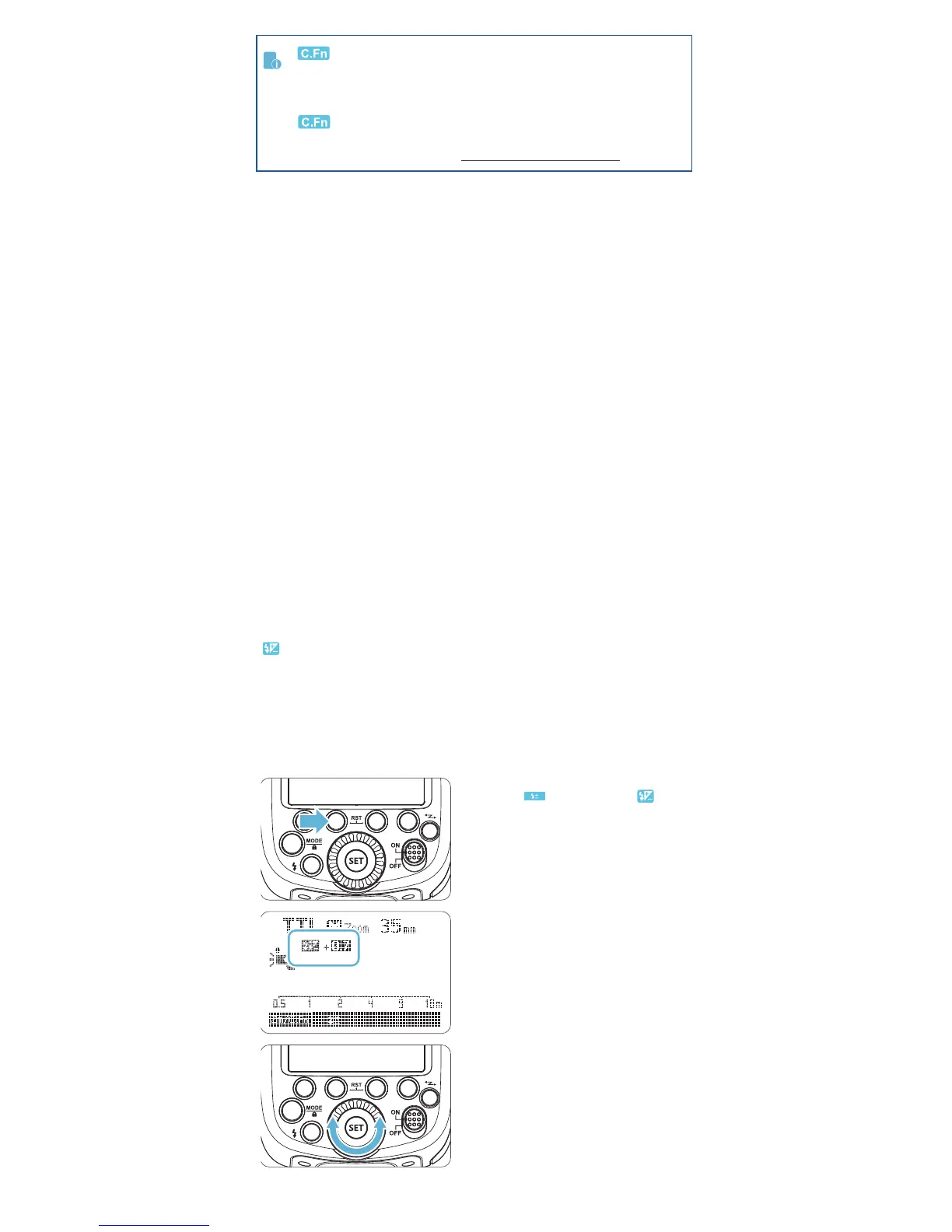
FEC: Flash Exposure Compensation


system is needed based on the environment.
Setting FEC:


See the Custom Function Menu section.

by default. Another option “30 minutes” is
available. See the Custom Function Menu section.
Press Function Button 2
< >. The icon < > and
-
tion amount will be high-
lighted on the LCD panel.
Press < SET > button again

Set the ash exposure
compensation amount.
Turn the Select Dial to set
the amount.
“0.3”means 1/3 step,
“0.7”means 2/3 step.

exposure compensation,
set the amount to “+0”.
2
3

Related product manuals