7. Short circuit and overload
If a short circuit or an overload occurs on the system, the
multi
MAUS
indicates this using two fl ashing symbols on the display screen: a streak
of lightning and the STOP symbol At the same time the voltage supply to
the system is shut off.
If there is a short circuit, e.g. because of a derailed coach or train, elimi-
nate the fault.
Press the “STOP” key once to switch the system back on with a delay of
approximately one second.
If the fault is not a short circuit, the cause may be an overload of the system due to the operation
of several locomotives at a time. If this occurs frequently, the power supply to your system is insuf-
fi cient. Connect an additional booster (section 3 “THE ROCO 10765 BOOSTER”, page 55). You must not
under any circumstances use a normal transformer connected directly to the power supply as this will
destroy the
multi
MAUS and booster.
To program on the separate programming track, either connect a stretch of track which is electri-
cally isolated from the rest of the system instead of your layout to the track output on the booster
or switch off the rest of the system with a switch before programming.
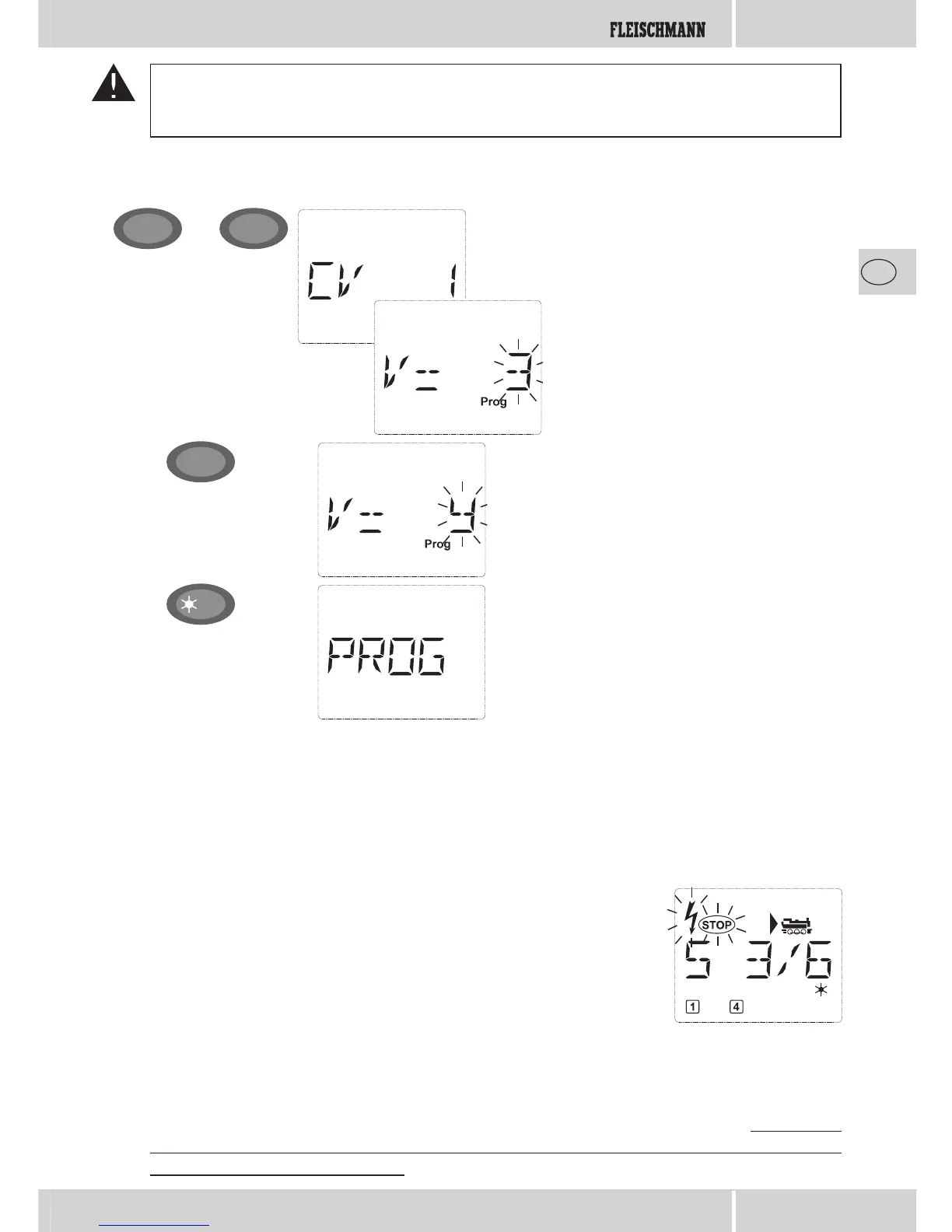
Example: To program the locomotive address = CV1 to value 4:
You can also program new values for CV 2, 3, 4 and 5 as shown in this example. To do so, you simply
press the “Menu” key together with the „function key“ with the number corresponding to the CV
and then proceed as in the above example.
Confi rm by pressing “OK”. After the last dis-
play “PROG” the
multi
MAUS returns to drive
mode.
Note: If you have changed CV1 for a locomo-
tive, check whether the specifi cation of the loco-
motive’s address in the library matches.
The displayed fi ctitious suggested value is eas-
ily overwritten by pressing one of the “function
keys”. The cursor fl ashes.
Press the “MENU” key and “function key” 1
together.
The display screen briefl y shows the selected CV
and then switches immediately to display the
fi ctitious suggested value.
+
MENU
1
OK
4 ghi
Input Display message Comment


 To Next Page