3.
2.
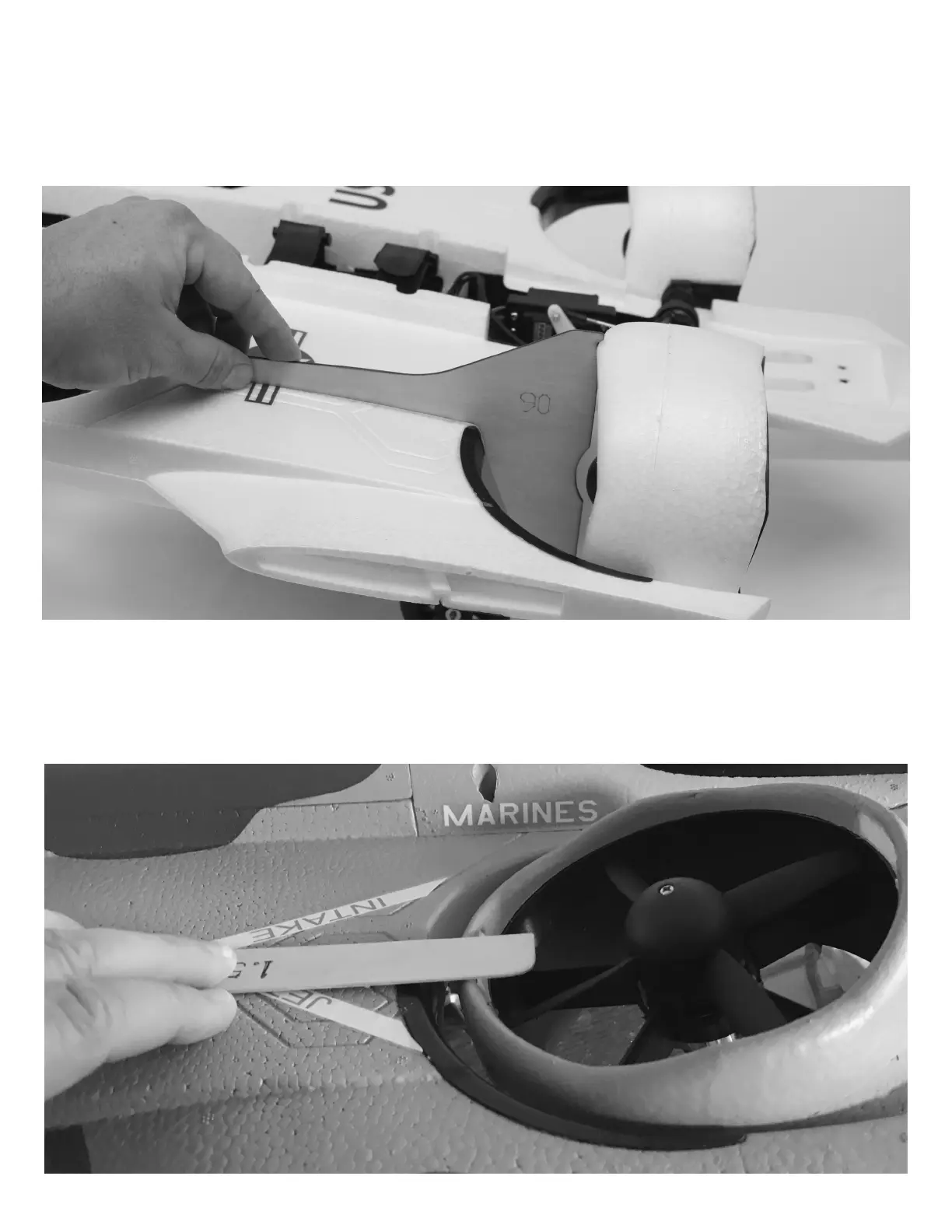
Move your Flight Configuration switch (channel 6) to the 90 degree "Conventional Configuration" position. Align the
provided 90 degree gauge with the panel line on the top surface of the wing and the center of a rear fan. Adjust your
transmitter's channel 6 end point (travel adjust or ATV) to set the angle of the rear fans so that they match the provided
gauge. Move the switch back and forth a few times and triple check this angle. This is the most critical of the three
angles. Take extra care when adjusting to be certain it is correct.
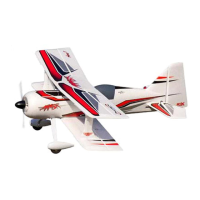
Move your Flight Configuration switch (channel 6) to the "Hover Configuration" position. Use a ruler on the top surface of
the wing and adjust your transmitter's channel 6 travel/end point/ATV to set the angle of the rear fans. Make this
adjustment so that the front edge of the fan just touches the ruler edge. This is the least important of the three angles. If
flying in higher winds, you can decrease travel slightly to provide more forward thrust. If flying in dead-calm conditions,
you can increase the travel slightly to stop forward motion. A slight forward bias is preferred overall, as it also helps yaw
authority while in Hover Configuration.
REAR FAN ANGLE ADJUSTMENT (CONTINUED)
22





 To Next Page