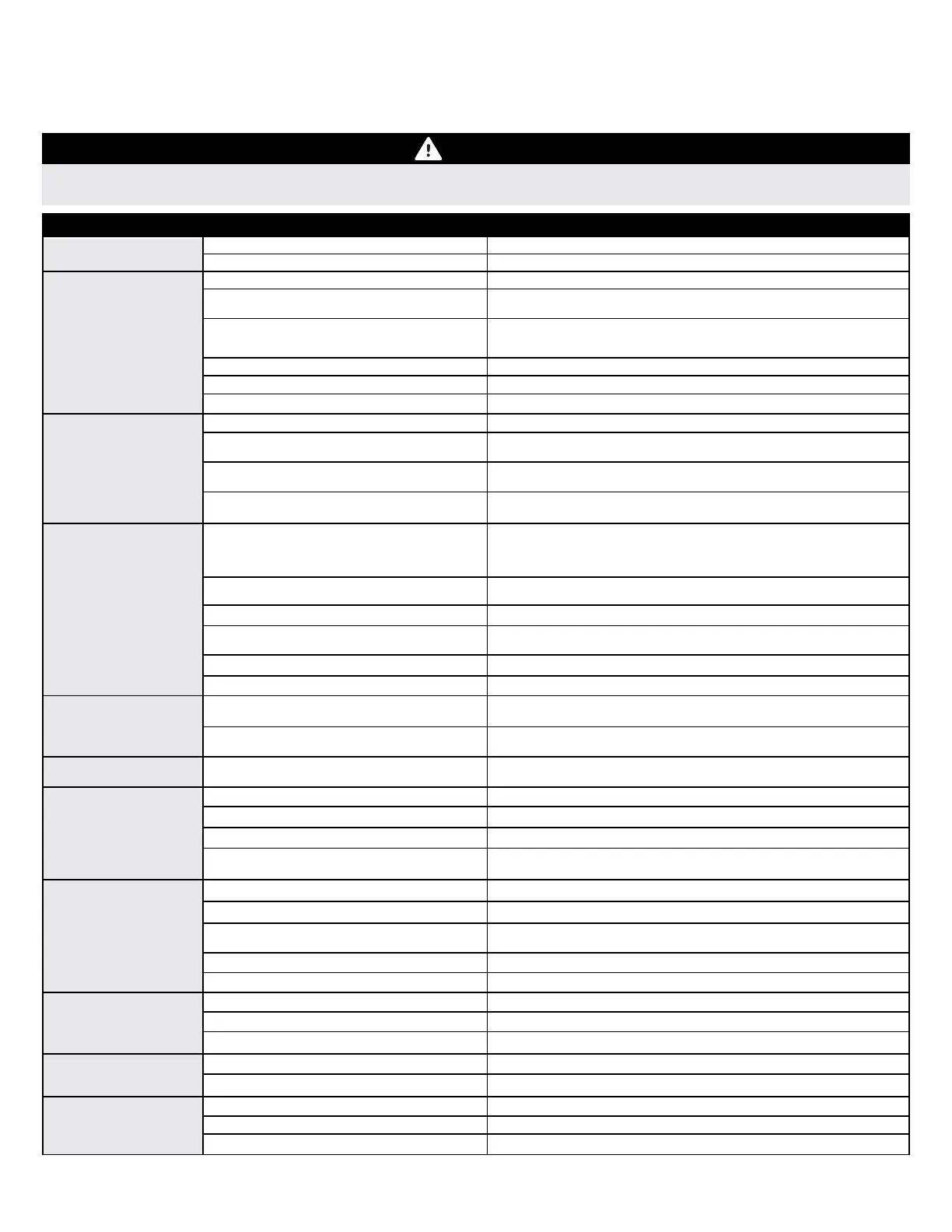
AIRCRAFT TROUBLESHOOTING GUIDE
Should you encounter any abnormal situations with your aircraft, refer to the matrix below to determine a probable cause and a
recommended solution for the action.
Unless specifically required, ALWAYS trouble shoot with fan blades removed, motors unplugged from the ESC
or with the aircraft securely restrained and clear of people and loose objects.
DISCREPANCY
PROBABLE CAUSE
RECOMMENDED SOLUTION
Motors will not Arm/Run -
no initialization tones
Dead battery
Bad ESC Module
Use a charged battery
Replace ESC Module
41
Transmitter model bound incorrectly,
incorrect active model memory, incorrect
data output configuration, incorrect
transmitter settings.
Motors will not Arm/Run -
with initialization tones,
Red LED BLINKING on
FLEXF3
Model not level
Level the model (the model must be within 25 degrees of level to arm)
Throttle command not low enough to Arm
Lower throttle stick. Lower throttle trim. Note: In forward flight
configuration, throttle must be advanced to run motors
No valid signal from the receiver
Check that transmitter and receiver are on and bound. Check receiver
connections per this instruction manual. Check that the correct
settings are made in the FLEXF3
Connected to Configurator via USB or Bluetooth
Disconnect/Unplug. Cycle FLEXF3 power.
Throttle channel reversed
Check transmitter setup. Reverse throttle channel as needed.
Arming fault not found
See Cypher wiki for further ARMING information
Have control, but a
control surface is not
responding correctly
Consult radio manual for proper binding and model selection
instructions.
Airframe or control linkage(s) damaged
Replace damaged control system components. DO NOT ATTEMPT
REPAIR.
Battery voltage too low
Use volt meter to check battery. Replace or recharge as necessary.
Battery intermittently connected to ESC
Verify that battery is connected, EC3 plugs are fully seated and that all
wires and cables are properly/well connected.
Battery Eliminator Circuit (BEC) damaged
Replace ESC. DO NOT ATTEMPT REPAIR.
Damaged servo
Replace servo. DO NOT ATTEMPT REPAIR.
Have control, but
transmitter sticks are
NOT moving the correct
controls
Wrong Channel Map in Betaflight Settings
Use your Configurator's receiver page to set the Channel Map
(Channel Order) as specified for your radio in this manual.
Wrong Transmitter Settings
Set your transmitter's Wing Type, Tail Type, switches, etc. as specified
for your radio in this manual or on the Flex Wiki page.
Failed control direction
test
DO NOT FLY! - Reference transmitter and receiver sections of this
manual
Incorrect transmitter or FLEXF3 controller
setting
Model does not have
control in hover
Battery not fully charged
Replace with fully charged battery
Check motor performance. Replace damaged motors.
Bad Motor
Verify: if direction wrong, reverse any two wires of that motor at ESC
Motor turning wrong direction
Check fan pitch. Fans should generate thrust out bottom of model while
turning correct direction. Replace with correct fan blades for location.
Wrong fan blades installed in location
Short or reduced flight
time or aircraft under
powered
Replace battery with one of a higher discharge (C) rating
Battery's discharge (C) rating too low
Ensure battery packs are adequately warm (70°F/21°C) before flight.
Ambient temperature is too cold
Replace with fully charged batteryBattery not fully charged
Remove battery from service and replace with different batteryFlight battery weak or damaged
Replace battery with one of proper capacity and discharge capability (C
rating)
Battery capacity too small for intended use
Excessive fan blade
noise and/or vibration
Replace damaged components. DO NOT ATTEMPT REPAIR.
Damaged fan blades, fan adapter or motor
Balance or replace the fan blades
Fan blades not balanced
Tighten with proper tools as needed
Fan or fan nut is loose
Control surface
oscillation
Balance or replace Fan/Motor
Fan/Motor not balanced
Realign and secure the FLEXF3 PCB to the aircraft
Loose FLEXF3 Mounting
Model not trimmed in
forward flight
Use gauges to adjust angle per this manual
Fan angle not properly set
Use clevises to adjust surfaces as described in this manual
Control surfaces need adjustment
Adjust CG to location specified as described in this manual
Wrong Center of Gravity
If the required solution does not rectify the problem, please contact product support for further assistance.
Do not have control
Receiver not bound
Bind receiver. Consult radio manual for proper binding instructions.
Wrong FLEXF3 receiver input settings.
Select the appropriate receiver choices as described in this manual or
on the Flex Wiki page.
Incorrect connection of receiver to the
FLEXF3
Connect the receiver to the FLEXF3 as described in this manual or on
the Flex Wiki page.
Receiver port not configured in the FLEXF3.
Configure the FLEXF3 receiver port as described in this manual of on the
Flex Wiki page.





 To Next Page