20 of 59 GH-24, GH-30, GH-45, GH-60 Rev.003
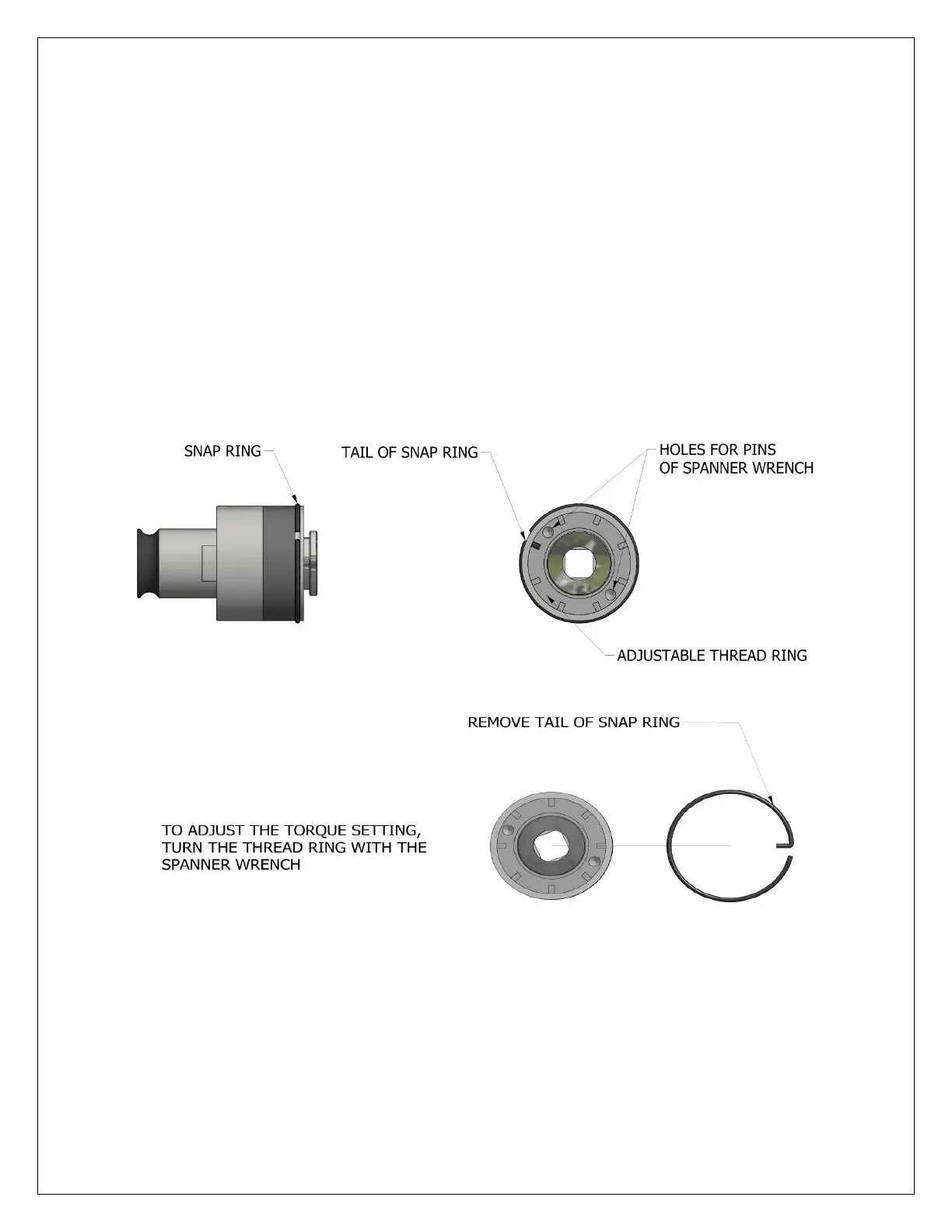
ADJUSTING TAP HOLDER TORQUE SETTING
The torque adapters are factory preset near the standard break torque limits developed for each tap size. The
break torque limit protects the tap when tapping blind or bottom holes in mild steel (approximately 229 BHN
or 25 RC). When the tap reaches the bottom of the hole, resistance will cause the torque holder’s safety clutch
to ratchet and stop the tap from turning, over-torqueing and ultimately breaking. When tapping hardened
steel (above 40 RC), stainless steel, or other tough alloys, an increase in the factory torque setting may be
required in order to drive the tap the full depth of the hole. When using the torque adapters to tap soft
materials or plastics, a decrease in the factory torque setting prevents the tap from over-torqueing after it
reaches the bottom of the hole.
Caution: Never adjust the torque setting more than one (1) notch at a time. Adverse tapping conditions and
broken taps may result!
Remove the snap ring.
Turn thread ring one notch using spanner wrench.
After turning the thread ring a full notch, reinsert the tail of the snap ring in the original hole. If a lesser
adjustment is needed, turn the adjusting thread ring half the distance between the thread ring notches.
Rotate the snap ring and insert the tail in the secondary hole position.
To increase the torque setting, turn the thread ring clockwise.
To decrease the torque setting, turn the thread ring counter-clockwise.



 To Next Page