23
MEMORY OPERATIONS
Naming the Memory
Channel (Memory Tag)
You can name the memory channel.
The name will be displayed instead of
frequency when you recall the memory
channel if Memory Tag feature is enabled.
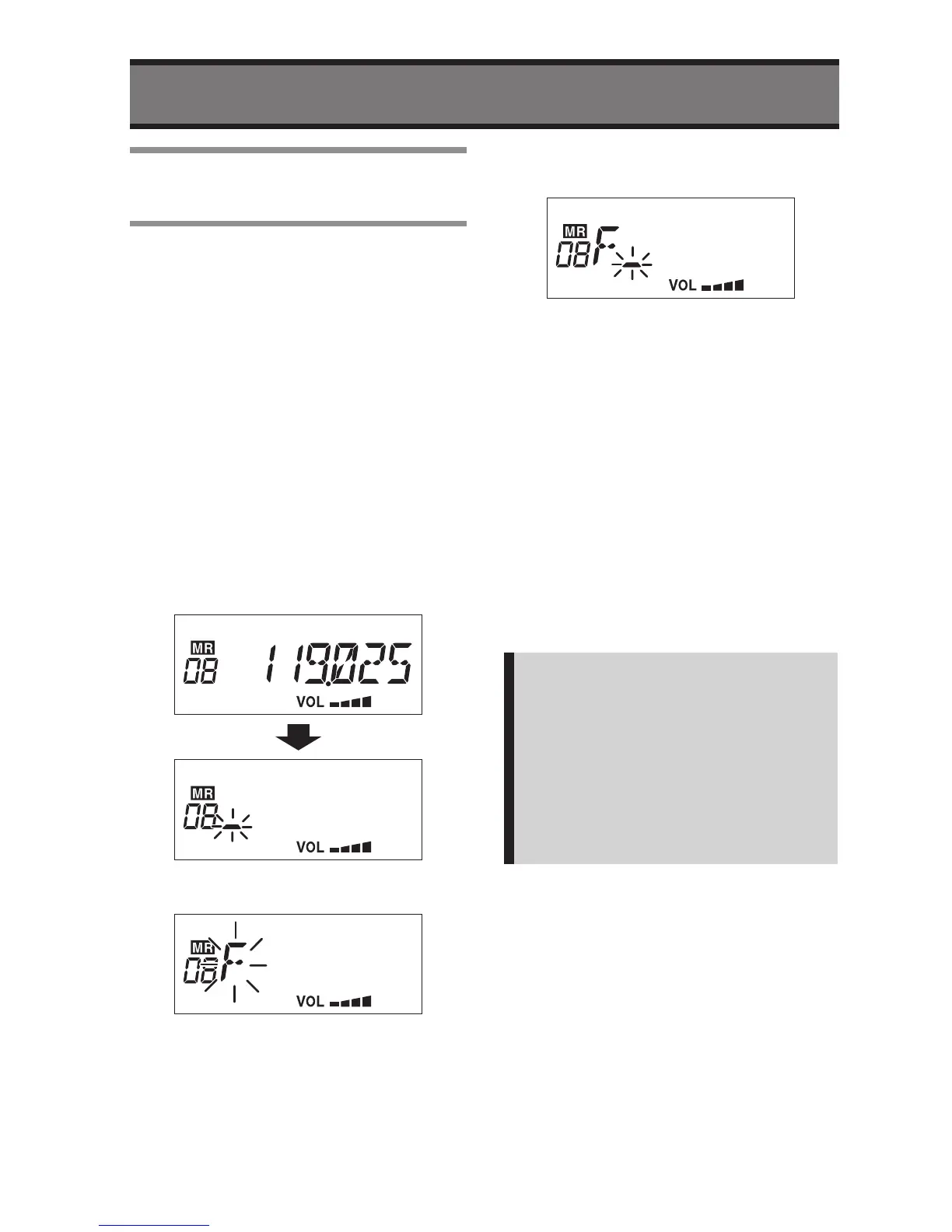
1
Press the V/M button during the
radio is in VFO mode.
• The “MR” icon and the Memory
Number will be displayed.
2
Select a Memory Number that you
want to make a Name Tag by rotary
knob.
3
Press and hold the V/M button
more than two seconds.
• The first digit will be flashing to input
first character.
4
Select a character by rotary knob.
5
Press the
c
button to move second
digit.
6
Enter the name tag by repeating the
step 4 and 5.
• It is available to enter maximum 6
characters.
If pressing the
v
button then the
entering digit will be backward.
7
Press and hold the V/M button
more than two seconds to save and
exit.
• If you want to exit without save the
tag information, then short press the
V/M button.
The radio will return to previous
condition.
Note:
• You can use following characters as
the Name Tag;
0 to 9, A to Z, /, _, ., +, *, <, >, $, &
and Space
• To delete the Name Tag, select the
named memory number then press
and hold the SQL button more than
two seconds.


 To Next Page