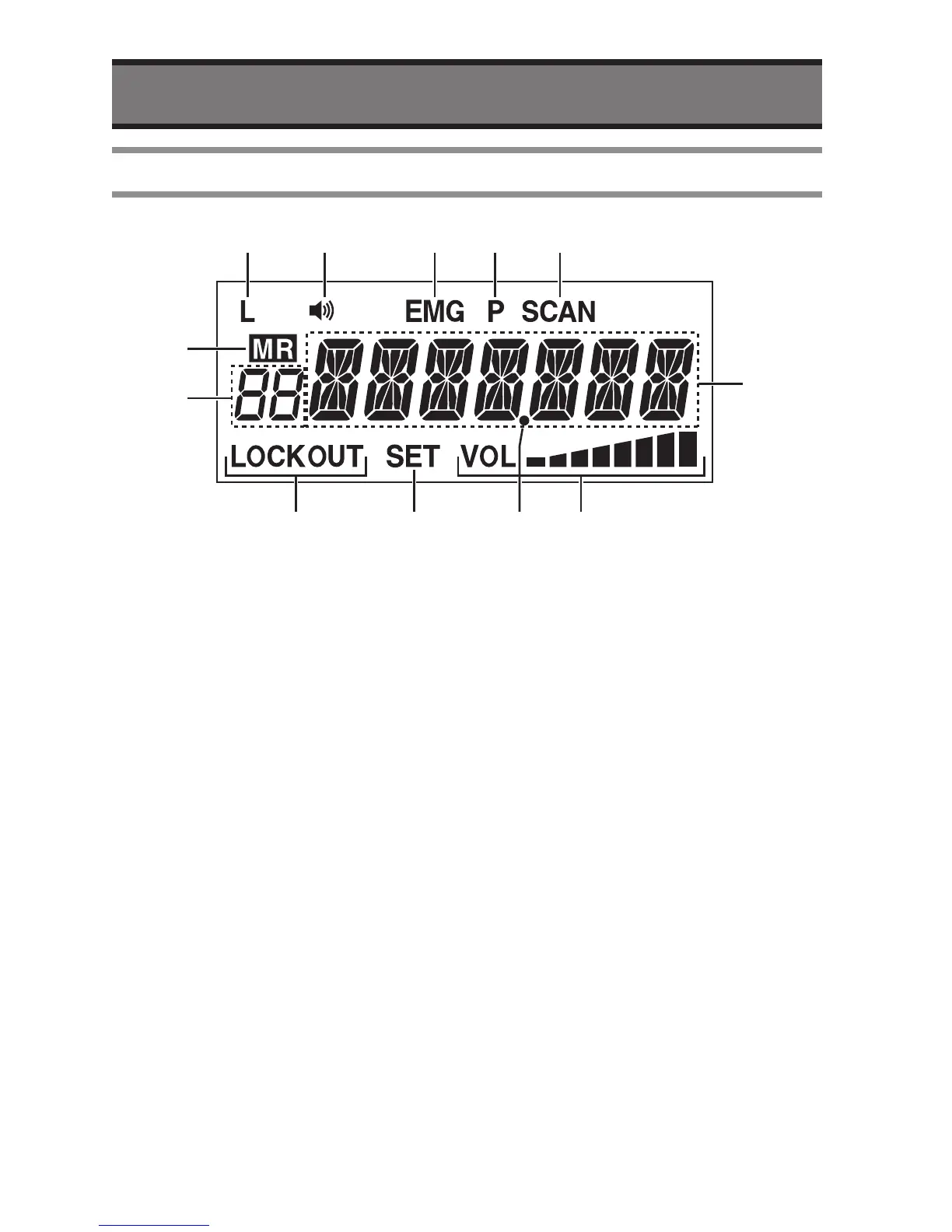
q
Low battery indicator
• The “L” will indicate when the voltage of
power source becomes less than 11.7
Volt.
w
Busy indicator
• The Busy icon will indicate when
receiving.
e
Emergency indicator
• The “EMG” icon will indicate when
recall the Emergency channel.
r
Priority Watch indicator
• The “P” icon will indicate when the
radio is in Priority Scan or Priority watch
mode.
t
Scan indicator
• The “SCAN” icon will indicate when the
radio is in SCAN mode.
y
Memory indicator
• The “MR” icon will indicate when the
radio is displaying a memory channel.
u
LOCKOUT indicator
• The “LOCKOUT” icon will indicate when
the channel is not in the SCAN LIST.
i
Setting mode indicator
• The “SET” icon will indicate when the
radio is in SETTING mode.
o
Volume level indicator
• It indicates the Audio Volume Level.
!0
Memory number indicator
• It shows memory number or “Pr” as
priority.
!1
Main indicator
• It shows frequency and/or setting etc..
!2
Decimal point indicator
• It indicates “dot” at decimal point.


 To Next Page