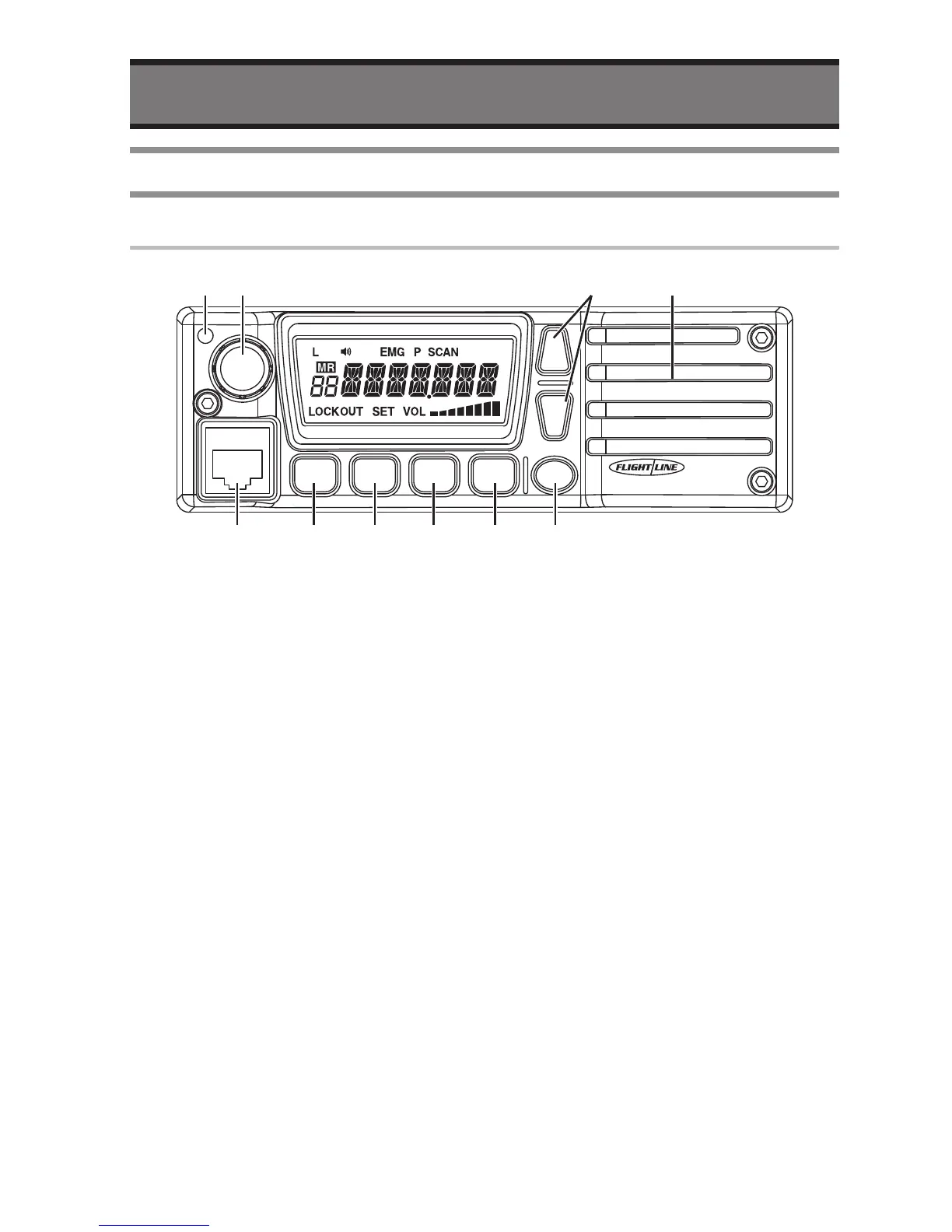
q
TX/RX indicator
• Indicate Red in transmission, Green in
Receiving.
w
Rotary Encoder
• Change the operating Frequency or
Memory Channel.
• Turning this Encoder while pausing
scan resumes the Scan mode.
• LCD Backlight will be ON by short
press.
• Available to change the tuning range by
Long Press.
e
Volume button
• The audio volume will be up or down.
r
Internal Speaker
• Internal Speaker.
• The audio output is available to change
to Headphone.
t
PWR button
• Short press: indicates voltage of power
source.
• Long press: turn the radio ON/OFF.
y
SQL button
• Available to change the Squelch setting.
u
PRI button
• Short Press: recall the Priority Channel.
• Long Press: recall the Emergency
Channel..
i
SCAN button
• Short Press: start SCAN function.
• Long Press: start Dual Watch function.
o
V/M button
• Short Press: switch between Memory
mode and VFO mode.
• Long Press: Add memory current
channel.


 To Next Page