Flowserve.com 12 PUIOM000650-00-UIM (EN/HL) August 2022
SEM-100 and SEM-100FT User Instructions
CAL-1 Calibration:
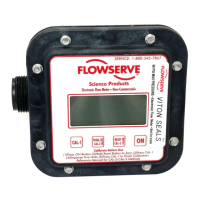
1. Press “ON” button to wake up meter.
2. Press and hold the “Reset” button to zero (“.00”) the Current
Total screen
3. Press “CAL-1” to enter calibration sequence.
4. Pump process liquid into a calibrated container that holds ve units
(gallons, liters, etc.)
Note: The display will blink as uid is being pumped.
5. Press “CAL-1” to complete the calibration process.
Note: The display will return to the Current Total screen and read
the previous total.
CAL-2 Calibration:
1. Press “ON” button to wake up meter.
2. Press and hold the “Reset” button to zero (“.00”) the Current
Total screen.
3. Press “CAL-1” to enter calibration sequence.
4. Press “CAL-2” to enter the CAL-2 calibration mode.
5. Dispense desired amount.
Note: For greatest accuracy pump a minimum of 9.5 liters (2.5
gallons). The minimum amount required is 1.9 liters (0.5 gallons).
6. Press “CAL-1”.



 To Next Page