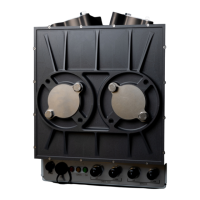
FGM 160 Operating Instructions
4. OPERATING PROCEDURE
4.1 Introduction
This section provides information about how to operate the FGM 160 field computer. The FGM
160 is a field mounted stand-alone ultrasonic gas flow measurement system, and does not
require any safe area communication device in order to operate. However, in order to
continuously monitor data and the meter performance, it is recommended to use the UFM
Manager software package. This program will provide hands-on process and status data
continuously with possible remote access to the FGM 160 system from any remote system
with the appropriate remote control software installed.
4.2 Power-Up Sequence
The power-up sequence describes the necessary handling of the FGM 160 in order to ensure
correct operation. The power-up sequence is as follows:
1. Connect all power, input and output signals and communication cables according to
the project specification and all relevant procedures and instructions.
2. Make sure that the power cable is connected to a suitable power source, either directly
to a 24 VDC supply or through a 110-240 VAC/24 VDC converter.
3. Turn on the power to the FGM 160. There is no power switch on the FGM 160 Field
Computer, so the power must be switched by an external switch or similar, preferably
in safe area.
4. On startup, the FGM 160 will go through a boot and an initialization sequence before
entering the standard operational (measurement) mode.
5. When the FGM 160 has entered the standard operational (measurement) mode, the
meter will, according to the system configuration, carry out transit time measurements,
retrieve pressure and temperature data, calculate volumetric and mass flow rates and
either actively output a set of predefined parameters at the analog 4-20mA outputs, or
make a set of process parameters available for DCS HART or Modbus communication.
4.3 Field Computer Configuration
The FGM 160 can be configured by using UFM Manager. During manufacturing, default
configuration is entered into the Field Computer. The system configuration will be modified by
Fluenta service engineers or partners when installing and commissioning the meter. This
configuration can be changed at any time by using The UFM Manager software. All system
configuration parameters are stored in a non-volatile memory, ensuring that no configuration
parameters are lost in case of power loss. Appendix II explains how to insert or modify system
configuration according to a Client parameter list.


 To Next Page