FGM 160 Operating Instructions
Action: Check the Alarm log for any error messages indicating any cause for the
problem. Turn the system Power OFF and ON again. If the situation
remains unchanged, contact Fluenta AS for guidance.
4.5.2 Error Check with UFM Manager
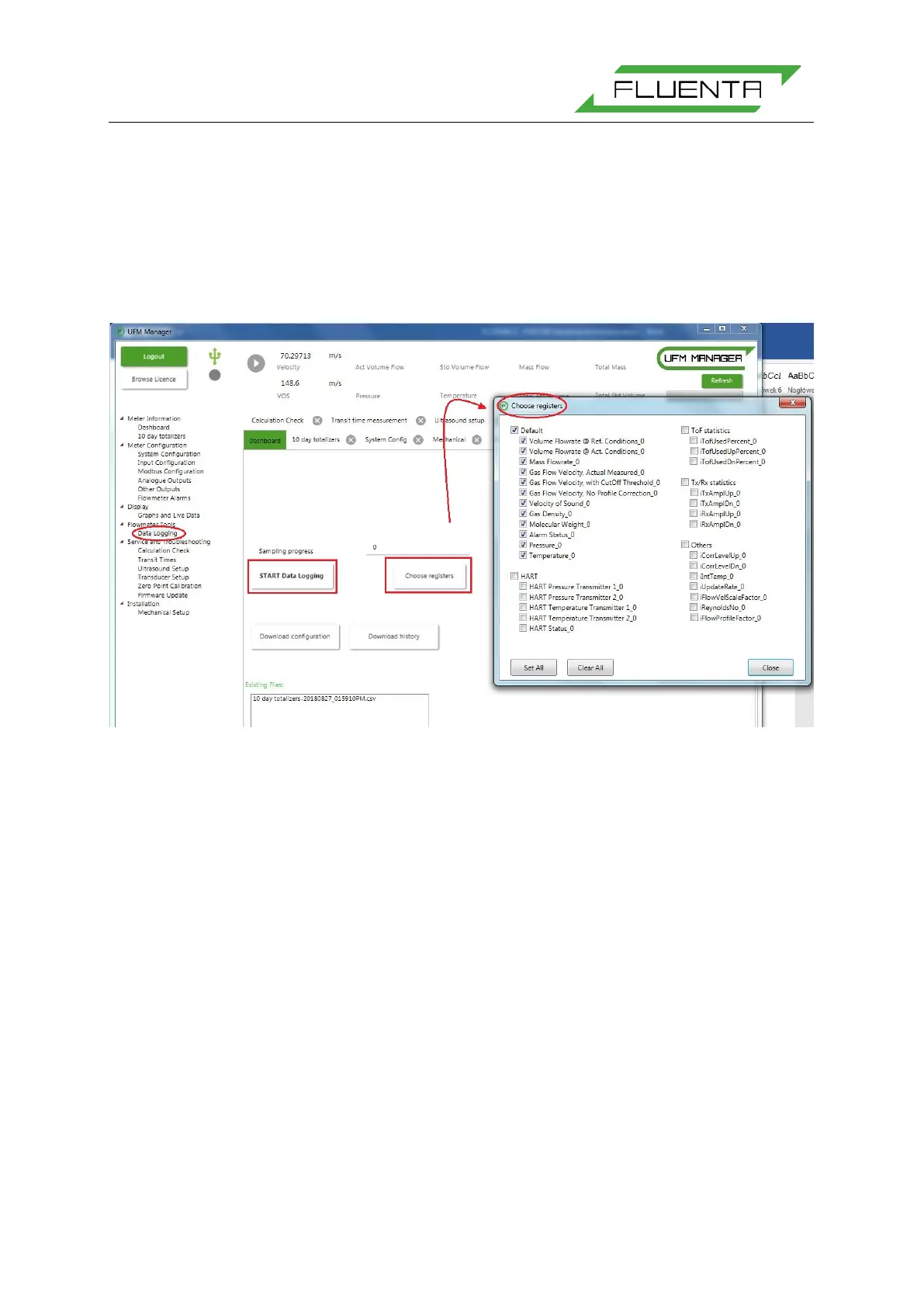
Through the FGM 160 UFM Manager, data can be logged for trend analysis and evaluation.
Figure 5: By pressing the “START Data Logging” button at the “Data Logging” tab, any or most parameters
can be logged to a data file. The data log file name will be generated automatically based on the current
date and time. The registers for the data log can be chosen by pressing the “Choose registers” button.
5. REFERENCES
[1] FGM 160 – Hazardous Area Installation Guidelines
[2] FGM 160 – Hazardous Area Certificates
[3] FGM 160 – Installation & Hook-Up Instructions
[4] FGM 160 – DCS Modbus Interface Specifications
[5] FGM 160 – HART Output Interface Specification


 To Next Page