FGM 160 Operating Instructions
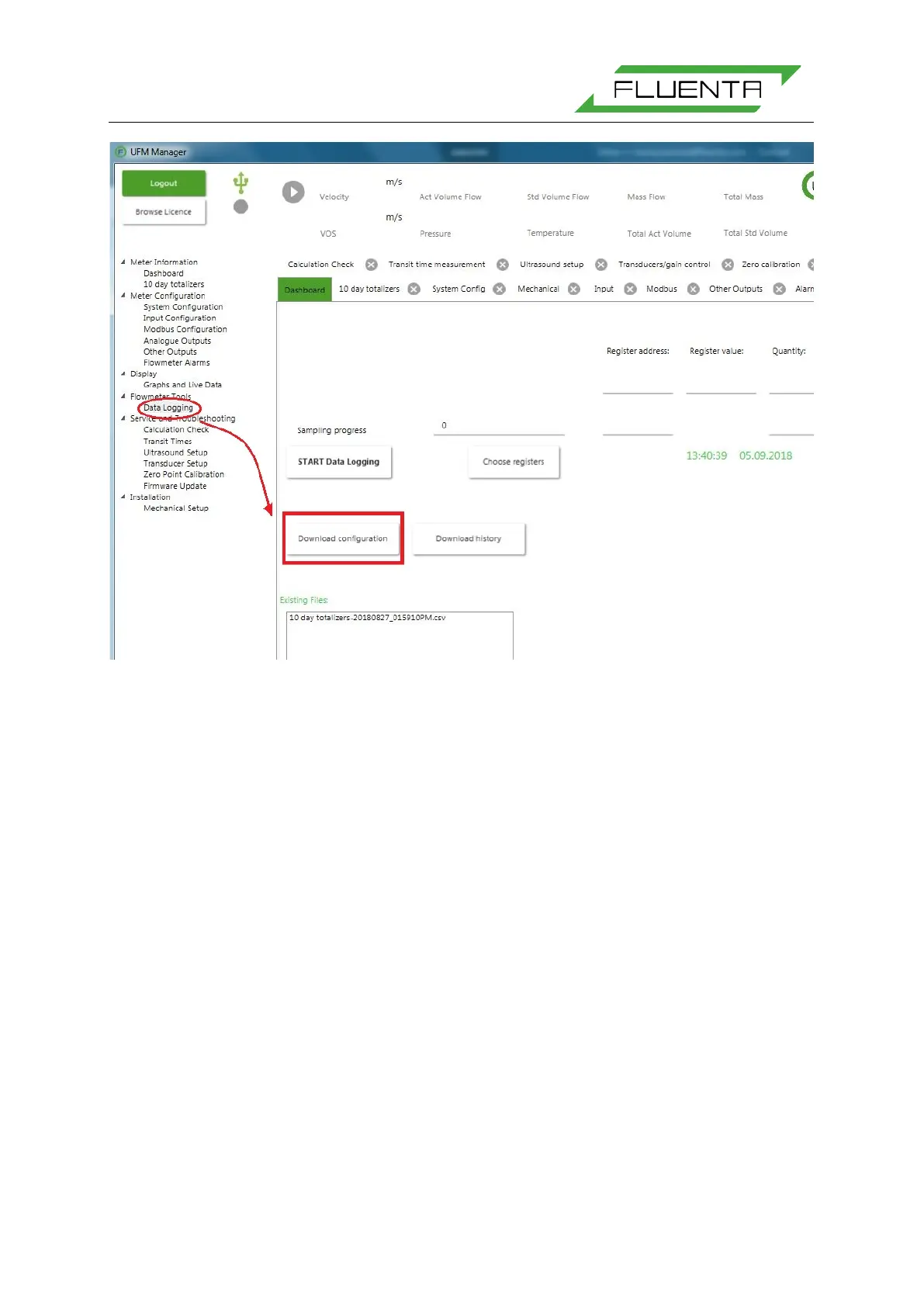
Figure 4: Download of system configuration using the UFM Manager.
The system configuration parameter file can be downloaded from the FGM 160 using the UFM
Manager, ref. Figure 4, by pressing the “Download configuration” button in the “Data Logging”
tab. The system configuration can either be copied to the clipboard and pasted into a
document, or saved directly to a file.
For a full listing of a system configuration file, refer to Appendix I.
Some of the system configuration parameters are also available through the DCS Modbus
registers. However, parameters that should only be accessed by authorized personnel are not
accessible through this communication line. For a full listing of accessible configuration
parameters through the DCS Modbus interface, refer to DCS Modbus Interface Specifications
[4].
4.4 Local Display Functions
The FGM 160 is equipped with a local LCD display mounted at the front, and visible through
the Ex-d safety glass. The display shows predefined process parameters from the FGM 160.
Further, 4 status LEDs are visible at the front for the following status information:
• Power
This LED will have a green light when the system power is ON.
• Status
This LED will light:
GREEN; if no Alarms are active (system status OK).


 To Next Page