11
Operating Your Television
Basic Operations
Turning Your TV On and Off
TURN ON TV
1. Connect to power with the main power cable. The TV will enter STANDBY mode and the
LED indicator light will be red.
2. From the STANDBY mode, use the POWER button either on the main unit or on the
remote, to turn the television on.
TURN OFF TV
From ON mode, use the POWER button either on the main unit or on the remote control to
turn the television to STANDBY mode.
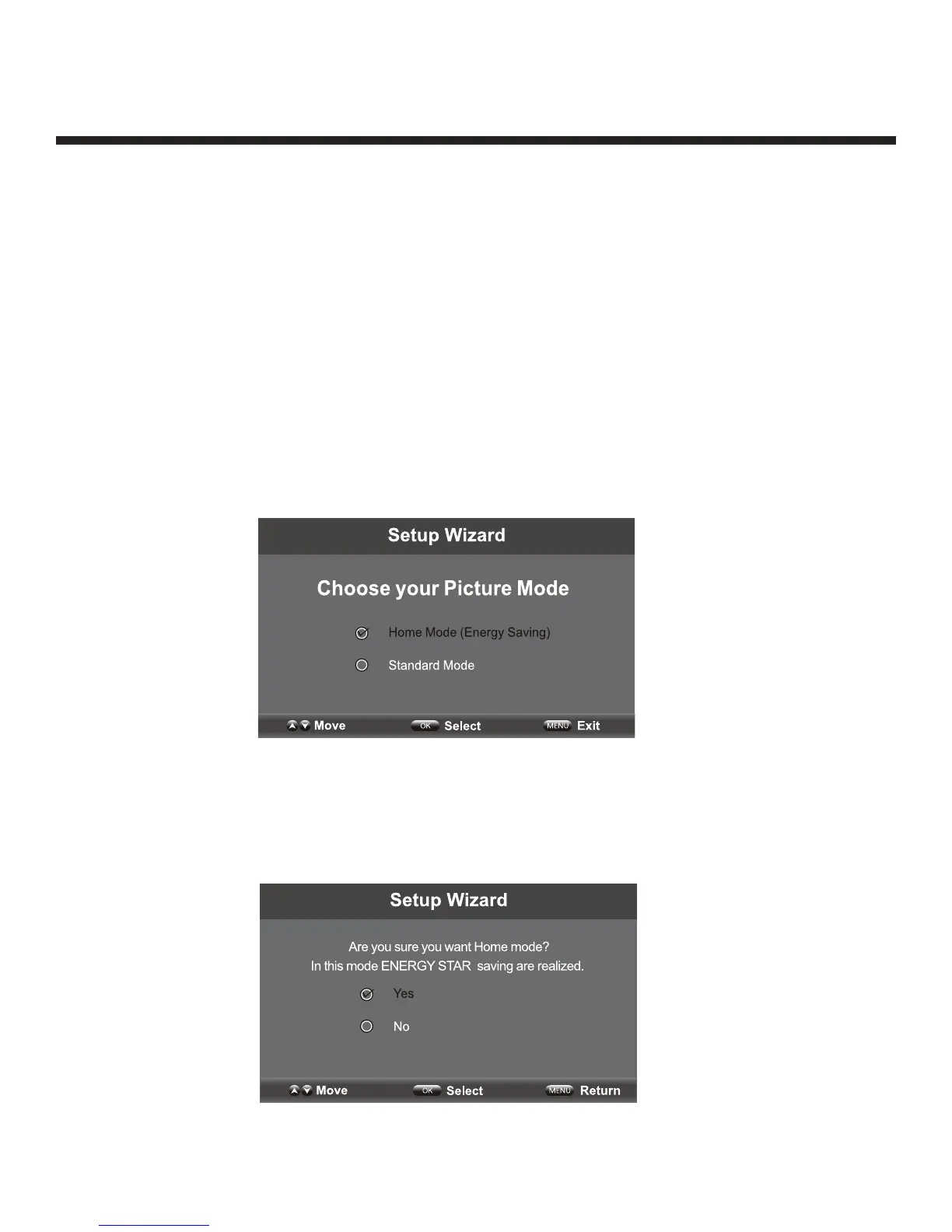
Picture Mode Setup Wizard
If using your TV for the first time, select the the desired picture mode as shown below.
Home Mode (Energy Saving): The energy saving mode will show a darker picture as it
requires less energy power consumption, as required by the Energy Star
®
qualification.
Standard Mode: Shows the picture more brightly as it requires more energy to operate
volume, sound mode, picture mode and change source.
The power consumption may exceed the requirements of the Energy Star
®
qualification.
Press “Yes” to confirm.
®


 To Next Page