16
Operating Your Television
Setup Menu Options
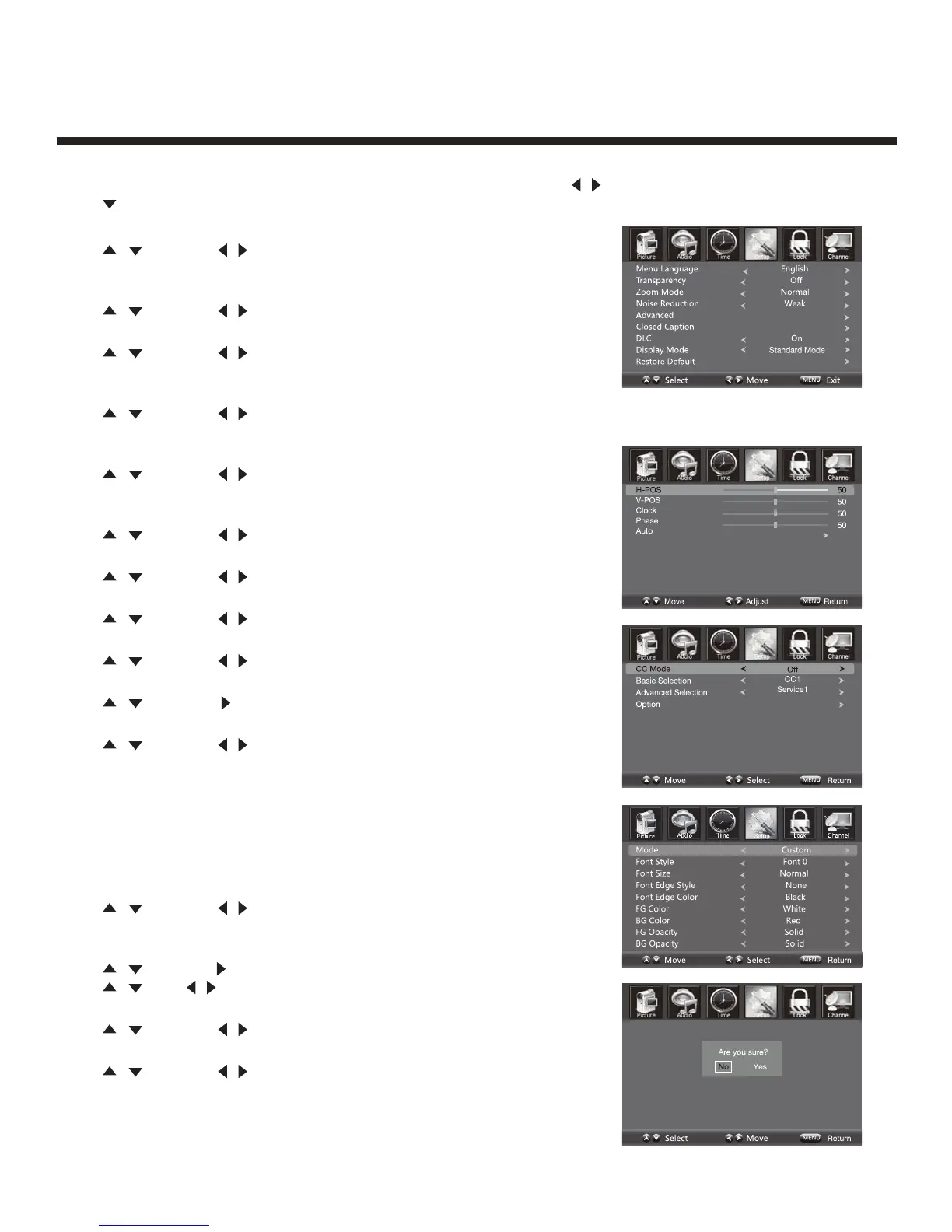
Press MENU on the side panel or on the remote control, then use
/ to select the SETUP menu.
Press or OK to enter (see picture).
Menu Language
Press
/
then use
/ to select menu language for either
English, French or Spanish.
Transparency
Press
/
then use
/ to turn On or Off the transparency function.
Zoom Mode
Press
/
then use
/ to select the zoom for either Wide, Zoom,
Cinema or Normal.
Noise Reduction
Press
/
then use
/ to adjust the noise reduction mode for either
Weak, Middle, Strong or Off.
Advanced
Press
/
then use
/ to select the advanced options between
H-POS, V-POS, Clock, Phase, Auto (only used in VGA source mode).
H-POS
Press
/
then use
/ to adjust the H-POS of the picture.
V-POS
Press
/
then use
/ to adjust the V-POS of the picture.
Clock
Press
/
then use
/ to adjust the Clock of the picture.
Phase
Press
/
then use
/ to adjust the Phase of the picture.
Auto
Press
/
then use to adjust the Auto of the picture.
Closed Caption
Press
/
then use
/ to navigate and highlight the close caption
item, then press the g button to enter into the following menu.
CC Mode
Select the CC mode options from: On, Off, or CC on Mute.
Basic Selection
Select the basic selection from: CC1, CC2 CC3, CC4, Text1 Text2,
Text3, Text4.
Advanced Selection
Press
/
then use
/ to select the advanced selection from:
Service1, Service2, Service3, Service4, Service5, or Service6.
Option
Press
/
then use to enter into the following menu.
Press
/
then
/ to select.
DLC
Press
/
then use
/ to turn dynamic luminance control On or Off.
Display Mode
Press
/
then use
/ to select Home Mode or Standard Mode.
Restore Default
Select “Restore Default”, press OK and it will display “Are you sure?”
Select “YES” to select the factory default settings.


 To Next Page