12
Operating Your Television
Note: If you wish to change between Home Mode (energy saving) and Standard Mode later,
this can be changed under the Display mode in the Setup menu.
Natural Resources Canada’s (NRCan’s) Office of Energy Efficiency (OEE) promotes the
international Energy Star® symbol in Canada and monitors its use.
ENERGY STAR is the international symbol of premium energy efficiency. Products that
display the Energy Star® symbol have been tested according to prescribed procedures and
have been found to meet or exceed higher energy efficiency levels without compromising
performance.
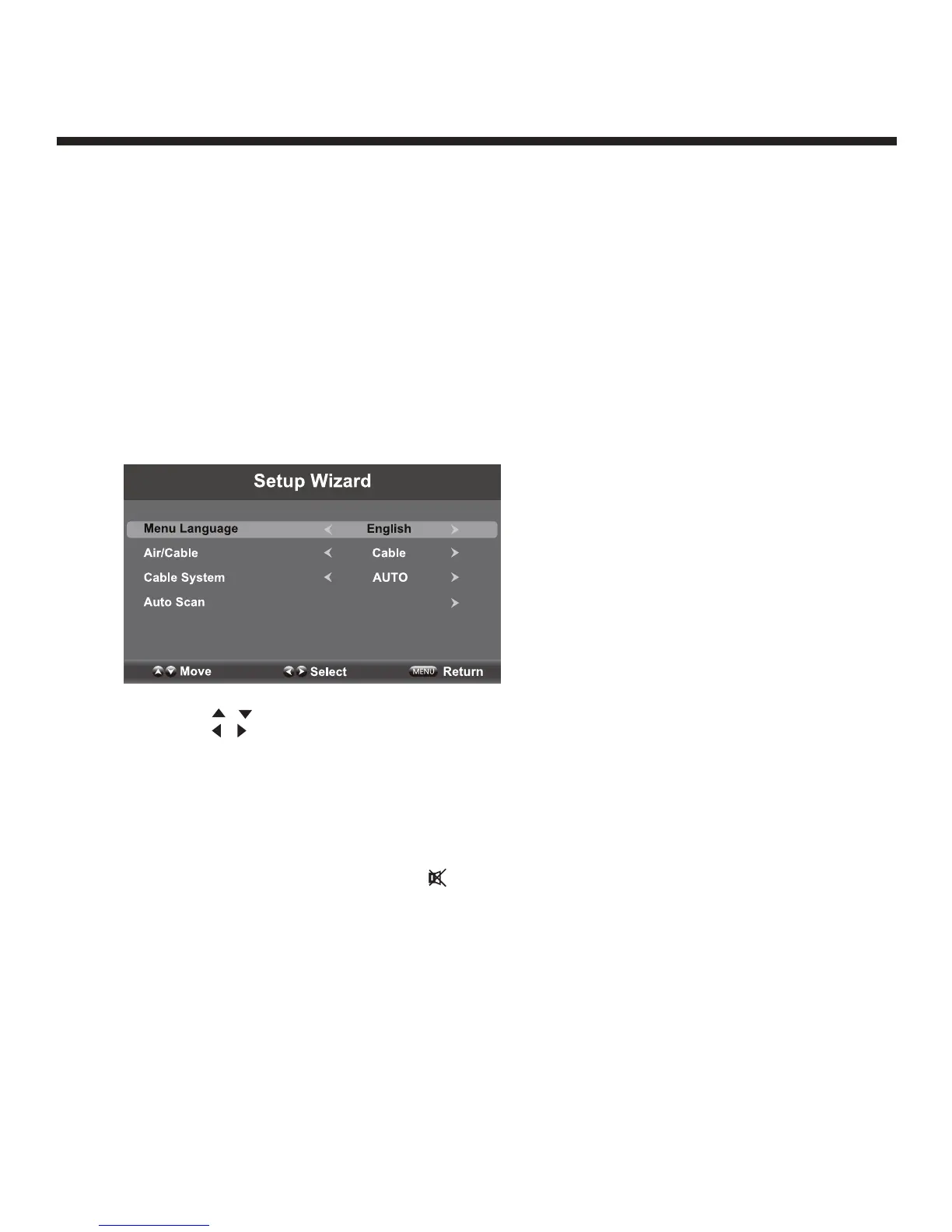
Select Your Onscreen Language Preference
Note: If using your TV for the first time, select the onscreen language which will be used to
display menus and information boxes.
• Press the
/ button to select Menu language.
• Press the
/ button to select the desired language.
• When satisfied with the selection, press EXIT to exit.
Volume Adjustment
1. Press VOL +/- to adjust the volume
2. To turn the sound off, press MUTE
. Press again to resume sound.


 To Next Page